Databases are the most underestimated cost driver in cloud infrastructure. Compute costs are visible and spike dramatically when something goes wrong. Database costs grow steadily and silently, driven by a combination of overprovisioned instances, high availability configurations applied indiscriminately, storage that grows automatically and never shrinks, and backup retention policies that nobody has reviewed since the database was first provisioned.
Most teams approach cloud database cost optimization by rightsizing instances. That helps, but it is rarely the biggest lever. The bigger problems are structural: Multi-AZ enabled on databases that never need failover, non-production databases running at 3am on a Sunday, storage that grew automatically and can never shrink.
This guide covers how to approach cloud database cost optimization across AWS RDS, Azure SQL, and GCP Cloud SQL using consistent principles across all three providers, from the most impactful structural fixes to the granular levers that compound over time.
Why Database Costs Are Different From Compute Costs
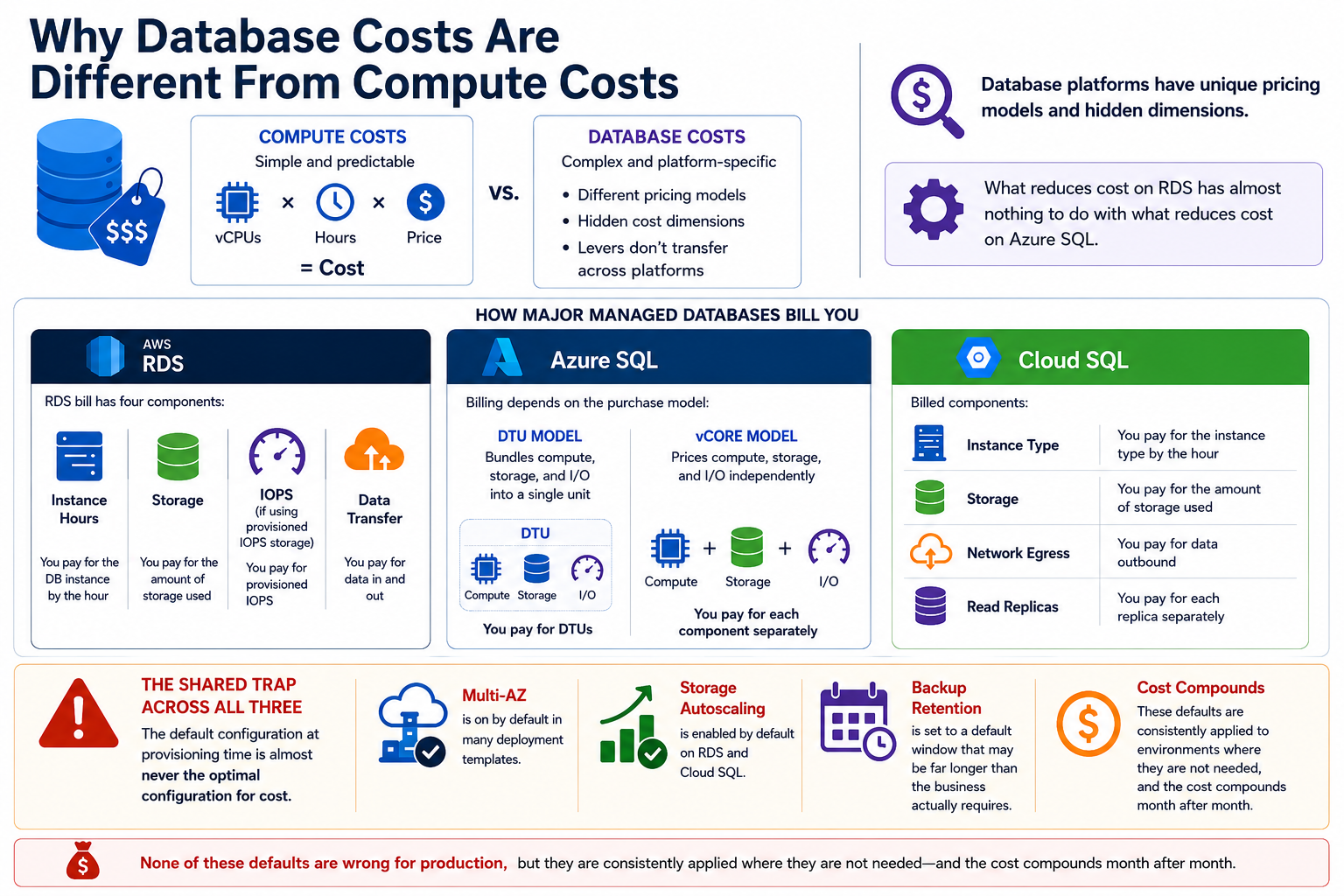
Compute costs are straightforward to reason about: vCPUs times hours times price. Database costs are different. Each managed database platform has its own pricing model with its own hidden cost dimensions, and the levers that reduce cost on RDS have almost nothing to do with the levers that reduce cost on Azure SQL.
An RDS bill has four components: instance hours, storage, IOPS (if using provisioned IOPS storage), and data transfer. Azure SQL bills differently depending on whether you are using the DTU model (which bundles compute, storage, and I/O into a single unit) or the vCore model (which prices them independently). Cloud SQL bills for instance type, storage, network egress, and any read replicas separately.
The shared trap across all three is that the default configuration at provisioning time is almost never the optimal configuration for cost. Multi-AZ is on by default in many deployment templates. Storage autoscaling is enabled by default on RDS and Cloud SQL. Backup retention is set to a default window that may be far longer than the business actually requires. None of these defaults are wrong for production, but they are consistently applied to environments where they are not needed, and the cost compounds month after month.
Rightsizing: The Starting Point to optimize database cloud costs
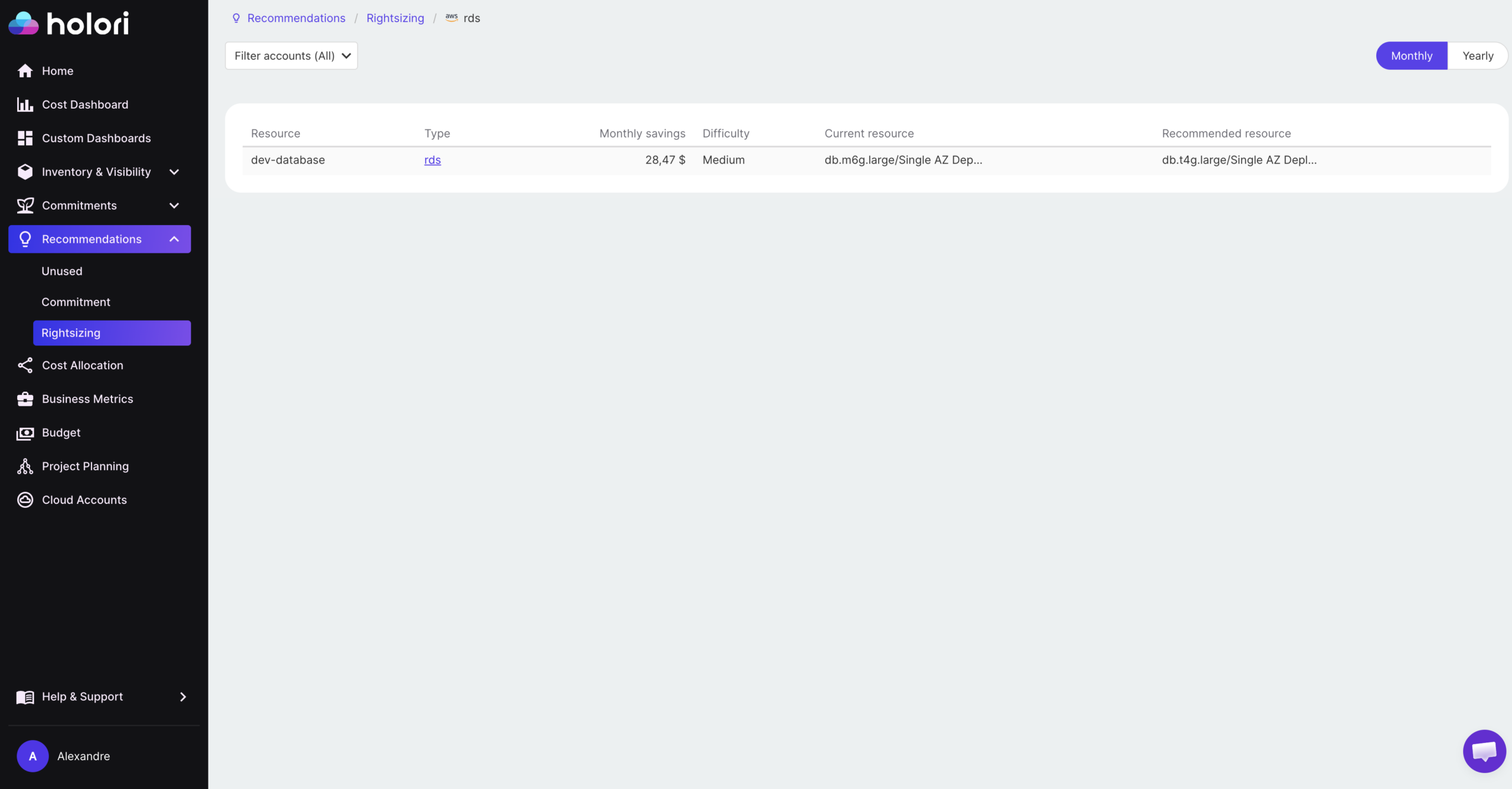
Instance rightsizing is the most widely discussed cloud database cost optimization strategy and also the most commonly done poorly. The mistake is sizing databases the same way you size compute: by looking at average CPU utilization and scaling down if it is low.
Database workloads have a different utilization profile from application servers. A database instance that averages 15% CPU utilization may regularly spike to 80% during peak query load, batch jobs, or end-of-day reporting cycles. Sizing down based on averages without understanding the peak distribution can cause latency spikes and connection failures that are far more expensive to diagnose and recover from than the cost savings justify.
The right approach is to use performance data over a 30-day window that includes representative workload patterns. On AWS, RDS Performance Insights provides query-level CPU, memory, and I/O data that shows not just average utilization but the distribution of load across the day and week. On Azure, Query Performance Insight and Azure Advisor surface equivalent recommendations. On GCP, Cloud SQL Query Insights identifies the specific queries and time windows driving resource consumption.
For non-production databases (development, staging, QA), the rightsizing opportunity is larger and the risk is lower. Most non-production databases are provisioned at the same instance size as production by default and run 24 hours a day despite being used only during business hours. Dropping non-production instances by one or two size tiers and pairing that with scheduled start and stop automation typically reduces their cost by 60 to 75% with no impact on developer productivity.
Burstable instance types (db.t3 and db.t4g on RDS, the Basic tier on Azure SQL, the shared-core instances on Cloud SQL) are appropriate for development databases and low-traffic internal tools where the workload is intermittent rather than sustained. They are consistently underused because engineers default to the same instance family as production, even when the workload does not require it.
Multi-AZ and High Availability: The Most Expensive Default
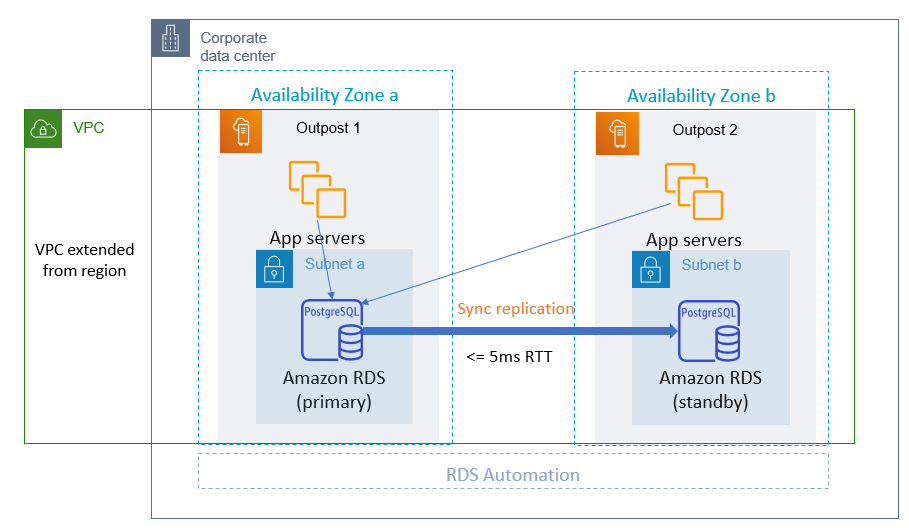
The high availability multiplier on RDS and Cloud SQL is the most commonly misapplied cost driver. Multi-AZ doubles your instance cost in exchange for automatic failover to a standby replica. For production databases serving user traffic, that is a reasonable trade. For a development database that a single engineer uses four hours per day, it is $50 to $200 per month in pure waste.
On AWS, RDS Multi-AZ deploys a synchronous standby replica in a second availability zone. You pay for two instances but can only use one for reads and writes. The standby exists solely for failover. At a db.m6g.large instance ($0.192 per hour in US East), Multi-AZ adds roughly $140 per month compared to a single-AZ deployment. Across ten non-production databases with Multi-AZ enabled unnecessarily, that is $1,400 per month in avoidable spend.
Azure SQL handles high availability differently depending on the service tier. The General Purpose tier uses remote storage with no zone redundancy by default. Adding zone redundancy adds approximately 30% to the instance cost. The Business Critical tier includes high availability replicas in the base price but costs significantly more per vCore. Understanding which tier your databases actually need, based on their recovery time requirements rather than a blanket policy, is the primary Azure SQL cost lever.
On Cloud SQL, high availability adds a standby instance in a second zone and approximately doubles the instance cost. The same pattern applies: production databases with uptime SLAs need it, development and staging databases almost never do.
A practical audit across all three providers involves listing every database instance with high availability enabled and validating whether a documented business continuity requirement exists for each one. In most environments, 40 to 60% of HA-enabled databases are non-production or low-criticality workloads where the configuration was inherited from a production template and never reviewed.
Non-Production Databases: The Overnight Billing Problem
Non-production databases are the most consistently overspent category in cloud database cost optimization. A development database that is used eight hours per day during business hours runs for 24 hours, meaning it is idle and billing for 16 hours every weekday, plus the full weekend. On a monthly basis, that is roughly 67% of runtime with no utilization.
Automated scheduling solves this without any developer friction. On AWS, Instance Scheduler (part of the AWS Solutions Library) can stop and start RDS instances on a defined weekly schedule. A database that runs only during business hours (8am to 7pm weekdays) in a US time zone reduces its runtime from 730 hours per month to approximately 220 hours, a 70% reduction in instance cost.
Azure SQL does not support native start and stop scheduling for all deployment types, but Azure Automation runbooks can handle this for eligible configurations. Azure SQL Database serverless is an alternative worth considering for development databases: it automatically pauses compute after a configurable idle period and resumes on the next connection, billing only for compute seconds used. For intermittent workloads, serverless can reduce database compute costs to near zero during off-hours without any scheduling infrastructure.
Cloud SQL supports instance start and stop via the API and Cloud Scheduler, enabling the same pattern as RDS with a Cloud Scheduler job that calls the Cloud SQL Admin API on a defined schedule.
The combined impact of instance scheduling across non-production environments is typically the largest single optimization available in an organization that has not already addressed it. The cost reduction is immediate and requires no application changes.
Cloud Database Cost Optimization with commitments
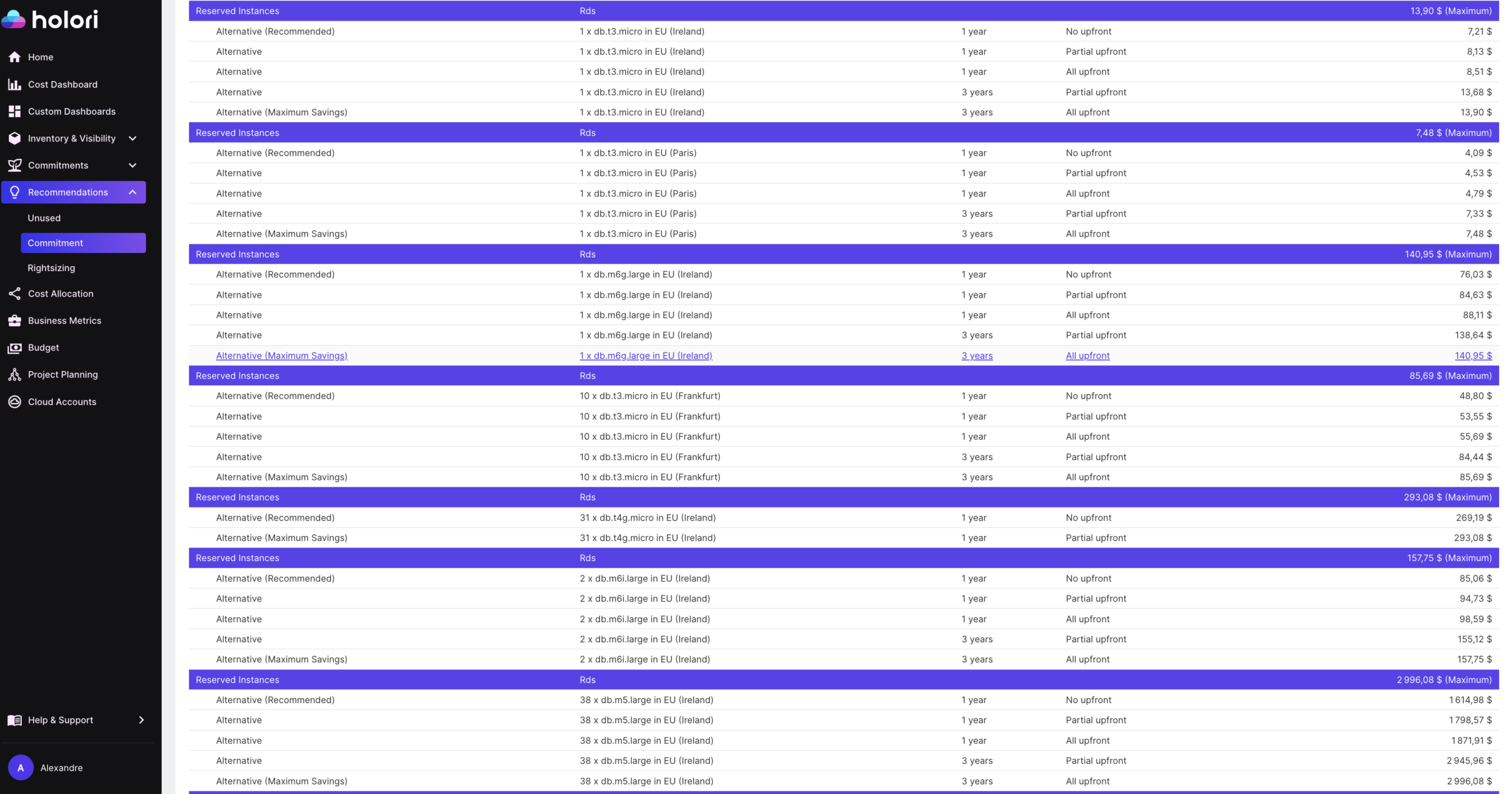
Once production databases are rightsized and HA configurations are validated, reserved capacity is the next lever. The discount levels for database reserved instances are comparable to compute, and production databases are excellent candidates because their workload is highly predictable and their lifecycle is long.
On AWS, RDS Reserved Instances provide discounts of up to 69% compared to on-demand pricing for a one-year commitment, and higher for three-year commitments. Unlike EC2 Reserved Instances, RDS RIs apply to a specific instance class and database engine within a region. A commitment for a db.m6g.large MySQL instance in US East applies only to that specific combination. This means the purchasing decision needs to be made carefully, particularly if you are likely to change instance types or migrate database engines.
Azure savings plans for databases span the entire Azure Databases portfolio: whether you use Azure SQL DB, Cosmos DB, PostgreSQL, or Managed Instance, they all count toward a single spend commitment. Unlike reservations, Azure savings plans offer cross-region and cross-service flexibility. This is more flexible than AWS’s approach and makes Azure’s commitment-based discounts easier to apply in environments where database types and regions are likely to change.
On GCP, Cloud SQL does not currently offer committed use discounts directly. However, sustained use discounts apply automatically when an instance runs for a significant portion of the month, providing a partial discount without requiring upfront commitment. For higher discounts, running Cloud SQL on committed Compute Engine infrastructure using the Cloud SQL on Compute Engine model is an option for large-scale deployments.
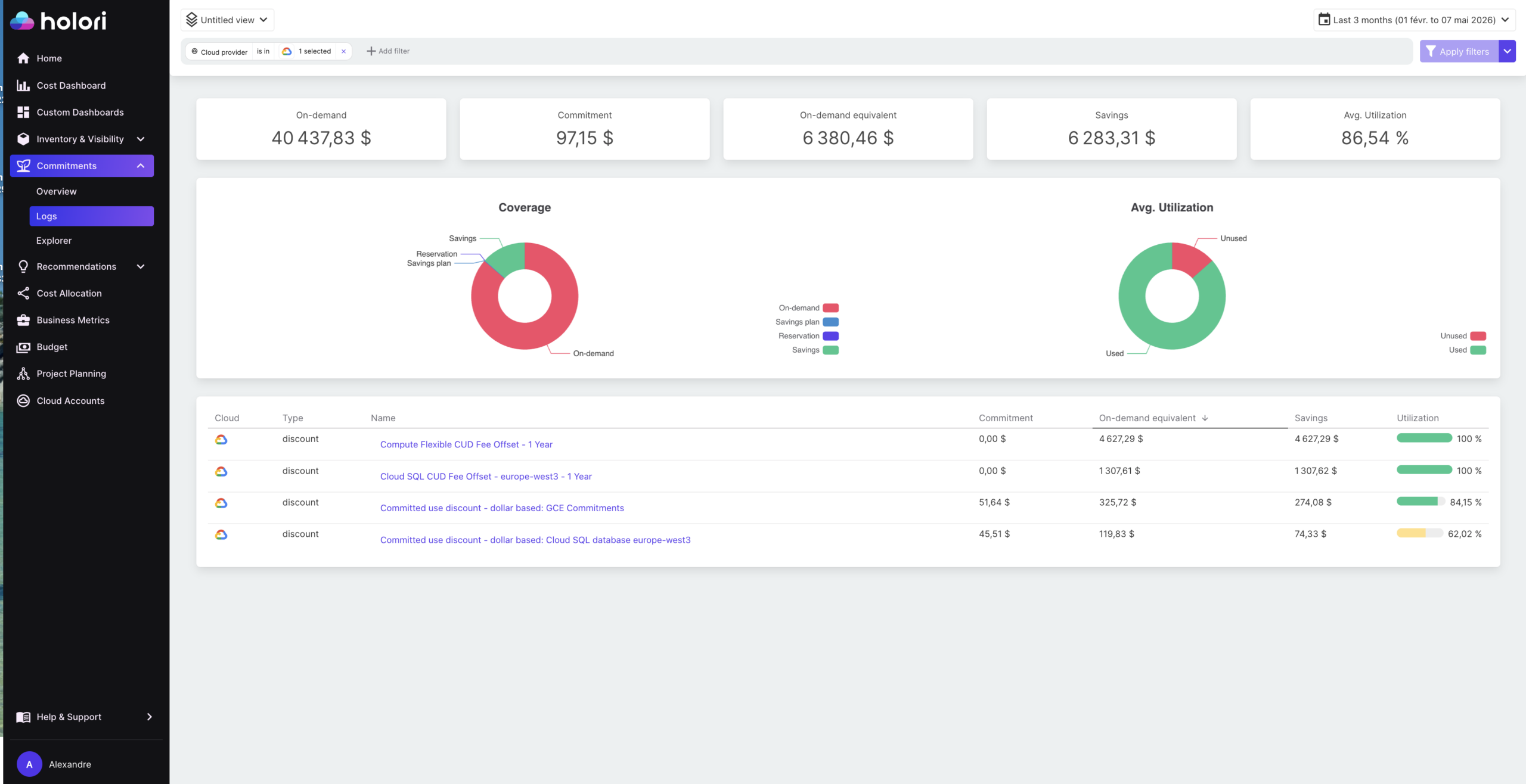
The standard caution applies across all three providers: rightsize before committing. Purchasing a reserved instance for an overprovisioned database locks you into the waste for the duration of the commitment. The correct sequence is always to validate the instance size at current and expected workload, then commit.
Storage, IOPS, and Backup Cost Traps
Storage costs accumulate in ways that are easy to miss on managed database platforms. The most significant trap is storage that was automatically scaled up and cannot be reduced.
RDS storage autoscaling increases storage automatically when the database is running low on space, which is convenient but permanent: you cannot reduce RDS storage size once it has been increased. A database that had a large data import six months ago and has since reduced its data volume continues to pay for the peak storage allocation indefinitely. The only way to reclaim this cost is to restore to a new instance with a smaller storage allocation, which requires a planned migration.
Provisioned IOPS storage (io1 and io2 on RDS) is significantly more expensive than general-purpose SSD (gp3) and is only necessary for workloads with sustained high I/O demands. Many databases are provisioned with io1 because the original engineer wanted to guarantee performance, but the actual workload sits well within the capabilities of gp3. If your workloads rarely cross 30 to 40% utilization, consider switching from provisioned IOPS to general-purpose SSD storage. On RDS, migrating from io1 to gp3 on a database that does not require guaranteed IOPS can reduce storage costs by 60% or more.
Backup and snapshot retention is a consistently overlooked cost driver. Many teams keep daily snapshots indefinitely, ballooning storage bills. Automating snapshot lifecycle policies with tools like AWS Backup, and reviewing point-in-time recovery windows on Cloud SQL where extending retention beyond what is necessary can double storage costs, produces immediate savings. Offloading cold backups to lower-cost storage like S3 Glacier or GCS Archive reduces long-term retention costs significantly.
How Holori Supports Cloud Database Cost Optimization
Cloud database cost optimization across multiple providers requires visibility that native tools do not provide. AWS Cost Explorer, Azure Cost Management, and GCP Billing each surface their own database costs separately, in different formats, making it difficult to assess the combined database spend across a multi-cloud environment or to identify which teams or applications own specific database costs.
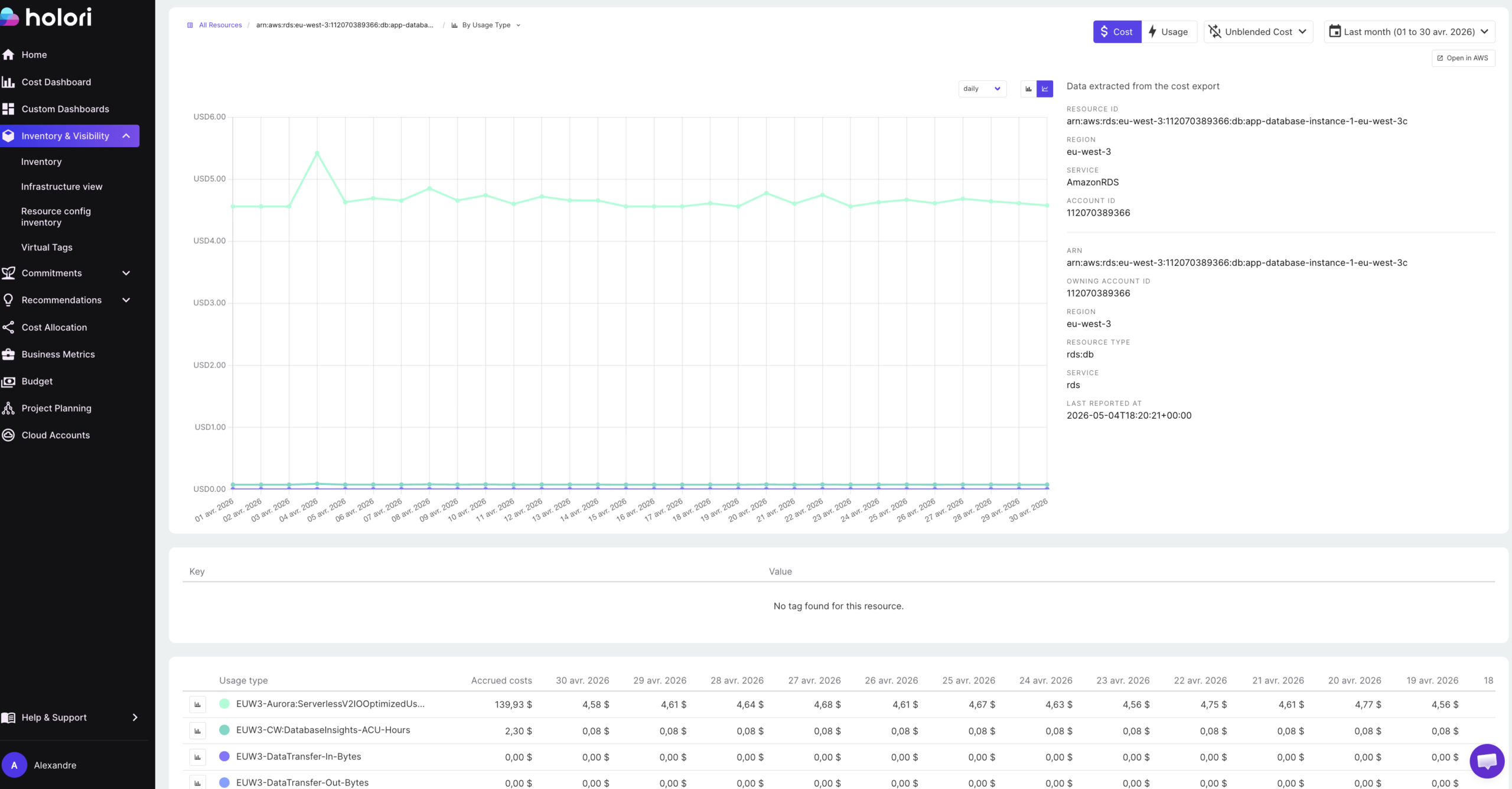
Holori normalizes database spend from RDS, Azure SQL, and Cloud SQL into a single view with consistent cost attribution. Virtual tags allow database costs to be allocated to the teams, products, or environments that own them, even when the underlying resources have inconsistent or missing tags. This is particularly valuable for identifying non-production database spend that is being absorbed into a shared or unattributed cost pool rather than being visible as an optimization target.
Anomaly detection flags unexpected database cost movements in real time. A runaway storage autoscaling event on RDS, a new read replica added without a corresponding cost review, or a backup retention window that was accidentally extended: these appear as anomalies before they compound across a full billing cycle.
Infrastructure diagrams show database instances alongside their configuration, making it easier to identify databases that are wrongly configured or no longer connected to any active workload.
Cloud database cost optimization is not a one-time exercise. Database costs change as applications evolve, data volumes grow, and team structures shift. The teams that maintain control treat it as an ongoing practice: auditing HA configurations quarterly, reviewing non-production scheduling monthly, and committing to reserved capacity only after validating that the underlying workload is stable and rightsized. Build those habits and database costs become predictable rather than a recurring source of billing surprises.
Conclusion
Cloud database cost optimization follows a consistent pattern regardless of which provider you are using. The biggest savings almost never come from the obvious lever of rightsizing instances. They come from fixing structural decisions that were made at provisioning time and never revisited: high availability enabled on databases that do not need it, non-production instances running around the clock, storage that autoscaled to a peak it will never reach again, and backup retention windows that are longer than any business requirement justifies.
The reason these problems persist is not that they are hard to fix. Most of them are a configuration change or a scheduled automation job. The reason they persist is that nobody has looked. Database costs sit below the line of visibility in most cloud cost reviews, buried inside a service-level total that gets less scrutiny than compute or networking.
The practical approach is to run a structured audit across four areas in sequence: validate high availability configurations against actual business continuity requirements, implement scheduling for all non-production databases, verify that storage type and IOPS allocation match current workload demand, and review backup retention against policy. In most environments that have not done this before, those four steps alone reduce database costs by 30 to 50% without touching a single line of application code or accepting any performance trade-off.
Once those structural issues are resolved, reserved capacity becomes the final lever: committing to stable, rightsized production databases at discounted rates and treating the savings as a compounding return on the operational discipline invested in the earlier steps.
Try Holori for free now: https://app.holori.com/
Frequently Asked Questions
What is the biggest source of waste in cloud database costs?
High availability configurations applied to non-production databases are consistently the largest single source of waste. Multi-AZ on RDS and zone-redundant configurations on Azure SQL double the instance cost and are appropriate for production workloads with uptime requirements, but are routinely enabled on development and staging databases where no such requirement exists.
Can I reduce RDS storage size after it has been automatically scaled up?
No. RDS storage autoscaling increases storage permanently and cannot be reversed on the same instance. The only way to reclaim oversized storage is to restore the database to a new instance with a smaller storage allocation. This is why it is worth monitoring storage growth actively and sizing the initial allocation carefully rather than relying entirely on autoscaling.
When does it make sense to use RDS Reserved Instances?
Reserved Instances make sense for production databases with stable, predictable workloads that will run continuously for at least one year. The key prerequisite is that the instance is already rightsized: committing to a reserved instance on an overprovisioned database locks in the waste for the duration of the commitment. Always rightsize before committing.
Is Azure SQL serverless worth using for development databases?
Yes, for intermittent workloads. Azure SQL serverless automatically pauses compute after a configurable idle period and resumes on the next connection, billing only for compute seconds used. For a development database that is accessed sporadically during business hours and idle overnight and on weekends, serverless can reduce compute costs to near zero during off-hours without requiring any scheduling infrastructure or application changes.
How do I identify non-production databases that are running unnecessarily overnight?
Start by tagging all database instances with an environment tag (production, staging, development, QA) if not already in place. Then filter your billing data by environment and review the runtime hours for non-production instances. Any database showing close to 730 hours of monthly runtime that is tagged as non-production is a candidate for scheduling automation. AWS Instance Scheduler, Azure Automation runbooks, and Cloud Scheduler on GCP can all implement start and stop schedules without application changes.