You cannot optimize what you cannot see. That statement is repeated constantly in FinOps circles, but it applies more literally to cloud asset inventory than to almost any other practice. Before you can rightsize an instance, you need to know it exists. Before you can delete an orphaned volume, you need to know it is orphaned. Before you can allocate costs to a team, you need to know which resources that team owns. Every cost management action starts with an accurate, up-to-date record of what is running in your cloud environment.
A cloud asset inventory is every component and configuration that keeps your applications running, whether it is an engineer’s test account or a production environment serving customers. It includes configuration and metadata such as tags, launch times, ownership information, and relationships between resources. Think of it as everything that shows up in your cloud bill plus the context that explains why it is there and who is responsible for it.
Most organizations discover they have an asset inventory problem the same way they discover they have a cost problem: reactively. A security audit finds resources nobody recognized. A billing review surfaces charges for accounts that were supposed to be decommissioned months ago. An engineer spins down a cluster and realizes nobody knows what depends on it. By that point, the problem has usually been compounding for months or years.
This guide covers what a cloud asset inventory should contain, how to build one that stays accurate as your environment grows, and how to connect it directly to cost optimization outcomes.
Why Cloud Asset Inventory Is a FinOps Problem, Not Just a Security Problem
Asset inventory is typically framed as a security and compliance concern. Knowing what exists is essential for vulnerability management, SOC 2 audits, and HIPAA compliance. All of that is true, but it understates the financial case for maintaining an accurate inventory.
In one real-world example, over 200 orphaned EC2 instances running outdated AMIs were found still running six months after the project they supported had been decommissioned. They were still running, still costing money, and still had open security group rules. That is both a security failure and a cost failure, and the root cause of both is the same: no asset inventory meant nobody knew these instances existed.
Cloud waste, the category of spend that most FinOps programs target first, is almost entirely an asset inventory problem. Idle instances, unattached storage volumes, orphaned snapshots, forgotten load balancers: none of these can be identified and eliminated without first knowing they exist. A well-maintained inventory helps IT teams prevent cloud sprawl, which occurs when unused or forgotten resources accumulate, leading to unnecessary costs and security risks.
Cost allocation is also an asset inventory problem. Attributing cloud spend to the right team, product, or environment requires knowing which resources belong to which owner. Without that mapping, cost allocation is guesswork dressed up as reporting.
The FinOps case for cloud asset inventory is straightforward: it is the prerequisite for every other cost management practice. You cannot optimize commitments without knowing your resource footprint. You cannot enforce tagging without knowing what is untagged. You cannot identify waste without knowing what is idle. Build the inventory first, and everything else becomes significantly easier.
What a Cloud Asset Inventory Should Contain
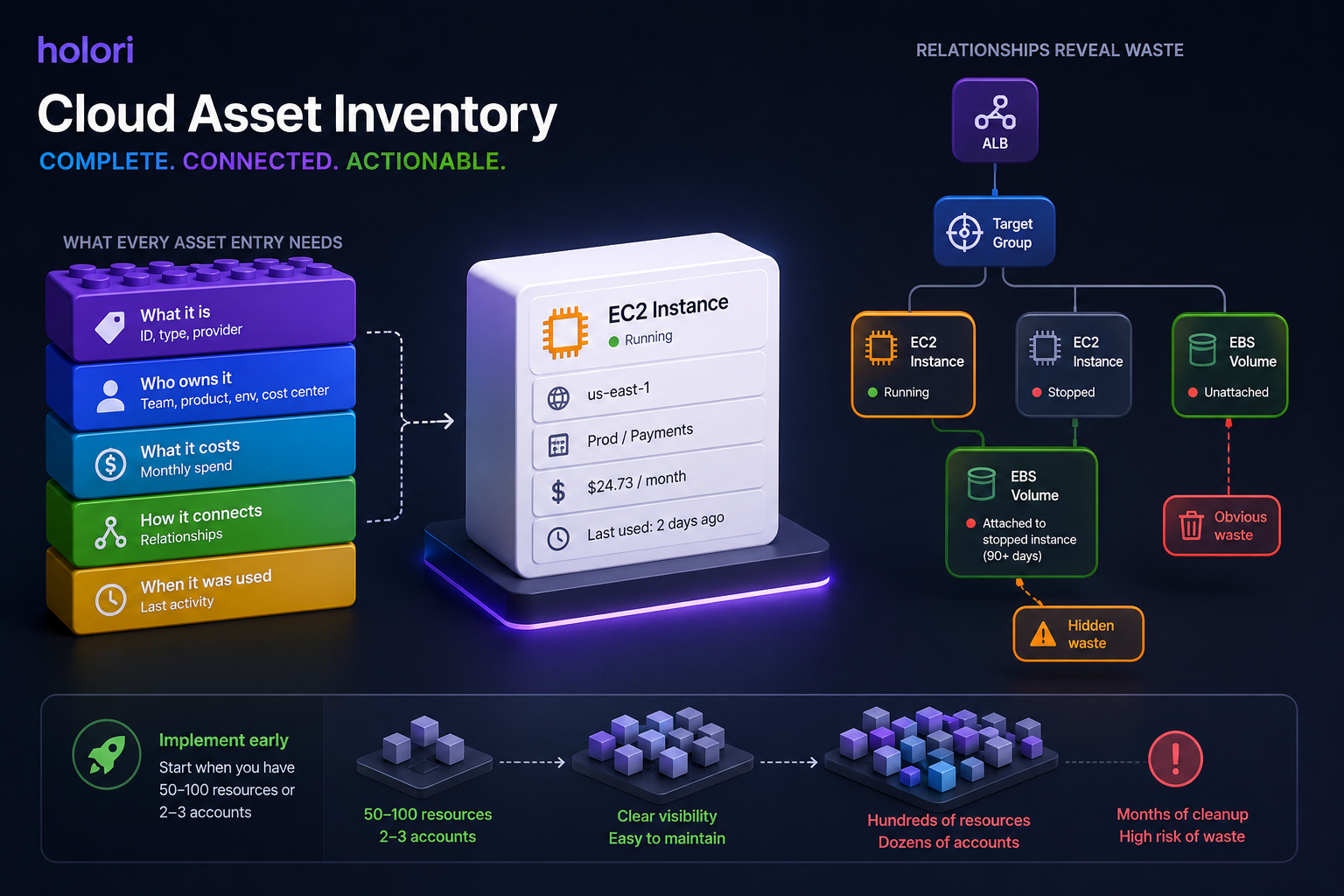
A useful cloud asset inventory is more than a list of resource IDs. It needs enough metadata to answer three questions for every resource: what is it, who owns it, and what does it cost?
The core attributes every inventory entry should include are:
- Resource identifier, type, and provider (EC2 instance, Azure VM, GCP Persistent Disk)
- Region and account or subscription
- Creation date and current status (running, stopped, unattached)
- Ownership metadata: team, product, environment, cost center
- Cost data: current monthly spend attributed to this resource
- Relationships: what other resources does this connect to (which volume is attached to which instance, which load balancer points to which target group)
- Last activity date: when was this resource last actively used
The relationships dimension is often the hardest to maintain but the most valuable for identifying waste. An unattached EBS volume is obvious waste. A volume attached to a stopped instance that has not been started in 90 days is less obvious but equally wasteful. Understanding resource relationships lets you identify the second and third-order cases that a simple list of running resources misses.
Implement the inventory early. The sooner you establish inventory practices, the easier it is to maintain visibility as complexity grows. Organizations that wait until they have hundreds of resources across dozens of accounts face months of cleanup work. Start when you have 50 to 100 resources or two to three accounts, before visibility problems become cost overruns.
How to Build a Cloud Asset Inventory Across AWS, Azure, and GCP
Each major cloud provider offers native tools for resource discovery, but none of them give you a complete picture on their own, and none of them solve the multi-cloud normalization problem.
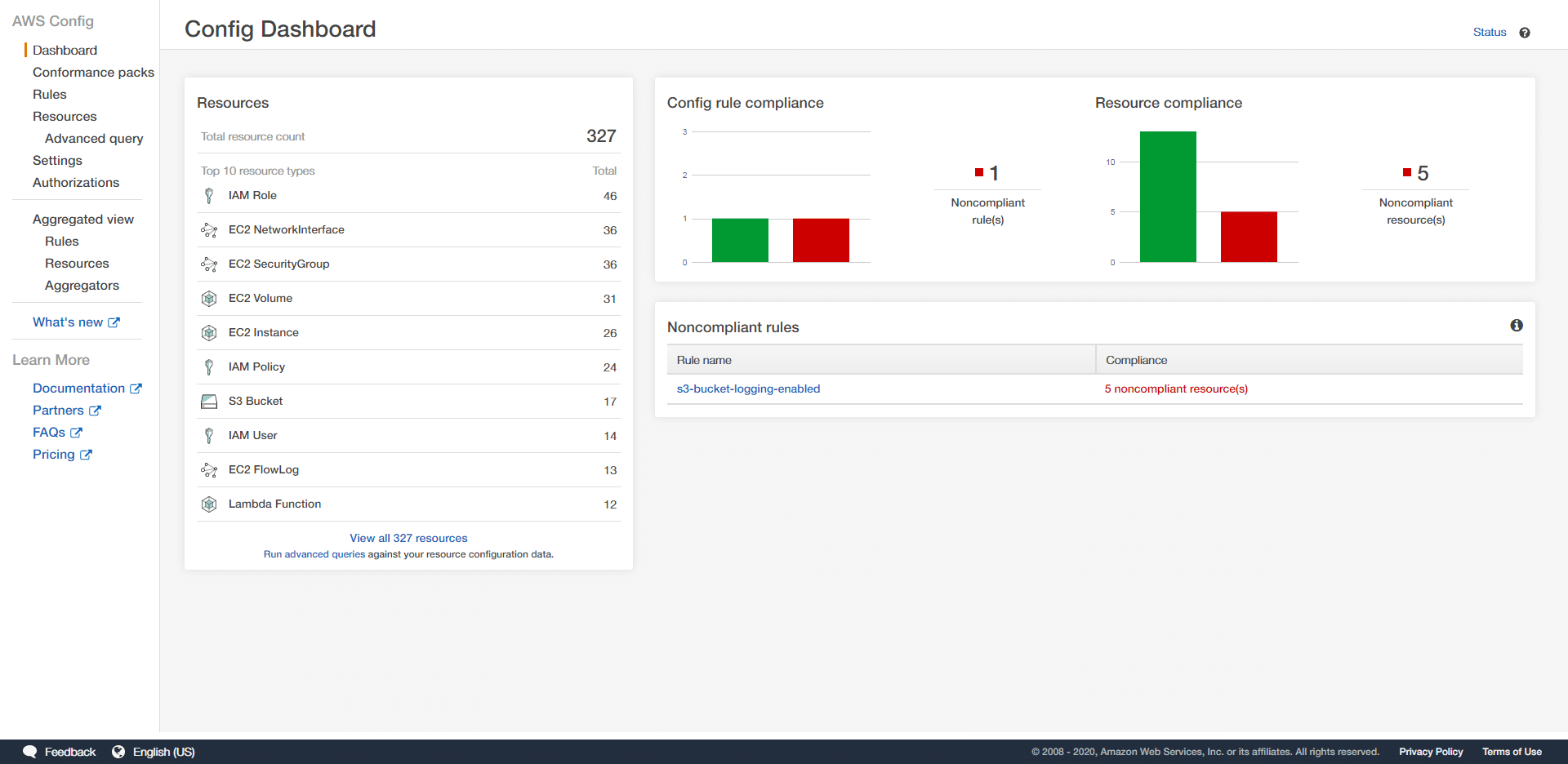
AWS offers AWS Config for continuous resource tracking and configuration history. AWS Config records every resource and its configuration state, tracks changes over time, and can evaluate resources against compliance rules. AWS Resource Explorer provides a searchable index of resources across all accounts and regions within an organization. Both are essential starting points for an AWS asset inventory, but they cover only AWS resources and use AWS-specific schemas.
Azure provides Azure Resource Graph, which allows querying across subscriptions and resource groups using a consistent query language (KQL). Azure Resource Graph is fast, supports cross-subscription queries, and includes resource metadata and relationships. Azure provides a strong foundation for inventory at the subscription level, though the schema differs significantly from AWS terminology.
GCP offers Cloud Asset Inventory as a native service that exports resource metadata for all GCP resources across an organization. It supports point-in-time snapshots and continuous monitoring of resource state changes. Like AWS Config and Azure Resource Graph, it covers only GCP resources.
The multicloud problem is that none of these tools talk to each other. An organization running workloads across all three providers needs to either build a custom aggregation layer that normalizes data from all three sources, or use a platform that handles this normalization natively. Building the aggregation layer manually is feasible for engineering teams with the capacity to maintain it, but it requires ongoing work as each provider updates its APIs and resource schemas.
For teams managing resources across providers, the practical approach is to define a canonical schema that maps the key inventory attributes from each provider into consistent fields, normalize ownership and tagging data into that schema, and maintain a single queryable inventory rather than three separate provider-specific ones.
Using Your Inventory to Drive Tagging Coverage
Most organizations approach tagging enforcement from the provisioning side: set a policy, require tags at creation time, and assume compliance. The problem is that cloud environments are never built from scratch under perfect conditions. Resources were created before the tagging policy existed. Automated tools create resources without tags. Acquired infrastructure arrives with a different tagging convention entirely.
The inventory is the tool that reveals the reality of your tagging coverage rather than the intended state. When every resource across AWS, Azure, and GCP is catalogued in a single view, you can immediately see:
- Which resources carry no tags at all
- Which resources are partially tagged (have some required tags but are missing others, for example a team tag but no environment tag)
- Which resources use inconsistent tag keys across providers (env on AWS, environment on Azure)
- Which resource types cannot be tagged by the provider at all and need an alternative attribution method
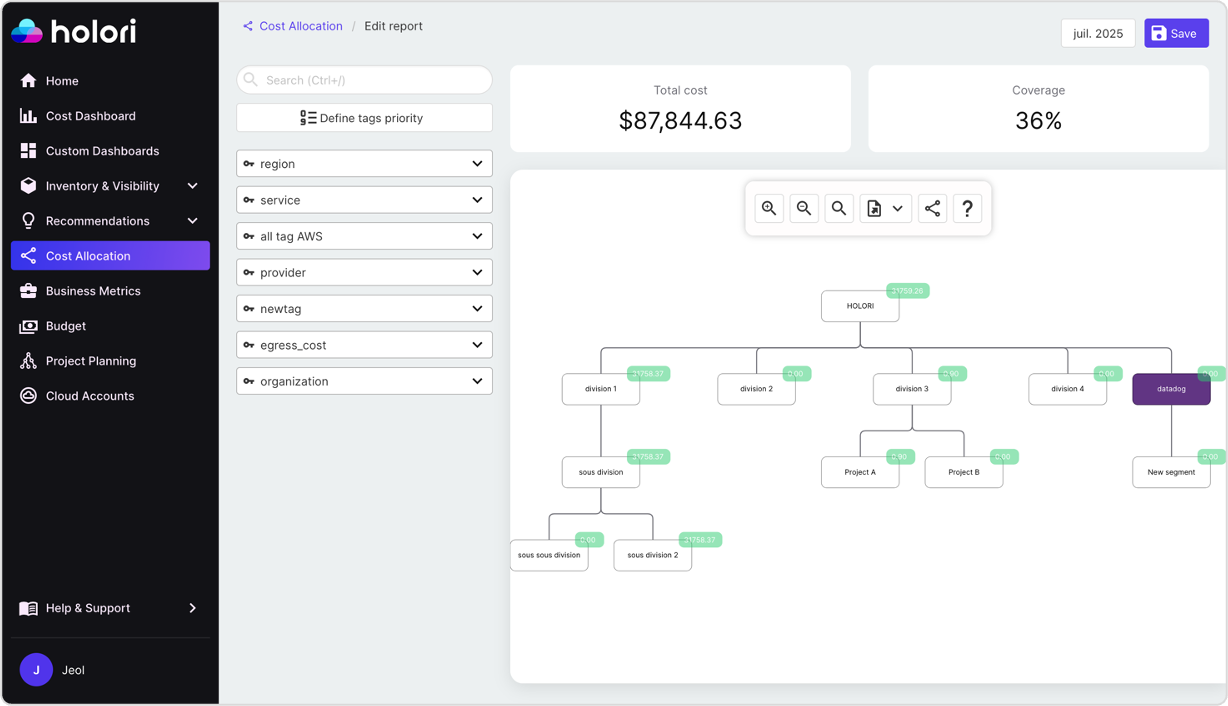
This tag coverage report becomes the primary action list for improving cost allocation accuracy. Rather than asking “why is 25% of our spend unattributed,” you can ask the more specific and more actionable question: “which specific resources are untagged, who provisioned them, and what is their monthly cost?”
Prioritizing that list by spend rather than by resource count is important. An environment with 500 untagged Lambda functions and one untagged RDS cluster should fix the RDS cluster first. The cluster may represent 80% of the unattributed spend despite being a single resource.
For resources that cannot be tagged at the infrastructure level, virtual tags fill the gap. A virtual tag rule can infer ownership from the resource name, the account it sits in, the region, or the service type, and apply the correct allocation metadata at the inventory layer without touching the resource itself. This means the inventory can surface 100% of spend in a structured allocation model even before full tagging compliance is achieved at the infrastructure level.
Tracking tagging coverage rate over time as a metric, measured as the percentage of resources carrying all required tags weighted by spend, gives the FinOps team a concrete indicator of whether governance is improving. A coverage rate that increases from 65% to 85% over two quarters reflects a program that is working. One that stays flat despite policy enforcement efforts signals that the enforcement mechanism has gaps worth investigating.
Tracking Resource Changes: Why History Matters as Much as State
A cloud asset inventory that only captures the current state of your environment answers one question: what exists right now? That is necessary but not sufficient. The more operationally useful question is: what changed, when, and who made the change? Without change history, the inventory is a photograph. With it, it becomes a timeline that makes cost spikes, security incidents, and compliance violations traceable to their root cause.
Resource changes in a cloud environment fall into three categories. Creation events are new resources being provisioned, which should always trigger a check: does this resource have the required tags, is it in an approved region, and does it map to a known team or project? Modification events are configuration changes to existing resources: an instance type being upgraded, a security group rule being changed, a storage tier being modified. Deletion events are resources being removed, which should update the inventory immediately to prevent ghost assets from persisting in allocation reports and waste audits.
Tracking these events continuously rather than through periodic scans matters because cloud environments move fast. A resource created and deleted within the same day will never appear in a daily inventory snapshot but will still generate charges in the billing data. Change event tracking at near real-time cadence catches ephemeral resources that point-in-time scans miss entirely.
Configuration drift is the specific change pattern that causes the most operational problems. Drift occurs when the actual state of a resource diverges from its intended state, typically because someone made a manual change in the console rather than through infrastructure-as-code. A security group rule added directly in the AWS console, an instance type changed via the Azure portal, a label removed from a GCP resource during a manual operation: none of these go through the change management process that IaC pipelines enforce, which means they are invisible unless the inventory is actively comparing current state against intended state.
Drift detection identifies configuration drift in real time and can trigger automated alerts or remediation workflows to restore the desired state before the drift causes a production impact or a compliance violation. From a FinOps perspective, drift detection also catches cost-relevant configuration changes that were not approved: an instance type that was upgraded manually and never reviewed, a storage tier that was changed without understanding the cost implications, or a new resource created outside the standard provisioning process that carries no tags and sits in the unattributed spend bucket.
Change history also feeds directly into anomaly detection. When a cost anomaly fires, the first question is always: what changed? A well-maintained change log lets you answer that question in seconds rather than spending hours comparing current and previous billing exports. If a cost spike appeared on Tuesday and the change log shows a new cluster was provisioned on Monday evening, the investigation is effectively complete. Without the change log, the same investigation might take a full day of cross-referencing billing data, CloudTrail logs, and engineering commit history.
The practical implementation of change tracking differs by provider. AWS CloudTrail records every API call across all AWS services, making it the primary source of change events for an AWS inventory. Azure Activity Log provides the equivalent for Azure resources. GCP Cloud Audit Logs covers GCP. In a multi-cloud inventory, normalizing change events from all three sources into a consistent format, with consistent terminology for event types and resource identifiers, is what makes cross-provider change history queryable rather than three separate audit logs that need to be consulted independently.
For FinOps teams, the most valuable change events to surface prominently in the inventory are provisioning events for resources above a defined cost threshold, configuration changes that affect billing (instance type, storage tier, IOPS settings), tag modifications that affect cost allocation, and deletion events that should trigger removal from the active inventory. Everything else can be retained in the change log for audit purposes without cluttering the operational view.
Connecting Asset Inventory to Cost Optimization
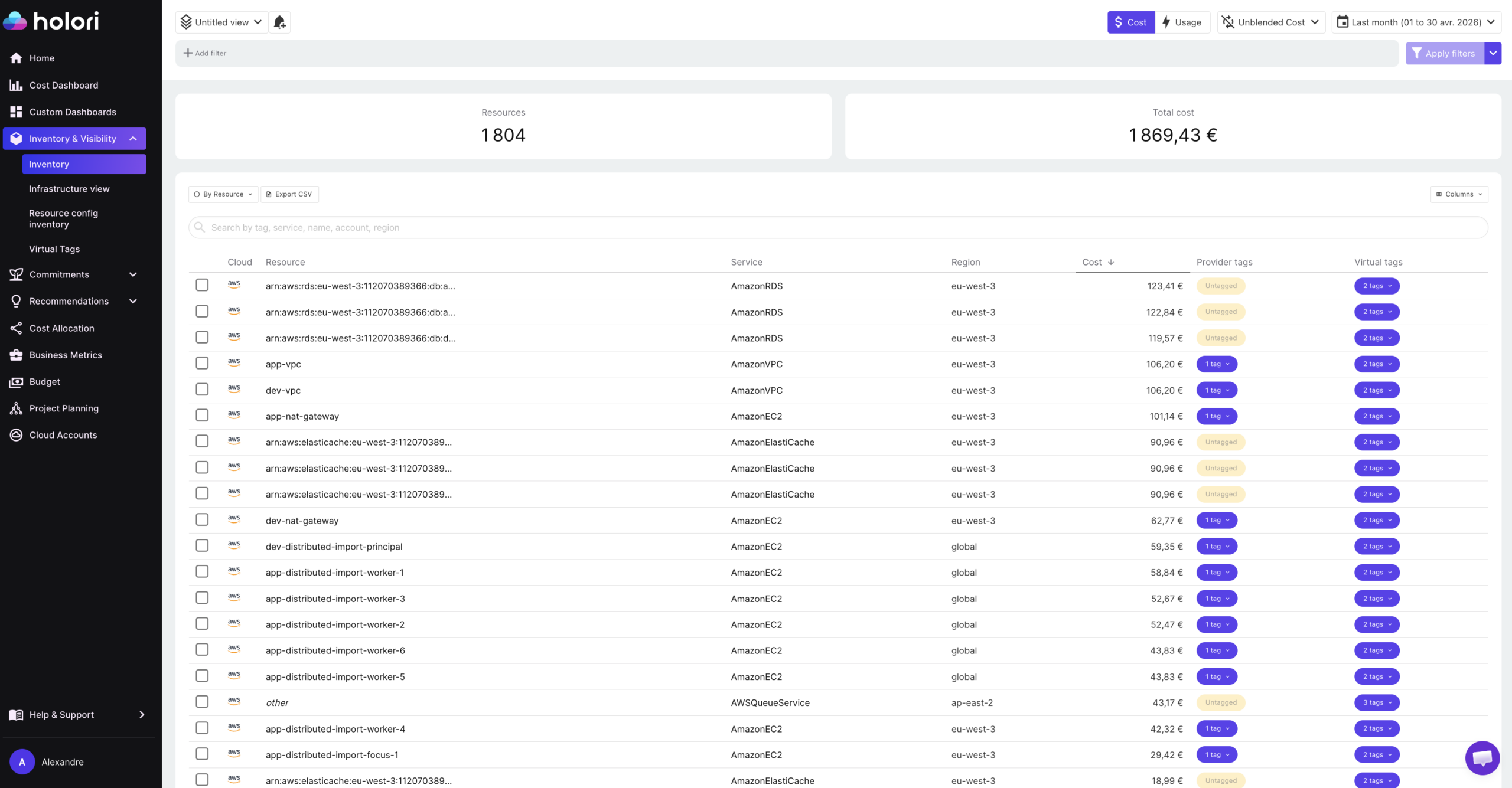
A cloud asset inventory that is disconnected from cost data is a compliance tool. One that is integrated with cost data is a FinOps tool. The difference is whether every inventory record carries the cost attribution that makes it actionable.
When you can query your asset inventory and filter by team, environment, or resource type, then sort by monthly cost and filter by last activity date, waste identification becomes a structured workflow rather than a manual investigation. All unattached volumes with no activity in 60 days, sorted by monthly cost. All stopped instances with no start event in 90 days. All snapshots older than 180 days with no associated backup policy. These queries run in seconds against a well-maintained inventory and produce a prioritized list of optimization targets.
The same inventory also powers commitment strategy. Knowing the full footprint of running compute resources, their instance types, regions, and uptime patterns, gives you the data needed to model Reserved Instance and Savings Plan coverage accurately. Without a complete inventory, commitment purchasing relies on billing aggregates that miss the resource-level detail needed to make confident purchasing decisions.
Cost allocation accuracy also improves directly with inventory quality. Every resource in the inventory that carries accurate ownership metadata is a resource that can be attributed correctly in cost reports. Closing the gap between inventory completeness and allocation accuracy is one of the fastest ways to improve the reliability of FinOps reporting.
How Holori Supports Cloud Asset Inventory
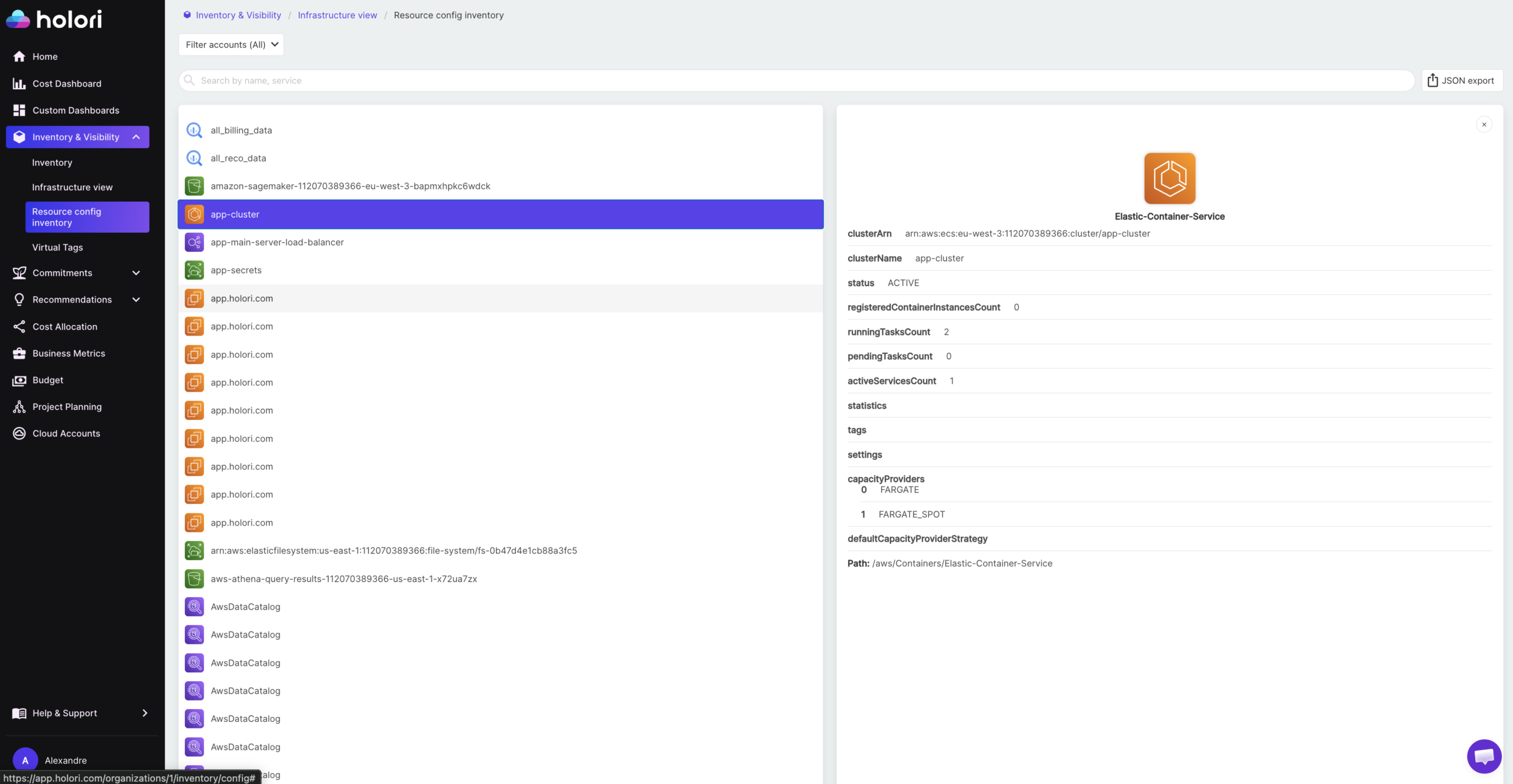
Holori provides two complementary inventory layers that together give FinOps and platform teams a complete picture of their cloud environment.
The first is a technical inventory. For every resource across AWS, Azure, GCP, OCI, and other supported providers, Holori captures the full configuration: instance type, region, account, status, attached resources, network configuration, and all associated metadata. This goes beyond a simple list of what exists. It gives platform and DevOps teams the resource-level detail needed to understand how each asset is configured, what it connects to, and whether its configuration matches what was intended.
The second is a cost inventory. Every resource in the technical inventory is enriched with its associated cost data, tags, and virtual tags, giving FinOps teams a single view where each asset has both a technical identity and a financial one. Rather than cross-referencing a resource list against a billing export, the cost inventory answers the full question in one place: what is this resource, who owns it, and what does it cost?
Virtual tags are central to making the cost inventory complete. In most multi-cloud environments, a significant portion of resources are missing required tags or carry inconsistent tag keys across providers. Rather than waiting for engineering teams to retroactively fix tagging at the infrastructure level, Holori’s virtual tag feature allows allocation rules to be applied directly in the inventory layer. A resource with no team tag can be attributed to the correct owner based on its account, naming convention, region, or service type, without any change to the underlying infrastructure. Virtual tags update dynamically as allocation rules evolve, which means the cost inventory reflects the current organizational structure rather than the tagging state from when resources were provisioned.
Where Holori goes beyond a standard asset inventory is in how it surfaces changes over time. Holori synchronizes with your cloud environment daily and generates automated infrastructure diagrams that capture not just the current state of your resources but the difference from the previous sync. These diff diagrams use a visual language that makes changes immediately interpretable: resources that were deleted since the last sync appear in red, newly created resources appear in green, and modified resources appear in yellow. Rather than reading through a change log or querying audit events, a platform engineer or FinOps practitioner can open the diff diagram and immediately see what changed across the entire environment in the last 24 hours.
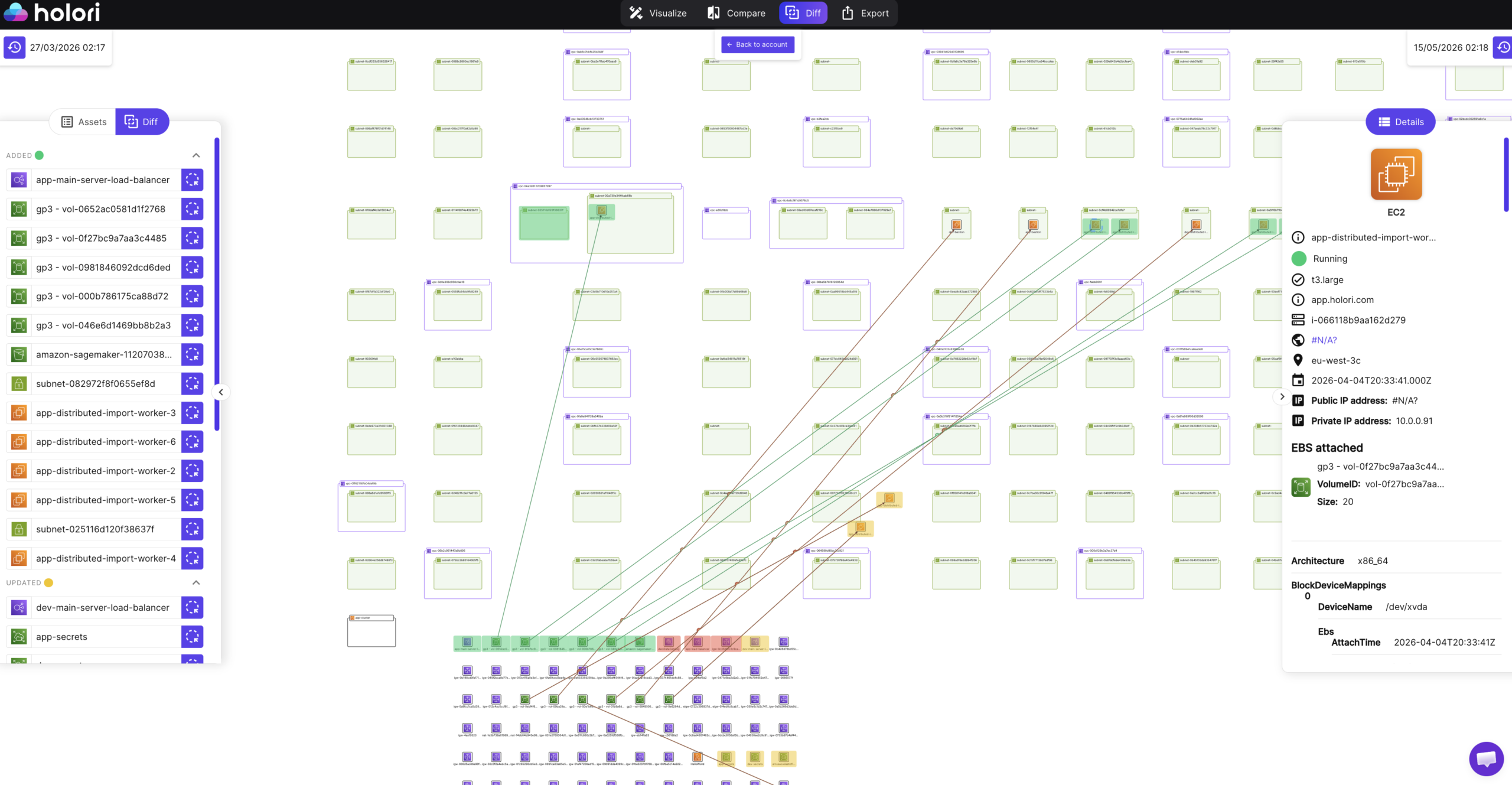
This visual change layer is particularly valuable for catching cost-relevant changes that would otherwise go unnoticed until the next billing cycle. A new cluster provisioned overnight appears in green with its configuration and estimated cost. A storage tier modification that affects billing appears in yellow with the before and after configuration. A resource that was deleted but whose cost is still showing in the billing export appears in red, flagging the potential ghost asset before it distorts the allocation report.
Combined, the technical inventory, the cost inventory with virtual tags, and the daily diff diagrams give teams the full picture of what exists, what it costs, who owns it, and what changed since yesterday.
Conclusion
A cloud asset inventory is the foundation every other FinOps practice is built on. Cost allocation, waste identification, commitment optimization, anomaly detection: none of these work reliably without an accurate, up-to-date record of what is running, who owns it, and what it costs.
The organizations that maintain a useful inventory treat it as an operational system rather than a one-time audit. They use it to drive tagging coverage, track configuration changes, identify drift before it becomes a cost or security problem, and connect resource-level detail to financial outcomes. Built and maintained correctly, the inventory stops being a compliance exercise and starts being the most actionable tool a FinOps or platform team has.
Frequently Asked Questions
What is a cloud asset inventory?
A cloud asset inventory is a continuously updated record of every resource running across your cloud environment, including compute, storage, networking, databases, and serverless components. Each entry should include the resource type, configuration, ownership metadata, cost attribution, and current status. In multi-cloud environments, a useful inventory normalizes resources from all providers into a consistent format so they can be queried and managed in a single view.
What is the difference between a cloud asset inventory and a CMDB?
A CMDB (Configuration Management Database) traditionally focuses on intended state, change control workflows, and manual configuration tracking aligned to ITSM processes. A cloud asset inventory focuses on actual running resources, real-time or near real-time synchronization with the live environment, and automated discovery. CMDBs track what should be deployed according to change management. Cloud asset inventories track what is actually deployed, including shadow IT and resources created outside formal processes.
How often should a cloud asset inventory be updated?
It depends on the use case. Security and compliance teams often require near real-time updates to catch configuration changes and new resources immediately. FinOps teams typically find daily synchronization sufficient for cost allocation, waste identification, and optimization workflows. The key is that the inventory cadence is fast enough to catch changes before they compound: a resource created and deleted within the same day should still be captured and its cost attributed correctly.
How do virtual tags help with asset inventory?
Virtual tags allow ownership and allocation metadata to be applied to resources at the inventory layer without modifying the underlying resource tags in the cloud provider. This is valuable in environments where tagging compliance is incomplete, where resources were created before the tagging policy existed, or where certain resource types cannot be tagged by the provider. Virtual tags ensure that every resource in the inventory carries the allocation metadata needed for cost attribution, even if the infrastructure-level tag is missing.
What should I do first when building a cloud asset inventory?
Start with discovery: connect all cloud accounts and providers to a single inventory platform and run an initial scan to see everything that exists. Then audit the tag coverage of what you find, prioritizing resources by spend. Fix the highest-cost untagged resources first, either by adding tags at the infrastructure level or by applying virtual tags at the inventory layer. Once you have reliable attribution across 85% or more of spend, layer in change tracking and lifecycle management to keep the inventory accurate as the environment evolves.