If you have been running workloads on AWS for more than a few months, you have almost certainly looked at your On-Demand bill and wondered whether there is a smarter way to pay. There is. AWS offers two commitment-based pricing models that can cut your compute costs by up to 72 percent compared to On-Demand rates: Savings Plans and Reserved Instances. Both require you to commit to usage over a one or three-year term, and both deliver meaningful savings. But they work very differently, and choosing the wrong one for your workload type can leave you locked into a commitment that either underdelivers on savings or traps spend in coverage you can no longer use.
This guide breaks down exactly how each model works, where the real differences lie, and how to build a practical coverage strategy for 2026. It also covers how these commitment tools fit into a broader multi-cloud cost management picture, which is increasingly relevant for teams running workloads across AWS, GCP, and Azure simultaneously.
How AWS Savings Plans Work
AWS introduced Savings Plans in 2019 as a more flexible alternative to Reserved Instances. Instead of committing to a specific instance configuration, you commit to a minimum hourly spend in US dollars, and AWS automatically applies discounted rates to any eligible usage up to that amount.
TThere are four types of Savings Plans, each covering a different scope.
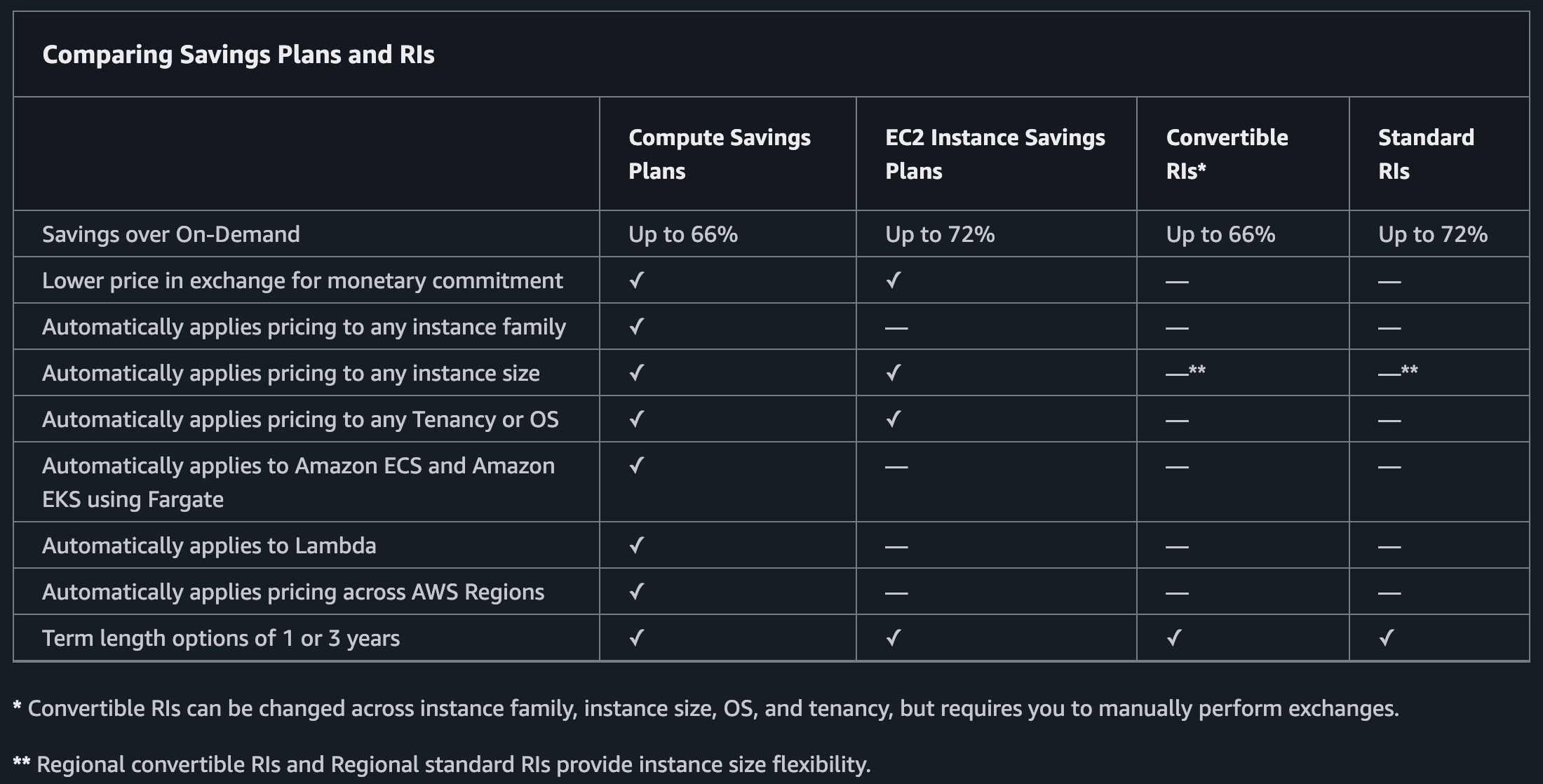
Compute Savings Plans are the most flexible. You commit to a dollar amount per hour, and the discount applies automatically across EC2 instances, AWS Fargate, and AWS Lambda, regardless of instance family, region, operating system, or tenancy. You can switch from an m5.large in us-east-1 to a c6g.xlarge in eu-west-1 without losing your discounted rate. The trade-off is that Compute Savings Plans offer up to 66 percent savings compared to On-Demand, slightly less than the maximum available through Reserved Instances.
EC2 Instance Savings Plans lock the discount to a specific instance family within a chosen region, for example, all M-family instances in us-east-1. Within that constraint, you retain flexibility on instance size, operating system, and tenancy. Because the scope is narrower, the discount is higher, up to 72 percent off On-Demand, comparable to Standard Reserved Instances.
Database Savings Plans cover managed database services including Aurora, RDS, DynamoDB, ElastiCache, DocumentDB, Neptune, and Redshift, offering discounts of up to 35 percent. They provide a Savings Plan alternative to Reserved Instances for database workloads, though the discount ceiling is lower than what RIs can deliver on the same services.
SageMaker Savings Plans apply exclusively to Amazon SageMaker instance usage and offer discounts of up to 64 percent. If your team is running substantial ML training or inference workloads on SageMaker, this plan type deserves serious consideration alongside your compute coverage strategy.
One important operational point: Savings Plans cannot be modified or cancelled once purchased, except within a narrow seven-day return window that applies only to plans with an hourly commitment of $100 or less purchased within the current calendar month. In practice, any meaningful commitment is permanent for its term. There is also no secondary market for Savings Plans; you cannot sell them the way you can sell Reserved Instances.
How Reserved Instances Work
Reserved Instances are the original AWS commitment pricing model, predating Savings Plans by a decade. Rather than committing to a spend amount, you commit to a specific resource configuration: an EC2 instance type, region, operating system, and tenancy. AWS applies a billing discount whenever your running instances match those attributes.
AWS offers two classes of Reserved Instances for EC2.
Standard Reserved Instances provide the highest discounts, up to 72 percent off On-Demand for a three-year, all-upfront commitment. The trade-off is rigidity: once purchased, you cannot change the instance family or region. You can modify the Availability Zone, instance size within the same family, and scope between regional and zonal, but that is the extent of it. Standard RIs can, however, be listed for sale on the AWS Reserved Instance Marketplace, which gives you an exit route if your workloads change.
Convertible Reserved Instances offer more flexibility by allowing exchanges for other Convertible RIs with different instance families, operating systems, or regions, provided the exchange is for equal or greater value. The discount ceiling is lower, 31 to 54 percent for a one-year term, reflecting the added optionality.
Beyond instance class, Reserved Instances also have a scope dimension. Zonal RIs reserve actual capacity in a specific Availability Zone, which matters for mission-critical applications where capacity availability during high-demand periods is not just a cost concern but an availability concern. Regional RIs apply the discount across the entire region without guaranteeing capacity, offering broader coverage but no capacity reservation.
Reserved Instances are also available for services beyond EC2, including RDS, ElastiCache, Redshift, OpenSearch, MemoryDB, and DynamoDB. This makes them the only commitment option for database and caching workloads, which is a significant reason why even teams that default to Savings Plans for compute still maintain a reserved instance strategy for their data tier.
AWS Savings Plans vs Reserved Instances
| Compute Savings Plan | EC2 Instance Savings Plan | Database Savings Plan ★ New | Standard Reserved Instance | Convertible Reserved Instance | |
| Commitment type | Hourly spend ($) | Hourly spend ($) | Hourly spend ($) | Instance config | Instance config |
| Max discount | 66% | 72% | 35% serverless / 20% provisioned | 72% | 54% |
| Flexibility | Full (family, region, OS) | Within family/region | Full (engine, family, region) — Gen 7+ only | None | Exchange-based |
| Service coverage | EC2, Fargate, Lambda | EC2 only | Aurora, RDS, DynamoDB, ElastiCache (Valkey), DocDB, Neptune, Keyspaces, Timestream, DMS, OpenSearch | EC2 only | EC2 only |
| Term options | 1 or 3 year | 1 or 3 year | 1 year only ★ | 1 or 3 year | 1 or 3 year |
| Capacity reservation | No | No | No | Zonal only | No |
| Marketable | No | No | No | Yes | No |
| Database coverage | No | No | Yes — see above ★ | RDS, ElastiCache, Redshift etc. | No |
When to Choose Savings Plans
Savings Plans make sense for most teams as the primary commitment vehicle for EC2 and serverless compute. The core advantage is that your commitment survives architectural changes. If you migrate from x86 to Graviton, shift a workload from one region to another, or move from EC2 to Fargate, a Compute Savings Plan continues to apply without any intervention.
They are particularly well-suited to teams that are actively modernising their infrastructure. Locking into Standard RIs before a container migration or instance family transition is a common source of stranded commitment spend, and Savings Plans eliminate that risk.
The practical starting point for most teams is a Compute Savings Plan covering 60 to 70 percent of your minimum baseline hourly spend, set at No Upfront on a one-year term. This conservative approach means you are only committing to usage you are highly confident will persist, leaving the remainder as On-Demand headroom for growth and flexibility.
When Reserved Instances Still Win
Reserved Instances remain the better choice in three specific scenarios.
The first is maximising discount depth on stable database workloads. Database Savings Plans now provide flexible coverage across Aurora, RDS, DynamoDB, ElastiCache, and other managed services at up to 35 percent off for serverless workloads. However, Reserved Instances for the same services can deliver higher discounts — particularly for provisioned instances on longer terms with upfront payment, where the Database Savings Plans ceiling is only 20 percent. If you have stable, long-running database workloads where the instance type is not going to change, and you are running provisioned (not serverless), RIs still win on discount arithmetic.
The second is capacity reservation. If you are running workloads where availability during capacity-constrained events matters — such as financial transaction processing, real-time gaming, or healthcare systems — a Zonal Reserved Instance guarantees that AWS holds physical capacity for you. Savings Plans provide billing discounts but not capacity guarantees.
The third is maximum discount optimisation on stable, long-lived workloads. If you have an application that has been running on the same instance type in the same region for two years and is unlikely to change, a three-year Standard Reserved Instance with all-upfront payment captures the highest possible discount, up to 72 percent, and the Marketplace provides a liquidation path if things change unexpectedly.
A fourth scenario where Reserved Instances remain the only option: older database instance generations. Database Savings Plans only cover Generation 7 and newer instances, and ElastiCache only through Valkey. If your fleet includes Generation 5 or 6 database instances, or Redis-based ElastiCache, Reserved Instances remain your only path to commitment discounts on those workloads.
Building a Layered Coverage Strategy
The most effective approach in 2026 is not choosing between Savings Plans and Reserved Instances but layering them. A practical structure looks like this:
Start with a Compute Savings Plan covering your verified baseline compute spend. Use the past 60 to 90 days of hourly On-Demand data to identify your minimum spend floor, not your average, and commit to around 70 to 80 percent of that floor. This becomes your safety net that survives any architectural changes.
Add EC2 Instance Savings Plans for instance families you are confident will not change. If you run a large fleet of Graviton-based M7g instances that is not moving anywhere, an EC2 Instance Savings Plan on the M family captures the higher discount tier.
Maintain Standard Reserved Instances for your data tier exclusively, covering RDS, ElastiCache, and Redshift instances that run continuously.
Leave 20 to 30 percent of compute as On-Demand, and layer Spot Instances on top for batch processing, ML training jobs, or any workload that can tolerate interruption. Spot is not a commitment model, but it rounds out the cost strategy and often delivers the largest savings per dollar of spend on the right workloads.
The Multi-Cloud Dimension
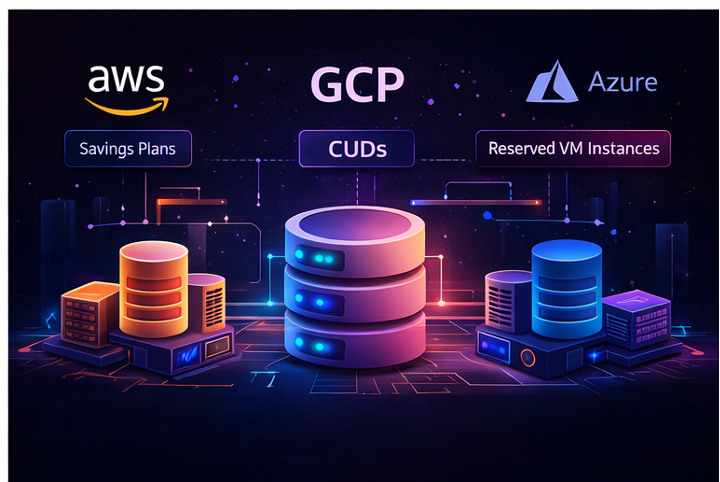
AWS Savings Plans and Reserved Instances solve the cost commitment problem on AWS specifically. But a large and growing share of engineering teams now operate across two or three cloud providers, which introduces a challenge that neither model addresses: how do you build a coherent commitment strategy when your workloads span AWS, GCP, and Azure?
GCP’s equivalent model is Committed Use Discounts (CUDs). Resource-based CUDs commit you to specific vCPU and memory allocations in a region and offer up to 57 percent savings for a one-year term and 70 percent for three years. Spend-based CUDs work more like AWS Compute Savings Plans, committing to a minimum hourly spend on Cloud Run or Cloud SQL in exchange for discounts of around 17 percent. Google also applies Sustained Use Discounts automatically for instances that run more than 25 percent of a billing cycle, requiring no commitment at all.
Azure’s equivalent is Reserved VM Instances, which follow a model closer to EC2 Reserved Instances: you commit to a specific VM size or VM series in a region for one or three years and receive discounts of up to 72 percent. Like Convertible RIs on AWS, Azure Reserved Instances can be exchanged or refunded under certain conditions, giving you some flexibility if your workload requirements change.
Managing commitment coverage across all three providers in isolation is where most FinOps teams struggle. The discount logic, billing units, and coverage mechanics differ enough across AWS, GCP, and Azure that a spreadsheet-based approach quickly becomes unmanageable. Understanding your actual utilisation across providers before purchasing commitments is the prerequisite for any of this to work, which is why multi-cloud cost visibility tools have become a practical necessity for commitment planning, not just reporting.
Holori’s multi-cloud billing normalisation consolidates your AWS, GCP, and Azure spend into a unified view, allowing you to identify baseline usage by service and region across providers before making commitment decisions. Rather than running separate analyses in Cost Explorer, GCP Billing, and Azure Cost Management and trying to reconcile them manually, you can assess coverage gaps and utilisation rates from a single interface and prioritise commitments where On-Demand exposure is highest.
Getting the Commitment Size Right
The most common mistake teams make with both Savings Plans and Reserved Instances is over-committing based on average spend rather than minimum spend. Committing to your average means that during any period where usage drops below that average, you are paying for committed capacity you cannot consume, permanently. Unlike On-Demand waste, which stops the moment you turn off a resource, stranded commitment spend continues billing for the remainder of your one or three-year term.
Work from hourly data, not monthly summaries. The right input is your hourly On-Demand spend over the past 60 to 90 days, which you can pull from Cost Explorer at hourly granularity filtered to On-Demand purchase type. Monthly or daily figures smooth out the troughs in your usage pattern and will overstate your true baseline. From the hourly dataset you want three numbers: the minimum hourly spend, the 10th percentile (p10), and the mean. The minimum is your absolute floor; the p10 is more useful in practice because it filters out genuinely anomalous hours like maintenance windows or planned downtime without being distorted by them.
One nuance that trips up first-time buyers: you commit to the discounted rate, not the On-Demand rate. When purchasing a Savings Plan to cover a specific instance, the hourly commitment you enter is the post-discount rate. For example, an EC2 instance with an On-Demand rate of $0.384/hr covered by a Compute Savings Plan at 30 percent discount means you commit to $0.269/hr — not $0.384/hr. This means the dollar figure you enter at purchase time will always be lower than the On-Demand spend it replaces, which is counterintuitive when sizing your commitment against your Cost Explorer spend data. When comparing your p10 On-Demand figure to a proposed commitment amount, make sure you are applying the expected discount rate to convert between the two.
Commit to 70 to 80 percent of your p10, not your mean. The p10 already excludes your ten quietest percent of hours. Applying a further buffer on top ensures your commitment is fully utilised in nearly every scenario without requiring perfect foresight. To make this concrete: suppose your 90-day analysis returns a p10 of $4.20 per hour and a mean of $6.80 per hour. Committing to the mean creates real stranded spend risk every time usage dips. Committing to 75 percent of p10 gives you a Savings Plan of $3.15 per hour. On an annual basis that commitment costs $27,594, while the same usage billed at On-Demand rates would run roughly $81,000. The discount is realised cleanly because the commitment is sized to usage you are near-certain to generate.
Treat AWS recommendations as a starting point, not a target. Cost Explorer’s purchase recommendations are generated from your historical usage and do account for your existing Savings Plans and RIs when estimating uncovered On-Demand spend. The real limitation is that they are entirely backward-looking: they have no awareness of planned migrations, seasonal demand patterns, or growth you know is coming. If any of those apply to your environment, the recommended commitment will be higher than what you should actually purchase. The gap between the AWS recommendation and your p10-based figure is not waste to be closed — it is On-Demand flexibility you are consciously preserving.
Audit existing utilisation before buying anything new. This is the step most teams skip. Any existing Savings Plan running below 90 percent utilisation consistently is already over-committed relative to actual usage. Stacking a new commitment on top compounds the problem. The correct sequence is always: check current coverage rate and utilisation first, identify what is genuinely uncovered, then size new commitments only against that exposed baseline.
How Holori Helps You Manage Coverage and Act on Recommendations
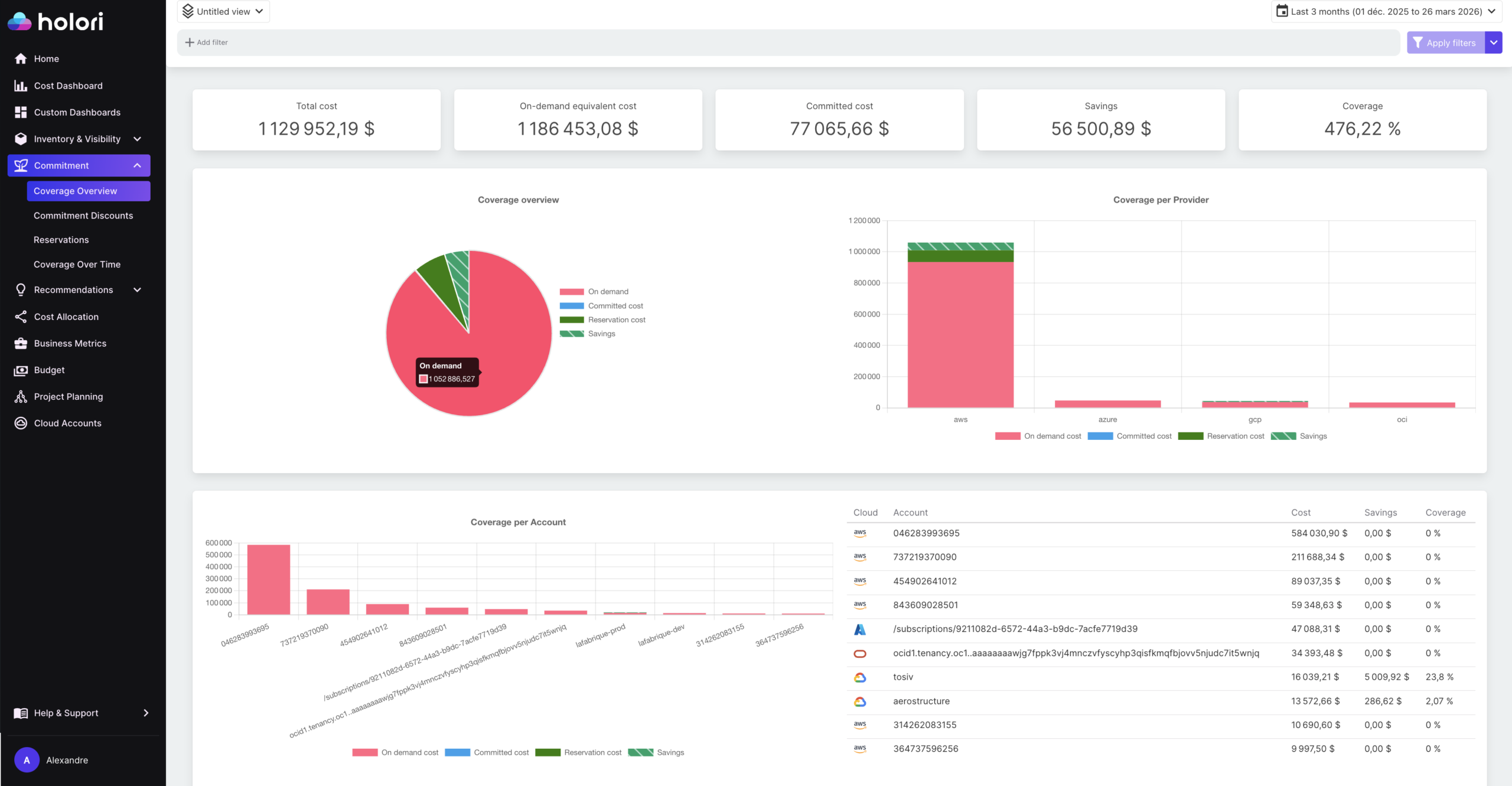
The starting point is coverage visibility. Holori shows your current Savings Plans and Reserved Instance coverage rate across your AWS account, broken down by service and accounts. Rather than opening Cost Explorer separately and cross-referencing it with your billing dashboard, you can see at a glance what percentage of your eligible compute spend is currently covered by commitments and where the uncovered On-Demand exposure sits. This is particularly useful for accounts that have accumulated commitments over multiple years and where the true coverage picture is harder to assess from native tooling alone.
On top of that coverage view, Holori surfaces the AWS purchase recommendations directly within the platform. These are the same recommendations generated by Cost Explorer based on your usage history, but presented alongside your actual spend data and existing commitment inventory rather than in isolation. The practical value is context: when a recommendation suggests purchasing an additional $2.50/hr Compute Savings Plan, you can immediately see what your current utilisation rate is on existing plans and whether the account has the uncovered On-Demand baseline to support it, rather than having to switch between tools to piece that picture together.
For teams operating across multiple cloud providers, this becomes more significant. GCP Committed Use Discounts and Azure Reserved VM Instances have their own native recommendation surfaces, and they share no common interface with AWS Cost Explorer. Holori’s multi-cloud billing normalisation means your AWS coverage gaps are visible in the same context as your GCP and Azure commitment positions, letting you prioritise where to act first rather than managing each provider’s recommendations in isolation.
The commitment purchase itself still happens in the AWS console, but the decision of what to buy and how much to commit is better informed when coverage rate, historical utilisation, and AWS recommendations are available in one place alongside the rest of your cloud spend.
Conclusion: AWS Savings Plans vs Reserved Instances
For most AWS-centric teams in 2026, the default position should be Compute Savings Plans as the primary commitment vehicle for EC2 and serverless, supplemented by Reserved Instances for the data tier and for any scenario where capacity reservation matters. Standard Reserved Instances remain the right tool for highly stable, long-running workloads where the instance configuration is genuinely not going to change.
The more interesting challenge for 2026 is not choosing between Savings Plans and Reserved Instances within AWS but building a commitment strategy that works across the full cloud estate. Teams running multi-cloud environments need visibility into utilisation across providers before they can commit confidently, and managing AWS, GCP, and Azure commitment coverage in isolation leaves meaningful savings on the table.
The financial logic is straightforward: On-Demand pricing is the most expensive way to run predictable workloads, and every percentage point of covered baseline spend translates directly to margin. The operational complexity is in knowing what your baseline actually is, and in keeping commitment coverage aligned as workloads evolve. That is the real work of cloud cost management in 2026.
Try Holori for free and manage your AWS commitments easily: https://app.holori.com/
FAQ
Can I use Savings Plans and Reserved Instances at the same time?
Yes, and most teams do. The typical setup is Savings Plans for compute (EC2, Fargate, Lambda) and Reserved Instances for specific database workloads where the higher discount justifies locking into an instance configuration. There is no conflict between the two — AWS applies whichever discount is most beneficial to each eligible usage line.
What happens if I don’t use my full Savings Plan commitment?
You pay for it regardless. If your hourly commitment is $3.00 and only $2.00 worth of eligible usage runs that hour, the remaining $1.00 is billed as wasted commitment. It does not roll over to the next hour. This is why sizing against your p10 rather than your average matters — underutilised commitment is a permanent cost, not a recoverable one.
Is a one-year or three-year term better?
Three-year terms offer higher discounts (up to 72 percent vs. around 40 to 66 percent for one-year), but lock you in for longer. For most teams, one-year terms on Compute Savings Plans strike the right balance: meaningful savings without betting on three years of workload stability. Reserve three-year commitments for infrastructure you are genuinely certain will not change, such as a production database on a specific instance type that has been running unchanged for years.
Can I sell a Savings Plan I no longer need?
No. Unlike Standard Reserved Instances, which can be listed on the AWS Reserved Instance Marketplace, Savings Plans have no secondary market. The only exit is the seven-day return window, which only applies to plans with an hourly commitment of $100 or less. For any meaningful commitment, assume it is permanent for its term.
Do Savings Plans cover all AWS services?
No. Savings Plans currently cover EC2, Fargate, Lambda, SageMaker, and a range of managed database services via Database Savings Plans. Services like S3, CloudFront, Route 53, and most other non-compute services are not eligible and have no equivalent commitment pricing model.
How do AWS Savings Plans recommendations work?
Cost Explorer generates purchase recommendations based on your On-Demand usage history over a lookback period you select (7, 30, or 60 days). The recommendations account for your existing Savings Plans and RIs when estimating uncovered spend. Their main limitation is that they are backward-looking — they cannot account for planned migrations, seasonal patterns, or growth you know is coming. Treat them as a useful data point rather than a precise prescription.