Costs rarely surprise anyone on day one, and people will rarely try to optimize Databricks cost from day 1. However, they creep up over months, one idle cluster and one oversized job at a time. By the time finance asks why the bill doubled, nobody can point to a single cause.
That’s the nature of consumption based platforms. Databricks bills you for exactly what you use, down to the second. That’s fair, but it also means waste is invisible until it isn’t. A notebook left running overnight, a production pipeline stuck on the wrong compute type, or a Delta table with millions of tiny files can each quietly add thousands of dollars a month.
This guide breaks down how Databricks pricing actually works, what drives your bill up, and how to optimize Databricks cost without slowing your team down. It’s written for data engineers, platform teams, and FinOps practitioners who need to go from “our Databricks bill is high” to “here’s exactly why, and here’s what we’re doing about it.”
What Actually Makes Up Your Databricks Bill
Before you can optimize Databricks cost, you need to understand what you’re actually paying for. Most teams assume there’s one number to control. There are actually two.
The Databricks Unit (DBU) explained
A DBU, or Databricks Unit, is Databricks’ measure of processing power consumed per hour. Every workload you run, whether it’s a notebook, a scheduled job, or a SQL query, consumes DBUs at a rate that depends on the compute type behind it.
The math is simple in principle:
Cost = DBUs consumed × DBU rate per hour
The complexity comes from the fact that the DBU rate changes depending on your compute type, your pricing tier, and your cloud provider. Two clusters running the same job for the same duration can cost very different amounts if one uses All Purpose Compute and the other uses Jobs Compute.
Billing is per second, not per hour. That’s good news. You’re not paying for a full hour just because a job ran for six minutes. But per second billing only helps if clusters actually shut down when they’re not needed, which, as we’ll see, is where most teams leak money.
Compute costs versus cloud infrastructure costs
Here’s the part a lot of teams miss. Your Databricks DBU bill is only part of the story. Databricks runs on top of your cloud provider’s infrastructure, whether that’s AWS EC2, Azure VMs, or Google Compute Engine. That infrastructure is billed separately, directly by your cloud provider.
In practice, infrastructure costs commonly account for 50 to 70 percent of total Databricks spend. If you’re only watching your Databricks invoice and ignoring the matching line items in your AWS or Azure bill, you’re looking at less than half the picture. Any serious cost optimization effort has to account for both.
Pricing tiers: Standard, Premium, and Enterprise
Databricks sells three tiers, and the tier you’re on sets your baseline DBU rate.
Standard covers the essentials: notebooks, Spark compute, Delta Lake, and basic job scheduling. It doesn’t include Unity Catalog, role based access control, or audit logging.
Premium adds governance: Unity Catalog, RBAC, table access controls, and compliance features. Most production deployments with more than a handful of users end up here. The DBU rate runs roughly 20 to 30 percent higher than Standard, depending on compute type.
Enterprise is negotiated directly with Databricks and adds enhanced security, dedicated support, and SLAs.
One thing worth flagging for planning purposes: Databricks retired the Standard tier on AWS and GCP in October 2025. On Azure, new Standard workspaces can no longer be created as of April 2026, and every remaining Standard workspace will be auto upgraded to Premium on October 1, 2026. Teams still on Standard for interactive workloads should expect a rate increase of at least 35 percent once that migration happens. If that’s you, it’s worth budgeting for now rather than getting surprised later.
The Factors That Actually Drive Your Databricks Costs
When we discuss Databricks, it is essential to remember what a typical Databricks infra contains.
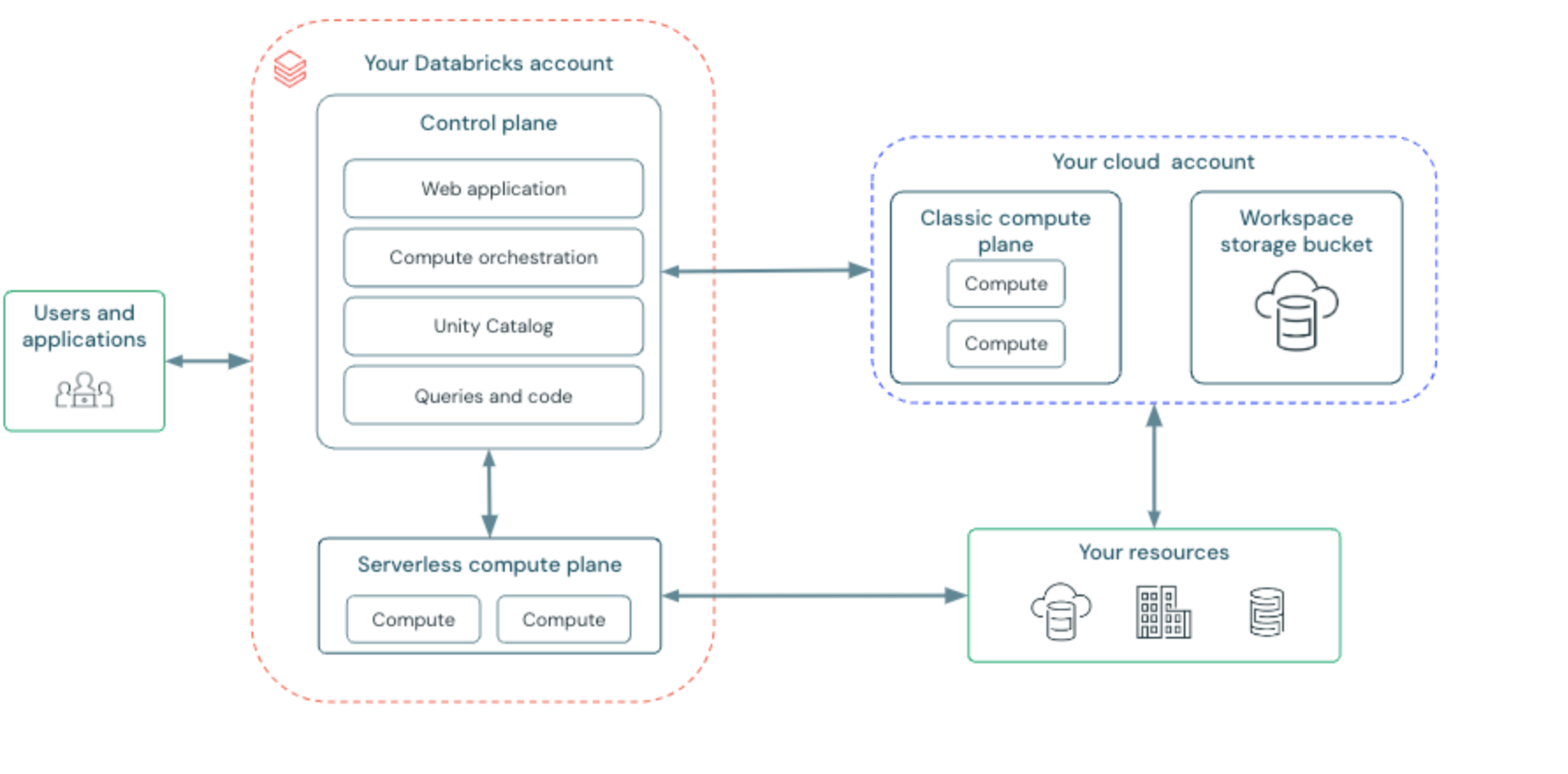
Once you understand DBUs and infrastructure costs, the next question is what makes those numbers go up. Seven factors matter most.
Cluster size is the most direct lever. More worker nodes and a bigger driver mean more DBUs consumed per hour, full stop.
Cluster type and autoscaling come next. Fixed size clusters waste money when utilization is low. Autoscaling clusters adjust worker count to actual load, which helps a lot for variable workloads, but only if you’ve set sensible upper bounds. Without a ceiling, autoscaling can spike costs just as easily as it saves them.
Compute type selection is usually the single biggest factor, and we’ll dedicate a full section to it below.
Region matters more than people expect. DBU rates and infrastructure pricing both vary by region. US East regions on AWS tend to be the cheapest. Running the same workload in Europe or Asia Pacific can meaningfully raise your bill.
Runtime choices, particularly whether Photon is enabled, affect both speed and cost. Photon carries a higher DBU rate but often processes SQL and DataFrame workloads two to five times faster, which can lower your total DBU consumption even though the hourly rate is higher.
Storage costs come from your cloud provider, not Databricks. Delta Lake data sitting on S3, ADLS, or GCS is billed at standard object storage rates, and cross region data transfer adds up quietly.
Workload duration and scheduling round things out. An unoptimized job that takes four hours to do what a tuned version could do in one hour is burning four times the DBUs it should. Nobody notices this kind of drift until someone actually looks.
All Purpose, Jobs, and SQL Warehouse Compute: Which One Costs What
This is where the biggest, fastest wins usually live.
All Purpose Compute
It powers interactive notebooks and collaborative development. It’s flexible, which is exactly why it’s expensive: it carries the highest DBU rate of any compute type, and it keeps running for as long as someone leaves it on. A data scientist who opens a notebook, runs a query, and steps away for lunch is paying All Purpose rates the entire time. This single pattern is the most common source of preventable Databricks waste.
Jobs Compute
It is built for scheduled, automated workloads: nightly ETL, data quality checks, model training runs. The DBU rate is typically 2 to 3 times cheaper than All Purpose for equivalent resources, and clusters terminate automatically once the job finishes. If your production pipelines are still running on All Purpose clusters, this is very likely your biggest single opportunity to cut spend.
SQL Warehouses
They come in two flavors. Classic Warehouses run on clusters you provision and size yourself; you pay for the time they’re running, even when idle, unless you set auto suspend. Serverless Warehouses spin up on demand and scale to zero when not in use, at a higher per DBU rate. For steady, high frequency queries, Classic usually wins. For bursty, unpredictable analytics, Serverless usually wins because you stop paying for idle time.
Delta Live Tables
They sit between All Purpose and Jobs Compute in cost, and are purpose built for streaming and declarative ETL pipelines. Model Serving endpoints use their own DBU based model tied to CPU or GPU compute and the provisioned concurrency you configure.
The pattern across all of these: the more predictable and automated the workload, the cheaper the compute type should be. Interactive and ad hoc work costs more by design. The optimization is making sure each workload actually sits on the compute type it belongs on.
A Realistic Databricks Cost Example
Numbers make this concrete. Here’s an illustrative example for a mid sized data engineering team: five engineers doing interactive development, plus three nightly ETL pipelines in production, on Premium tier, AWS, US East.
| Cost component | Usage | Rate | Monthly cost |
| Dev, All Purpose Compute, 5 engineers | 2,200 DBUs (4 hrs/day × 22 days) | ~$0.55/DBU | ~$1,210 |
| Production ETL, Jobs Compute, 3 pipelines | 900 DBUs (2 hrs/night × 30 nights) | ~$0.22/DBU | ~$198 |
| Databricks DBU total | 3,100 DBUs | n/a | ~$1,408 |
| AWS EC2 infrastructure | n/a | n/a | ~$800 to $1,200 |
| Total estimated monthly cost | ~$2,200 to $2,600 |
Notice what jumps out. Interactive development costs more than six times what the production pipelines cost, for a much smaller amount of actual delivered work. And infrastructure costs add nearly as much on top of the DBU bill as the DBU bill itself. These are exactly the two places to focus first: reining in interactive cluster sprawl, and treating cloud infrastructure spend as part of the same optimization problem, not a separate one.
Actual figures vary by tier, region, and any committed use discounts you’ve negotiated, so treat this as a model to build from rather than a universal number.
Databricks Pricing Differences Across AWS, Azure, and GCP
Your cloud provider shapes your total cost more than most teams realize.
On AWS, Databricks has done significant optimization work, and Graviton2 instances can deliver up to 4x better price performance for lakehouse workloads compared to x86 instances. If your clusters are still running on older x86 instance types, that’s worth revisiting.
On Azure, Databricks integrates tightly with Azure Data Factory, Azure DevOps, and Microsoft Entra ID, which is a real advantage for teams already standardized on Microsoft’s stack. Azure Reserved VM Instances, on one and three year terms, can meaningfully cut the infrastructure half of your bill if usage is predictable, even though DBU rates stay at your contracted level.
On GCP, DBU pricing follows the same structure as the other two clouds, but there’s a gotcha: Committed Use Discounts on Compute Engine don’t automatically apply to Databricks managed infrastructure. If you’re on GCP, confirm with your account team how to structure commitments so the discount actually reaches your Databricks spend.
Across all three, the rule holds: your real bill is DBU charges plus cloud infrastructure charges, and the second number is often as large as, or larger than, the first.
Ten Proven Ways to Optimize Databricks Cost
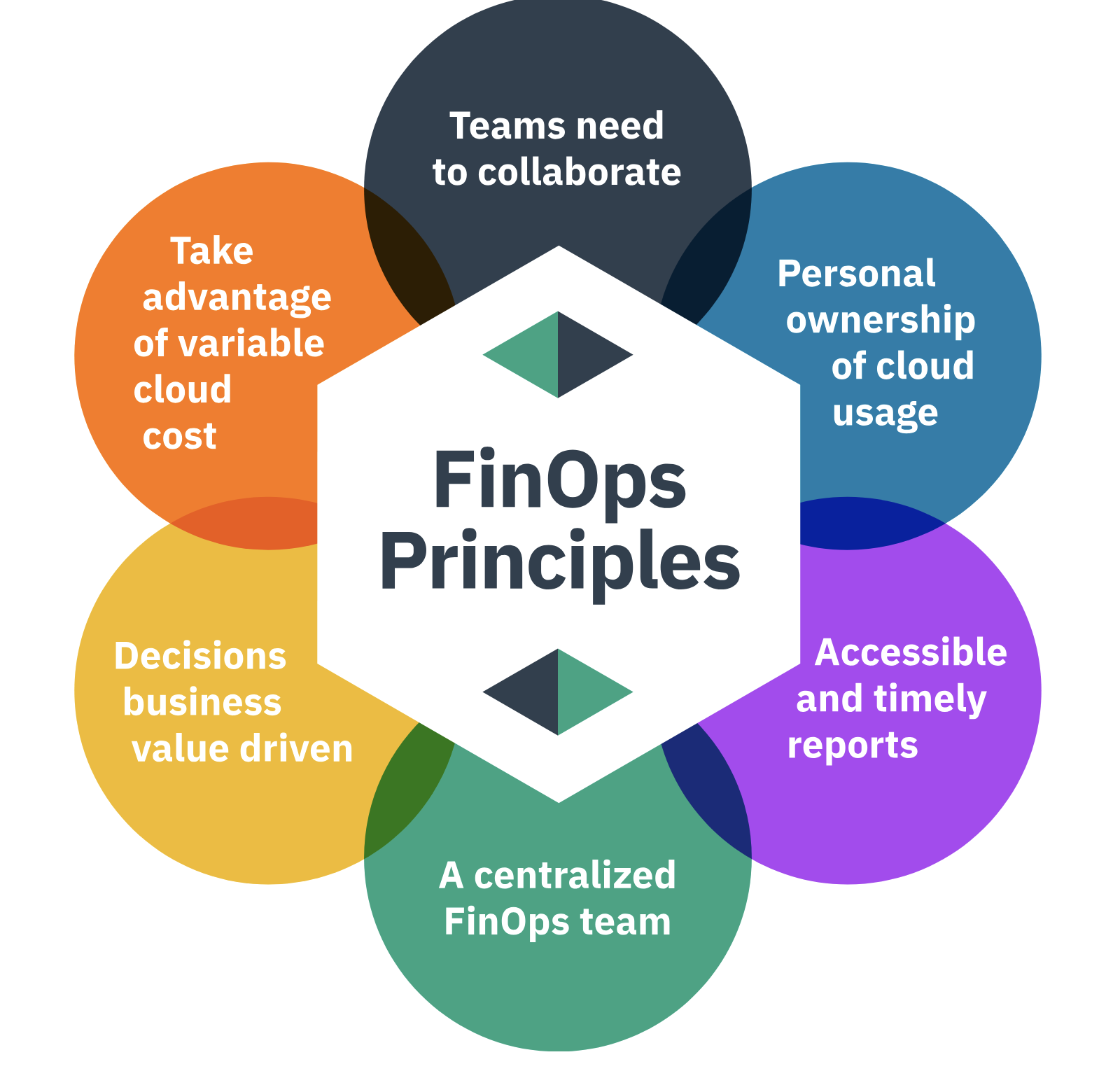
Understanding the pricing model is step one. Acting on it is where the savings show up. Here are ten tactics, ordered roughly by impact.
1. Move production workloads from All Purpose to Jobs Compute.
This is the single highest impact change most teams can make. If scheduled pipelines are still running on interactive clusters, you’re paying two to three times more than necessary, and it’s usually a configuration change rather than a code change.
2. Set auto termination on every interactive cluster.
Databricks doesn’t set a timeout by default, so a forgotten cluster runs, and bills, indefinitely. Thirty minutes is a sensible default. This alone can cut All Purpose spend by 20 to 40 percent on teams where people routinely leave clusters running.
3. Use spot or preemptible instances for fault tolerant jobs.
Spot Instances on AWS, Spot VMs on Azure, and Preemptible VMs on GCP can offer up to 90 percent off on demand pricing. A practical pattern: run worker nodes on spot capacity while keeping the driver on demand. Databricks Jobs handles spot interruptions with task level retries, so this pairs well with ETL and batch workloads.
4. Right size clusters using real utilization data.
A ten worker cluster running a job that uses 30 percent of its capacity is common, and expensive at scale. Look at CPU utilization, memory pressure, and shuffle spill over time, then resize based on what’s actually happening rather than an initial guess.
5. Enable Photon for SQL heavy workloads.
Yes, it costs more per DBU. It also runs queries two to five times faster in many cases, which typically reduces total DBU consumption enough to more than offset the higher rate. Worth benchmarking on your actual workloads rather than assuming.
6. Maintain your Delta tables.
Poorly managed tables with millions of small files force Spark to scan far more than necessary, which multiplies both DBU and infrastructure costs. Regular OPTIMIZE, Z-ordering on frequently filtered columns, and VACUUM to clear stale files keep queries fast and cheap.
7. Choose serverless where the workload pattern fits.
Serverless SQL Warehouses and Serverless Jobs eliminate idle costs entirely, at a higher per DBU rate. For short, frequent, or unpredictable workloads, that trade usually favors serverless. For steady, always on workloads, classic compute is often cheaper.
8. Pre purchase DBUs if your usage is predictable.
Once you have three to six months of stable usage data, a commitment can unlock meaningful discounts. For teams spending more than roughly $5,000 a month, the math usually justifies at least a partial commitment on baseline workloads.
9. Tag every cluster, job, and warehouse.
You can’t optimize what you can’t attribute. Tags applied consistently at the workload level let you see cost by team, project, and environment, and they flow through to your cloud provider’s billing tools once configured correctly.
10. Replace long lived notebook pipelines with scheduled jobs.
Pipelines often get built interactively, start working, and just stay on All Purpose clusters because migrating them to Jobs Compute never quite reaches the top of the backlog. Make that migration part of your definition of done for any new pipeline.
Interested to learn more? Here is an interesting article on Databricks website.
Why Visibility Has to Come First
Every tactic above assumes you already know where your Databricks spend is going. In practice, that’s the part most teams skip, and it’s the part that makes everything else possible.
Databricks costs don’t live in isolation. They sit inside a broader cloud bill, mixed in with compute, storage, networking, and, increasingly, AI and LLM spend from tools like OpenAI, Anthropic, or your own model serving endpoints. Trying to optimize Databricks costs in isolation, without seeing how they fit into total cloud and AI spend, means you’re always reacting to last month’s invoice instead of catching drift as it happens.
None of the engineering tactics above work without that visibility layer underneath them. Auto termination, the right compute type, Delta table maintenance: those still have to happen. Visibility is what tells you where to point that effort first, and proves afterward that it actually worked.
How Can Holori Help You Optimize Databricks Cost
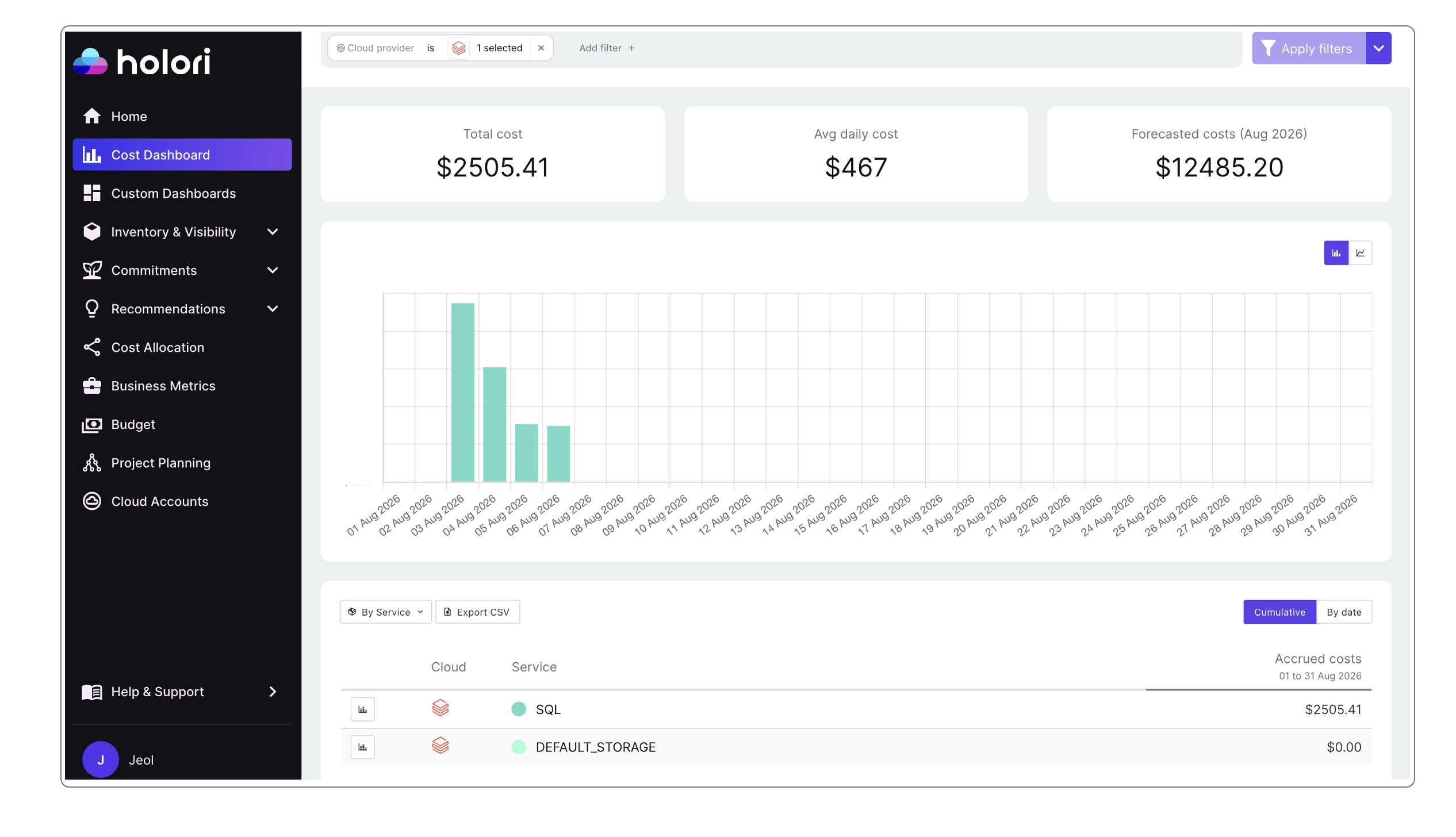
This is exactly the gap a FinOps platform like Holori is built to close.
Holori is a modern FinOps platform built to help companies visualize, allocate, and optimize cloud and AI costs across providers. For teams trying to optimize Databricks cost, that translates into a few concrete capabilities.
One dashboard for the full bill. Holori pulls in billing data from AWS, Azure, and GCP as well as numerous other cloud, AI and service providers such as Databricks.All your resources are centralized into a single cost dashboard. That means your DBU driven spend sits next to the EC2, VM, or Compute Engine charges it depends on, instead of living in a separate report you have to reconcile by hand every month.
Cost allocation by team and project. With Holori’s virtual tags, you can allocate Databricks spend, and the infrastructure behind it, to the team or project actually running the workload. That’s what turns “our Databricks bill went up” into “the data science team’s All Purpose usage went up,” which is the level of detail you actually need to act.
Budgets and alerts before the invoice arrives. Instead of discovering a runaway job at the end of the billing cycle, Holori lets you set budgets and alerts at the workspace, team, or project level, so a spike gets flagged within days.
Commitment and rightsizing recommendations. Holori surfaces unused resources, rightsizing opportunities, and commitment options across your cloud accounts, the same discipline that applies directly to the EC2 or VM infrastructure sitting underneath your Databricks clusters.
A single view across data and AI spend. Because Holori also covers AI cost management for providers like OpenAI, Anthropic, and Gemini, it fits the reality of modern data platforms, where Databricks pipelines increasingly feed, or get fed by, LLM based workloads. You get one place to track cost across the data and AI stack, rather than switching between tools for each layer.
None of this replaces the engineering work described earlier in this guide. What it does is make sure that work gets pointed at the right place first, and gives you the numbers to prove it paid off. Ready to give it a try? Go to https://app.holori.com
Building a Lightweight Databricks FinOps Practice
Cost optimization isn’t a one time project. Usage patterns shift as teams grow, as new pipelines ship, and as workloads move between compute types. A few habits keep costs under control on an ongoing basis.
Review cluster and job configurations monthly, not just when someone flags a spike. Set budget alerts at the workspace or team level so overspend gets caught within days, not at the end of the billing cycle. Make compute type selection part of code review for any new pipeline, the same way you’d review a security concern. And revisit committed use discounts and reserved capacity every quarter as usage patterns become clearer.
Teams that treat Databricks cost management as a continuous practice, rather than a quarterly fire drill, consistently spend less for the same output. The tooling helps, but the habit is what actually holds the savings in place.
Frequently Asked Questions
How much does Databricks cost per month? It depends heavily on usage, tier, and cloud provider. Small teams doing exploratory work might spend a few hundred dollars monthly. Mid size production deployments typically land between $2,000 and $10,000 a month once DBU charges and infrastructure costs are combined. Large enterprise deployments can reach $50,000 to $200,000 or more.
What is a DBU in Databricks? A Databricks Unit is the platform’s measure of processing capability, consumed per hour. Your cost equals DBUs consumed multiplied by the rate for your compute type, tier, and cloud provider.
Is Databricks expensive? It can be, but usually not because the platform itself is overpriced. Most of the cost comes from avoidable waste: idle clusters, workloads on the wrong compute type, and unmaintained Delta tables. Teams that address those three things typically see meaningful reductions without changing what they run.
Does Databricks charge for storage? No. Storage is billed by your cloud provider, at standard object storage rates for the S3, ADLS, or GCS buckets holding your Delta Lake data. It’s usually a small fraction of total spend compared to compute, but worth tracking separately.
What’s the fastest way to cut Databricks costs? Move production pipelines off All Purpose Compute and onto Jobs Compute, and set auto termination on every interactive cluster. Together, these two changes address the two largest sources of preventable waste and usually take less than a week to implement.