Cloud bills are full of surprises. One of the biggest? Cloud data transfer costs. They hide in plain sight, buried under line items like “DataTransfer-Out-Bytes” or “EC2-EgressBytes.”. The most (in)famous ones: AWS egress costs. By the time you notice them, they may already represent 20 to 30 percent of your total cloud spend.
This guide; focusing on AWS for clarity, gives you 10 actionable, expert-level tips to reduce these costs. Whether you are running a multi-region AWS setup or a containerized workload on GCP, these strategies will help you take back control of your networking bill.
Why Cloud Data Transfer Costs Are So Hard to Control

Cloud providers charge for data moving between services, availability zones, regions, and the public internet. These charges accumulate silently. Unlike compute or storage, data transfer has no fixed capacity that forces you to pay attention. As we already described in this article there are massive differences between providers.
AWS egress fees are the most notorious. AWS charges for data leaving its network to the internet, to other AWS regions, and even between Availability Zones within the same region. The rates vary significantly depending on the destination and the service involved.
Understanding the billing model is the first step. Without it, every optimization tip is just a guess.
Tip 1: Understand the Full AWS Egress Fee Structure
Before you can reduce AWS egress fees, you need to understand what triggers them.
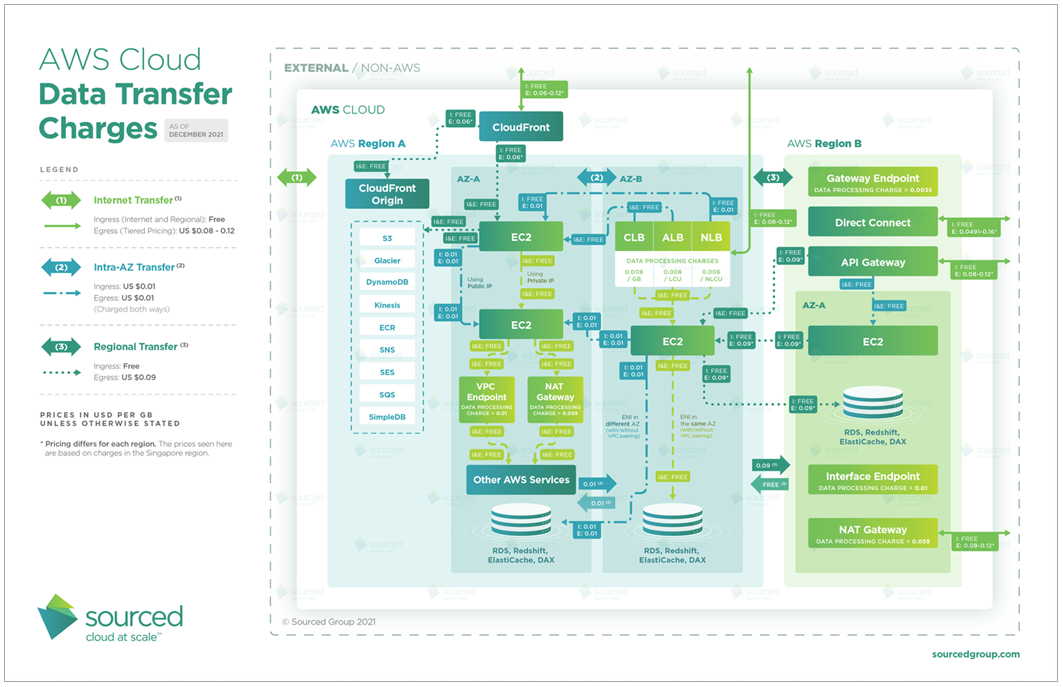
AWS charges in several distinct scenarios.First, data going from EC2 to the public internet incurs per-GB fees after a small free tier. Second, data moving between AWS regions is billed on both the sending and receiving side. Third, data moving between Availability Zones within the same region is often overlooked, but it adds up fast in microservices architectures.
The Four Main Egress Scenarios on AWS
- Data transfer to the internet is the most expensive category. AWS charges around $0.09 per GB for the first 10 TB per month from most regions, with volume discounts after that.
- Data transfer between AWS regions costs roughly $0.02 per GB. This seems small, but a distributed system replicating logs, metrics, or database records across regions can move terabytes per day.
- Cross-AZ traffic within the same region costs $0.01 per GB in each direction. So sending 1 GB from us-east-1a to us-east-1b costs $0.02 total. This is often the most surprising item on cloud bills.
- Data transfer within the same Availability Zone, using private IP addresses, is free. This is the golden rule of AWS network cost optimization.
Tip 2: Eliminate Unnecessary Cross-AZ Data Transfer
Cross-AZ data transfer is one of the most overlooked sources of cloud networking costs. It is especially painful in Kubernetes and microservices environments, where services are distributed across zones for high availability.
Every time a pod in Zone A calls a service in Zone B, you pay $0.01 per GB in each direction. In a busy cluster, this adds up to hundreds of dollars per month without a single byte leaving your AWS account.
How to Reduce Cross-AZ Traffic
The first step is to use topology-aware routing in Kubernetes. This feature, available since Kubernetes 1.21, routes service traffic to endpoints in the same zone first. It reduces cross-zone calls significantly without sacrificing availability.
The second step is to use Availability Zone-aware load balancing. AWS Application Load Balancers support zone affinity settings that keep traffic local when possible.
The third step is to co-locate tightly coupled services in the same AZ. Not every service needs multi-AZ deployment. Stateless, low-criticality workloads can run in a single zone without meaningful risk.
Tip 3: Use VPC Endpoints to Avoid Internet Egress Charges
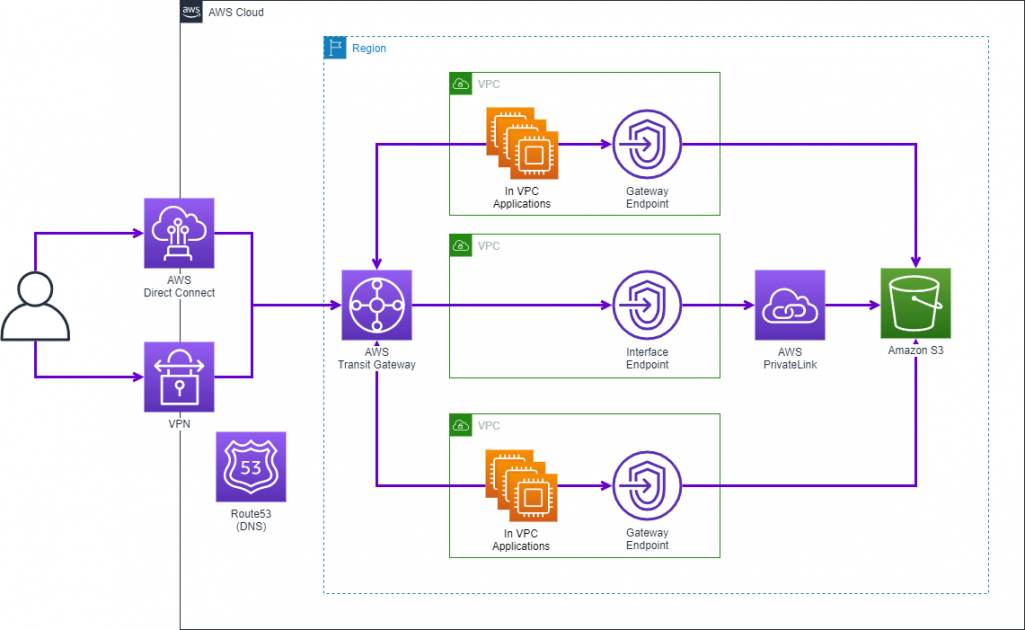
When your EC2 instances or Lambda functions call AWS services like S3, DynamoDB, or SQS, the traffic routes through the public internet by default. This means you pay AWS egress fees for data that never needed to leave the AWS network.
VPC Endpoints solve this problem. They create a private connection between your VPC and AWS services, keeping traffic on the AWS backbone.
Gateway vs Interface Endpoints
Gateway Endpoints are free. They support S3 and DynamoDB. If your workloads read or write large volumes to either service, a Gateway Endpoint should be your first action. Configuration takes about five minutes and the cost savings are immediate.
Interface Endpoints (powered by AWS PrivateLink) support dozens of other services, including SNS, SQS, Kinesis, and API Gateway. They cost around $0.01 per hour per AZ plus $0.01 per GB processed. For high-volume workloads, this is still far cheaper than internet egress rates.
Tip 4: Optimize Data Transfer Between AWS and the Internet
Internet egress is where AWS egress fees reach their highest rates. Every GB you send from EC2, CloudFront, or API Gateway to end users costs money. The goal is to send less data, more efficiently.
Use CloudFront as Your Egress Gateway
AWS CloudFront distributes content from edge locations close to end users. CloudFront charges lower egress rates than direct EC2 or S3 egress, especially for high-volume traffic. The price difference between EC2 internet egress and CloudFront egress can be 30 to 50 percent, depending on the region and volume.
More importantly, CloudFront caches content at the edge. Cached responses do not generate new origin fetches, which means no S3 or EC2 egress for those requests at all.
Enable Compression
HTTP compression (gzip or Brotli) reduces the size of text-based responses by 60 to 80 percent. Enabling compression in your application server, API Gateway, or CloudFront distribution is one of the highest ROI changes you can make. Smaller payloads mean lower data transfer costs and faster responses.
Tip 5: Rethink Your Multi-Region Architecture
Multi-region architectures are powerful. They improve latency, resilience, and compliance. But they generate substantial inter-region data transfer costs. Every replicated database row, synced log file, and forwarded event carries a price tag.
Choose the Right Replication Strategy
Not all data needs full replication. Audit your cross-region data flows and categorize them by necessity.
Real-time replication should be reserved for data that genuinely requires it, like active-active databases or disaster recovery targets with aggressive RPOs. For everything else, scheduled batch replication reduces both transfer volume and API call overhead.
Consider using AWS S3 Replication with filter rules. You can replicate only the objects that actually need to be in multiple regions, rather than mirroring entire buckets by default.
Consolidate Regions Where Possible
Teams often add regions reactively, to solve a latency problem or meet a regulatory requirement. Over time, the region count grows without a corresponding reduction in the old ones.
A periodic review of your region strategy can identify consolidation opportunities. Fewer regions mean fewer inter-region data flows and lower cloud data transfer costs overall.
Tip 6: Audit and Reduce NAT Gateway Data Transfer Costs
NAT Gateways are another hidden cost driver. They allow instances in private subnets to access the internet, but AWS charges $0.045 per GB processed through a NAT Gateway, on top of the egress fee for the outbound traffic itself.
Common NAT Gateway Cost Traps
The biggest trap is routing AWS service traffic through a NAT Gateway when a VPC Endpoint would work. If your Lambda functions or EC2 instances call S3 or DynamoDB through a NAT Gateway, you are paying twice: once for NAT processing and once for egress. Adding a Gateway Endpoint eliminates both charges for those services.
The second trap is centralizing NAT Gateways across AZs. Many teams use a single NAT Gateway in one AZ to save on hourly costs. But traffic from other AZs must cross AZ boundaries to reach it, generating cross-AZ charges. For high-traffic workloads, placing one NAT Gateway per AZ is cheaper overall.
Tip 7: Leverage AWS Direct Connect or VPN for Hybrid Workloads
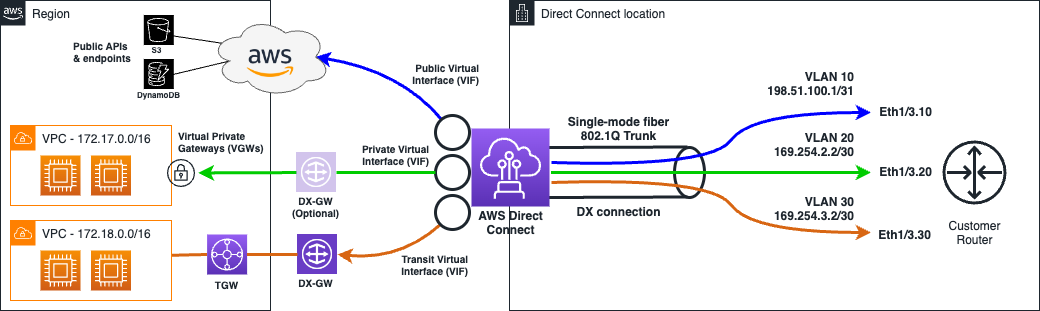
Source: AWS – How Direct Connect works
If your architecture involves on-premises infrastructure communicating with AWS, your cloud data transfer costs depend heavily on how that connection is established.
AWS Direct Connect provides a dedicated network connection between your data center and AWS. Data transfer rates over Direct Connect are significantly lower than over the public internet. For workloads moving large volumes of data between on-premises and AWS, the per-GB savings often offset the Direct Connect port costs.
When Direct Connect Makes Financial Sense
Direct Connect becomes cost-effective when you are consistently transferring more than a few terabytes per month. At lower volumes, a Site-to-Site VPN may be more economical, though it does not provide the same bandwidth guarantees.
Use AWS Pricing Calculator to model both options against your actual transfer volumes. Include the Direct Connect port fee, the data transfer rate, and your current internet egress costs in the comparison.
Tip 8: Optimize Logging, Monitoring, and Observability Pipelines
Observability infrastructure is a silent contributor to cloud data transfer costs. Logs, metrics, and traces flow continuously from your services to collection endpoints. In a microservices architecture, this volume can rival application traffic.
Reduce Log Volume Before It Moves
The cheapest byte is the one you never send. Implement log sampling in production environments. For high-frequency events, capture one in ten or one in a hundred. You get representative visibility without the full egress cost.
Use structured logging and filter at the source. Instead of forwarding every log line to a central aggregator in another region, use a local agent to filter out DEBUG and INFO noise before any data leaves the AZ.
Prefer Region-Local Monitoring Where Possible
Where your observability stack runs matters. Sending metrics from us-west-2 to a Datadog ingest endpoint in us-east-1 generates inter-region egress. Choose a monitoring endpoint that is geographically close to your workloads, or run a local aggregator that batches and compresses data before forwarding it.
Tip 9: Use Cost Allocation Tags and AWS Cost Explorer to Find the Biggest Offenders
You cannot reduce cloud data transfer costs without knowing where they come from. AWS provides tools to identify and attribute network costs, but they require deliberate configuration.
Set Up Cost Allocation Tags for Network Resources
Tag your NAT Gateways, VPC Endpoints, Transit Gateways, and load balancers with team, environment, and application identifiers. Activate these tags as cost allocation tags in the AWS Billing console.
Once activated, AWS Cost Explorer and Cost and Usage Reports can show you which teams, applications, or environments are generating the most transfer cost. This makes it possible to have targeted conversations about optimization rather than guessing.
Use AWS Cost Explorer Filters for Data Transfer
In AWS Cost Explorer, filter by the “Data Transfer” usage type. You can break this down by region, service, and usage type group. Look for:
“DataTransfer-Regional-Bytes” entries, which indicate cross-AZ traffic. “DataTransfer-Out-Bytes” entries, which indicate internet egress. “DataTransfer-CrossRegionTransfer” entries, which indicate inter-region flows.
Sort by cost descending and focus your optimization efforts on the top three line items. This is almost always where 80 percent of the cost originates.
For more granular allocation, dedicated FinOps tools such as Holori (see below) help you allocate dogs extremely easily. A system of virtual tagging eliminates the burden of configuring tags on the consoles. This is especially useful if you have multiple providers and accounts.
Tip 10: Consider a dedicated FinOps tool and practice to Govern Networking Costs Continuously
One-time optimizations are valuable. But cloud data transfer costs grow back. New services get added, architectures evolve, and teams make local decisions without global cost awareness.
A FinOps practice introduces ongoing governance for cloud spend, including networking. It aligns engineering, finance, and product teams around shared visibility and accountability.
What a FinOps Approach Looks Like for Networking Costs
First, establish a monthly review of data transfer line items. Assign a cost owner for each major workload. When transfer costs spike, there is someone responsible for investigating.
Second, create engineering guardrails. Use AWS Service Control Policies or custom tooling to alert teams when a new deployment routes traffic through a NAT Gateway instead of a VPC Endpoint, or when cross-region replication is enabled without an explicit justification.
Third, build networking cost into architecture reviews. Before deploying a new service or data pipeline, estimate the data transfer cost as part of the design document. This makes cost a first-class concern alongside performance and reliability.
Holori: Visibility Into Your Cloud Data Transfer Costs
Reducing cloud data transfer costs starts with having a clear picture of where your money is going. Holori provides multi-cloud cost visibility with detailed breakdowns of networking charges, including AWS egress fees, cross-AZ data transfer, and inter-region flows.
With Holori, you can visualize your infrastructure topology, identify expensive data paths, and track the impact of your optimizations over time. Instead of manually parsing AWS Cost and Usage Reports, you get actionable insights in a single dashboard.
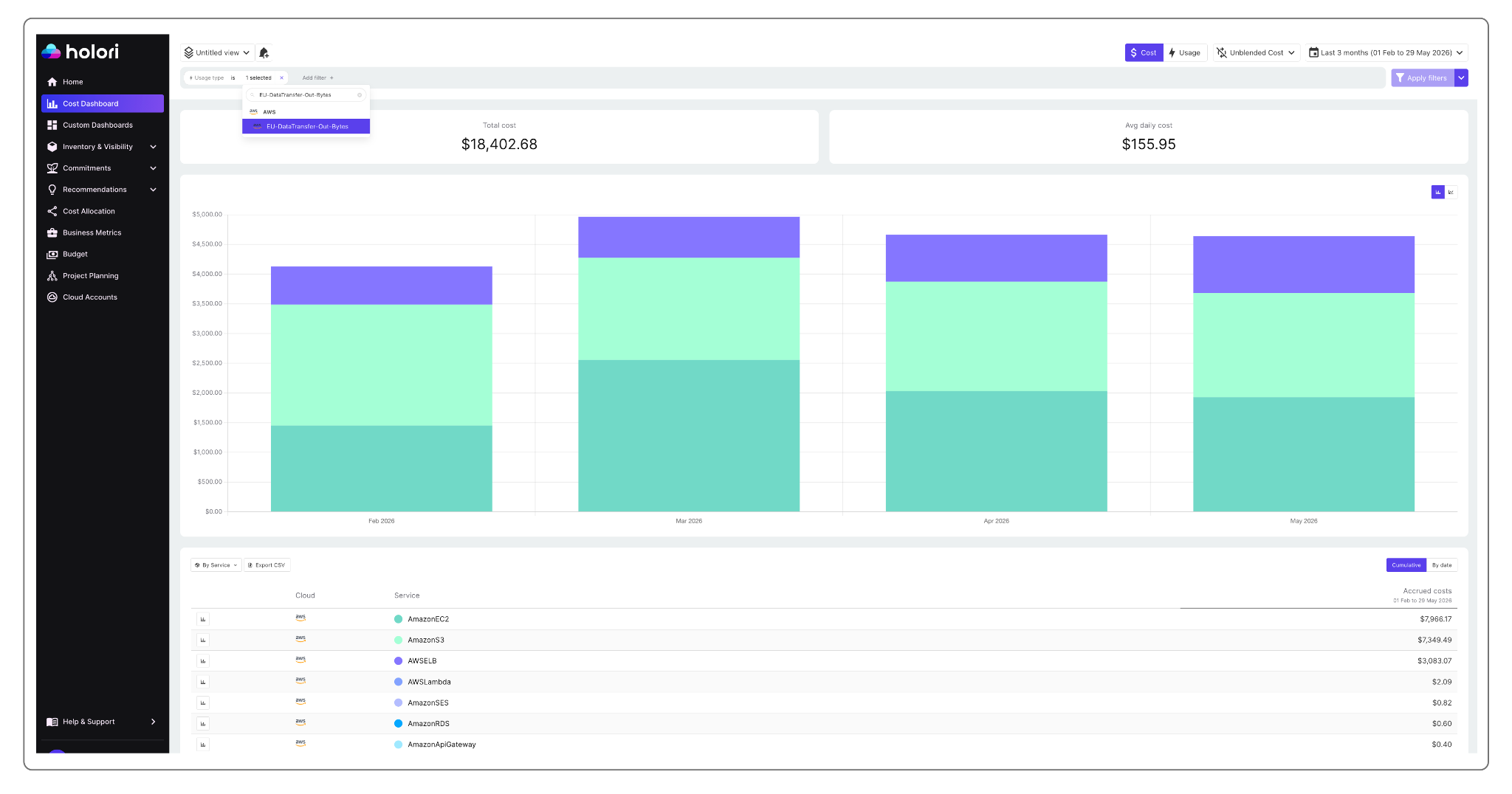
The screenshot above shows my “EU-DataTransfer-Out-Bytes” over the last 3 months in my entire infra. This means data leaving the EU region. There are two main takeaways here.
- Cost can quickly add-up and become massive. A few cents or USD per day per resource can seem like nothing, but summed up you quickly reached the cost of a small car.
- Egress is far from being limited to EC2. Numerous services incur egress charges and having a powerful FinOps tool helps you surface just that.
The analysis is here limited in one dimension: which services include egress out of EU charges. But you can of course play with the data in multiple ways. You can change the regions, you can focus on resources, accounts, tags etc. to get multiple points of view.
Moreover, Holori also offers automated cloud infra diagrams. This makes it the perfect tool to spot visually on a diagram which active regions you are using and where your resources are located.
Get access to usage cost details:
With Holori, for each resource and with a daily granularity you can easily spot the main egress “destinations” and how much they cost you.
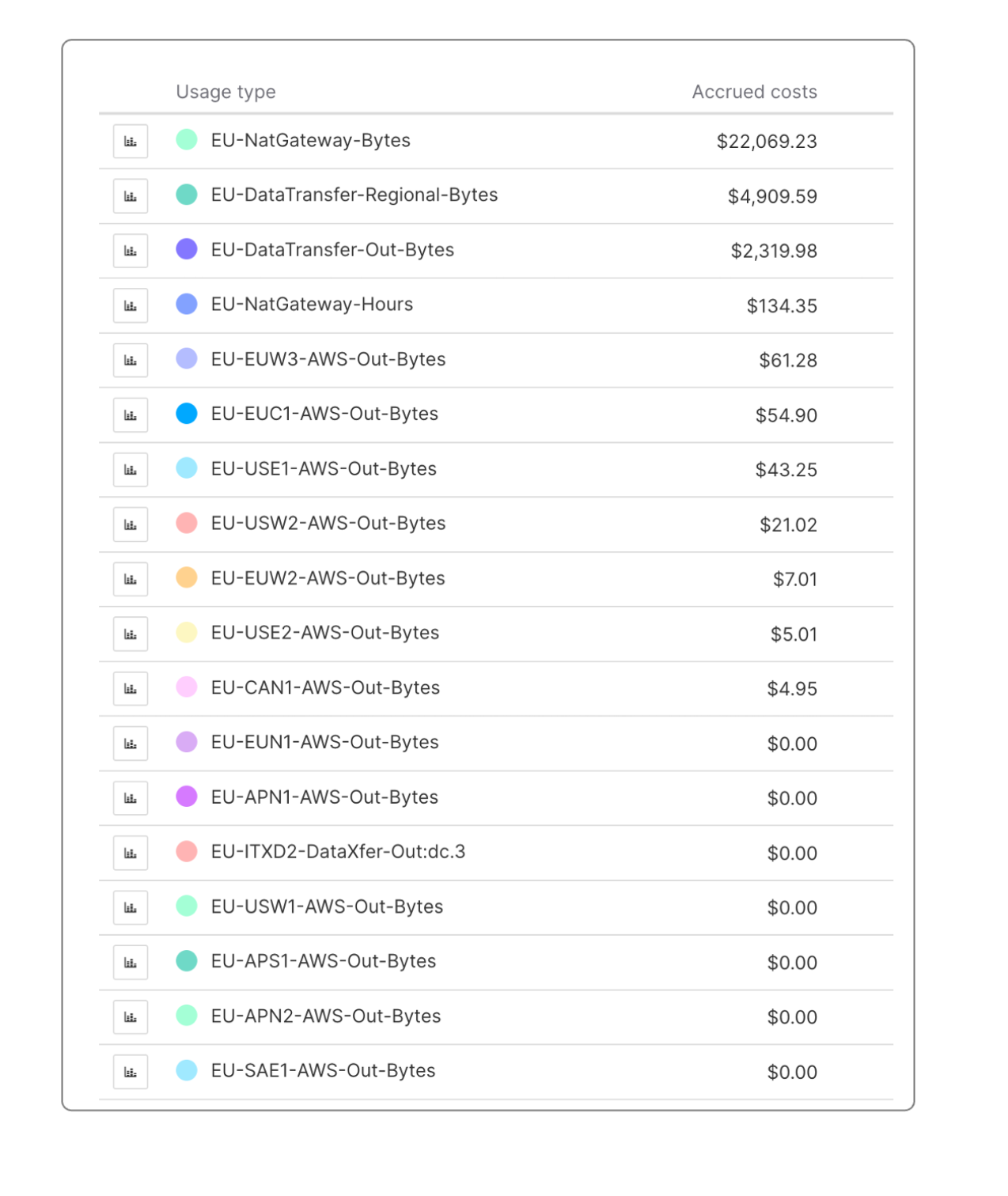
Relying on a third-party FinOps tool is key to open the bonnet and look beyond what AWS wants you to see on the console.
Holori has been built just for that. Empower teams to gain granular access into their cost data. It helps you put context around cost variations, allocate the right costs to the right department and build accurate reports to your management.
Explore what Holori can do for your cloud networking costs at holori.com.
Summary: Reduce Cloud Networking Costs With a Systematic Approach
Reducing cloud data transfer costs is not a one-step fix. It is a combination of architectural decisions, configuration changes, and ongoing governance.
Start with the highest-impact actions: audit your cross-AZ traffic, add VPC Endpoints for S3 and DynamoDB, enable CloudFront for internet-bound traffic, and stop routing AWS service calls through NAT Gateways. These four changes alone can cut your networking bill by 30 to 50 percent in most environments.
Then develop a FinOps practice around a solid tool such as Holori. You can then build the visibility and process to keep costs under control as your infrastructure grows. AWS egress fees will not disappear, but with the right strategy, they become predictable and manageable.