Serverless was supposed to make costs simple. Pay only for what you use, eliminate idle capacity, forget about provisioning. The reality that most FinOps practitioners discover is more complicated. Serverless cost optimization is not just about reducing function invocations. It requires understanding a billing model that operates at millisecond granularity, surfacing hidden charges that live outside the function itself, and building visibility into an architecture that was specifically designed to abstract away the infrastructure you’d normally track.
This guide covers everything FinOps teams need to know about serverless cost optimization: how serverless billing actually works, where the real costs hide, and the practical levers that produce meaningful savings across AWS Lambda, Google Cloud Run, and Azure Functions.
How Serverless Billing Actually Works
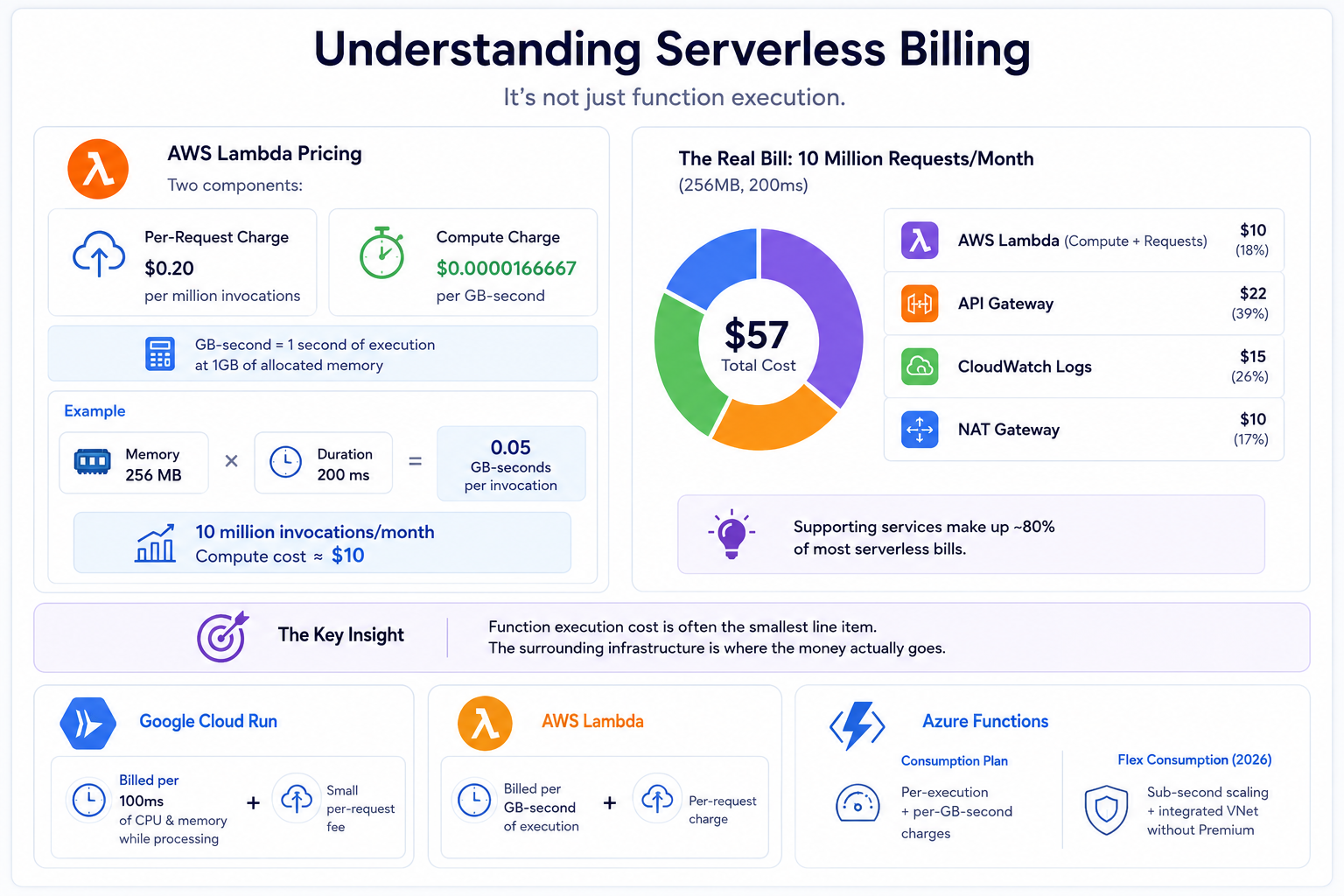
Before you can optimize serverless costs, you need to understand what you’re being billed for, because it’s not just function execution.
On AWS Lambda, the pricing has two components: a per-request charge of $0.20 per million invocations, and a compute charge measured in GB-seconds, priced at $0.0000166667 per GB-second. A GB-second is one second of execution time at 1GB of allocated memory. If you allocate 256MB and your function runs for 200ms, you consume 0.05 GB-seconds per invocation. At 10 million monthly invocations, that looks like a modest $10 in compute cost. The problem is that $10 figure is rarely what you actually pay.
The real bill for a 10-million-request API running at 256MB and 200ms typically lands around $57 once you add API Gateway, CloudWatch Logs, and NAT Gateway. Those supporting services can quietly make up 80% of most serverless bills.
This is the central insight behind effective serverless cost optimization: the function execution cost is often the smallest line item. The surrounding infrastructure is where the money actually goes.
Google Cloud Run bills per 100ms of CPU and memory when a container is processing a request, plus a small per-request fee. Azure Functions on the Consumption plan mirrors Lambda’s model with per-execution and per-GB-second charges. Azure’s Flex Consumption plan, which became the new standard in 2026, offers sub-second scaling and integrated VNet support without the premium plan requirement, a significant change for teams that previously paid for Premium just to avoid cold start penalties inside a VNet.
The Hidden Costs of Serverless Architecture
Serverless cost optimization starts with knowing which charges to look for. Most teams that are overspending on serverless are not overspending on their functions directly. They’re overspending on the infrastructure wrapped around them.
API Gateway is the most common surprise. Every HTTP request through AWS API Gateway costs $3.50 per million on the REST API, and $1.00 per million on the HTTP API. At high request volumes, API Gateway costs can exceed Lambda compute by a significant margin. Migrating from REST API to HTTP API where you don’t need the advanced features of REST (usage plans, request validation, caching) is often the single highest-return change available to teams doing serverless cost optimization.
CloudWatch Logs is the silent accumulator. By default, Lambda logs everything to CloudWatch, and by default CloudWatch retains those logs forever. Log retention set to infinite is one of the most common hidden costs in serverless environments, and storage costs can actually exceed execution costs for high-traffic functions. Setting a 7 to 14 day retention policy on all Lambda log groups is a low-effort change with immediate savings.
NAT Gateway can become one of the largest line items in a serverless bill when Lambda functions run inside a VPC and need to reach the internet or other AWS services. NAT Gateway charges $0.045 per GB of data processed, on top of the hourly cost. A Lambda function making API calls to external services and running inside a VPC is paying NAT Gateway fees on every byte of traffic. Using VPC Endpoints for AWS services like S3, DynamoDB, and SSM eliminates that NAT traffic entirely.
Data transfer costs follow every response your functions send. Outbound data from AWS to the internet is charged at $0.09 per GB after the first GB per month. For functions that return large payloads, this can accumulate quickly and is often not tracked separately in FinOps dashboards.
Memory Tuning: The Highest-ROI Optimization in Serverless
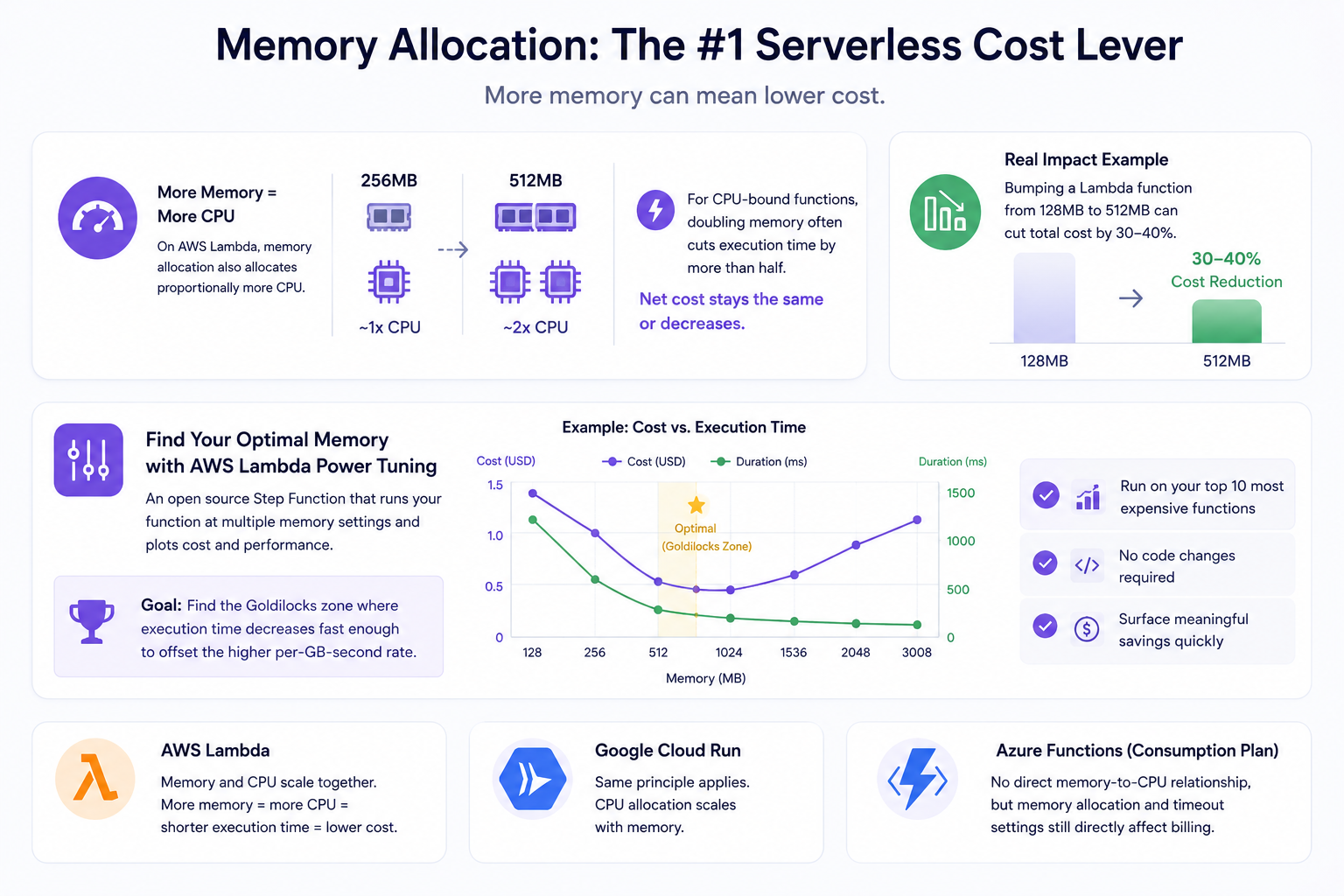
Memory allocation is the most underused lever in serverless cost optimization, and it works in a counterintuitive way. On AWS Lambda, allocating more memory also allocates proportionally more CPU. A function running at 512MB has roughly twice the CPU power of one running at 256MB. This means that for CPU-bound functions, doubling the memory allocation often cuts execution time by more than half, and the net cost stays the same or decreases.
Bumping a Lambda function from 128MB to 512MB often cuts total cost by 30 to 40% because functions run faster with more CPU, completing in less time even though memory cost is higher.
The right tool for finding the optimal memory configuration is AWS Lambda Power Tuning, an open source step function that runs your function at multiple memory settings and plots the cost and performance results. Running it on your top 10 most expensive functions typically surfaces meaningful savings with no code changes required. The goal is finding the Goldilocks zone: the memory setting where execution time decreases fast enough to offset the higher per-GB-second rate.
The same principle applies to Google Cloud Run, where CPU allocation scales with memory. Azure Functions on Consumption plan does not expose the same direct memory-to-CPU relationship, but function timeout configuration and memory allocation still directly affect billing.
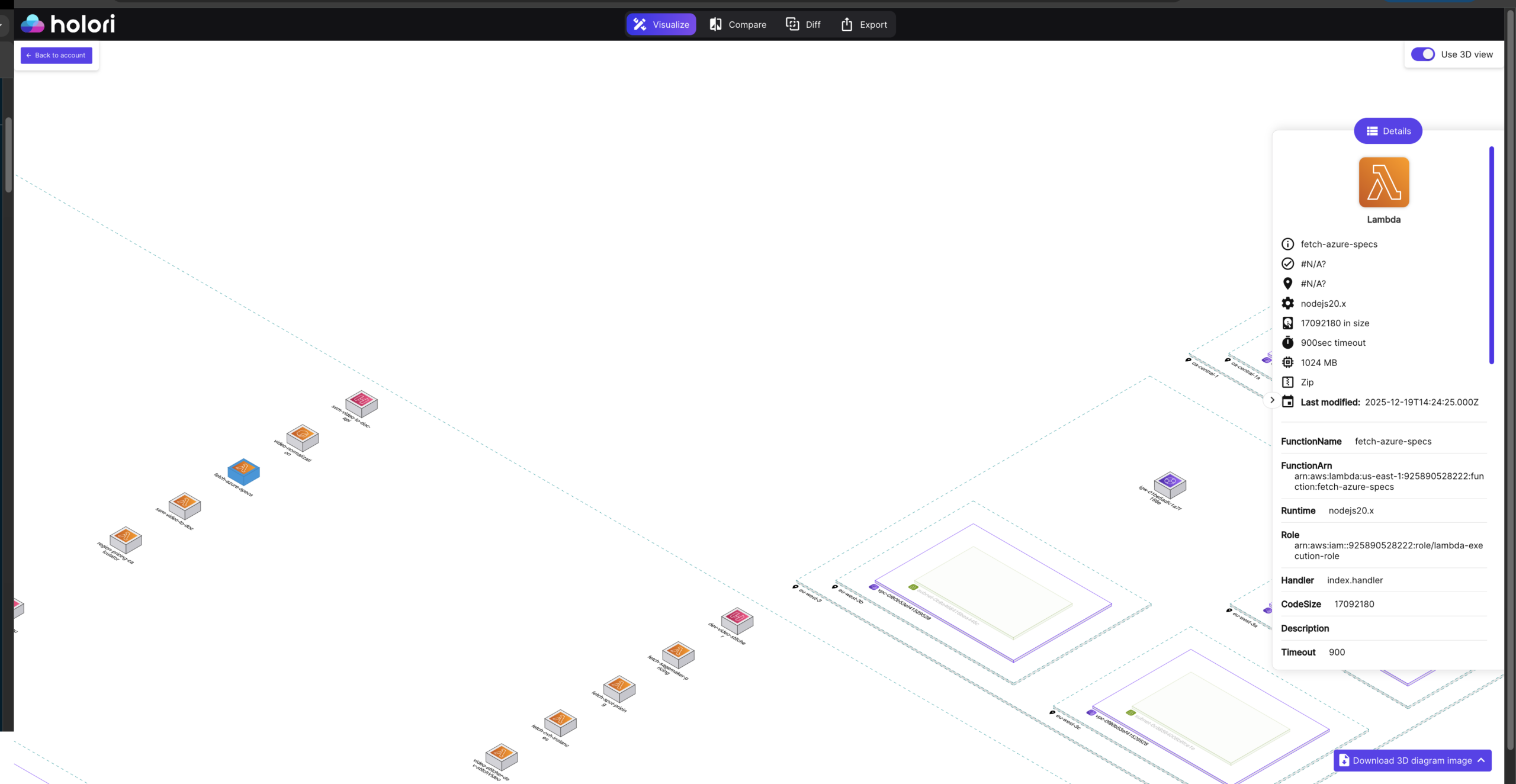
With Holori infrastructure diagrams, you can find the configurations of every of your cloud assets and understand how your serverless resources are configured precisely.
Cold Starts and Provisioned Concurrency: Getting the Math Right
Cold starts are both a performance problem and a cost problem, and the serverless cost optimization decision around provisioned concurrency is more nuanced than most guides acknowledge.
A cold start occurs when Lambda needs to initialize a new execution environment for your function. During that initialization, you’re billed for the time even though your code isn’t running yet. For functions with heavy dependencies or large deployment packages, cold starts can add hundreds of milliseconds to execution duration and therefore to cost.
Provisioned Concurrency eliminates cold starts by keeping execution environments warm and ready. Lambda Provisioned Concurrency costs $0.0000041667 per GB-second when idle, but for functions that receive steady traffic, this is often cheaper than paying for cold starts because cold start overhead directly extends billed duration.
The mistake most teams make is applying Provisioned Concurrency to every function as a blanket rule. The correct approach is to use it only where cold starts are measurably expensive, specifically for user-facing API functions where cold start latency directly impacts experience and where traffic patterns are predictable enough to set concurrency levels accurately. Background jobs, event processors, and infrequently triggered functions should not use Provisioned Concurrency, because the idle cost accumulates regardless of whether any invocations occur.
Scheduled Provisioned Concurrency is often the most cost-effective configuration: scaling concurrency up before known peak periods and scaling it back down during off-hours, rather than maintaining it at full capacity around the clock.
Architecture Patterns That Drive Serverless Cost Down
Serverless cost optimization is not only about tuning existing functions. Architecture decisions made during design have the largest impact on long-term costs, and FinOps teams should be involved in these conversations early.
Event filtering at the source reduces unnecessary invocations before they reach your function. AWS EventBridge Pipes and SQS filter policies allow you to drop events that don’t meet certain criteria before Lambda is invoked. Since you pay per invocation, every filtered event that never reaches your function is a direct cost saving. Teams that process event streams with Lambda and don’t use source-level filtering are often paying for substantial volumes of invocations that do nothing but check a condition and return.
Asynchronous processing reduces per-invocation cost by allowing functions to process work in batches rather than individually. An SQS-triggered Lambda function processing messages in batches of 10 pays for one invocation instead of ten, with roughly the same execution duration. Batch size tuning is one of the fastest wins available in serverless cost optimization for data processing workloads.
Step Functions Express Workflows vs. Standard Workflows is a decision with direct cost implications. Standard Workflows charge per state transition at $0.025 per 1,000 transitions. Express Workflows charge based on duration and invocations. For high-volume, short-duration orchestration, Express Workflows are dramatically cheaper. Many teams use Standard Workflows by default and are overpaying for orchestration by an order of magnitude.
ARM Graviton architecture is available on AWS Lambda and delivers meaningful savings with no code changes for most runtimes. ARM-based Graviton functions offer 15 to 20% lower costs for the same duration performance compared to x86 across major serverless providers in 2026. Switching a function’s architecture from x86 to arm64 in the Lambda configuration takes seconds and requires no changes to your code for Python, Node.js, or Java workloads.
Observability and Cost Allocation for Serverless
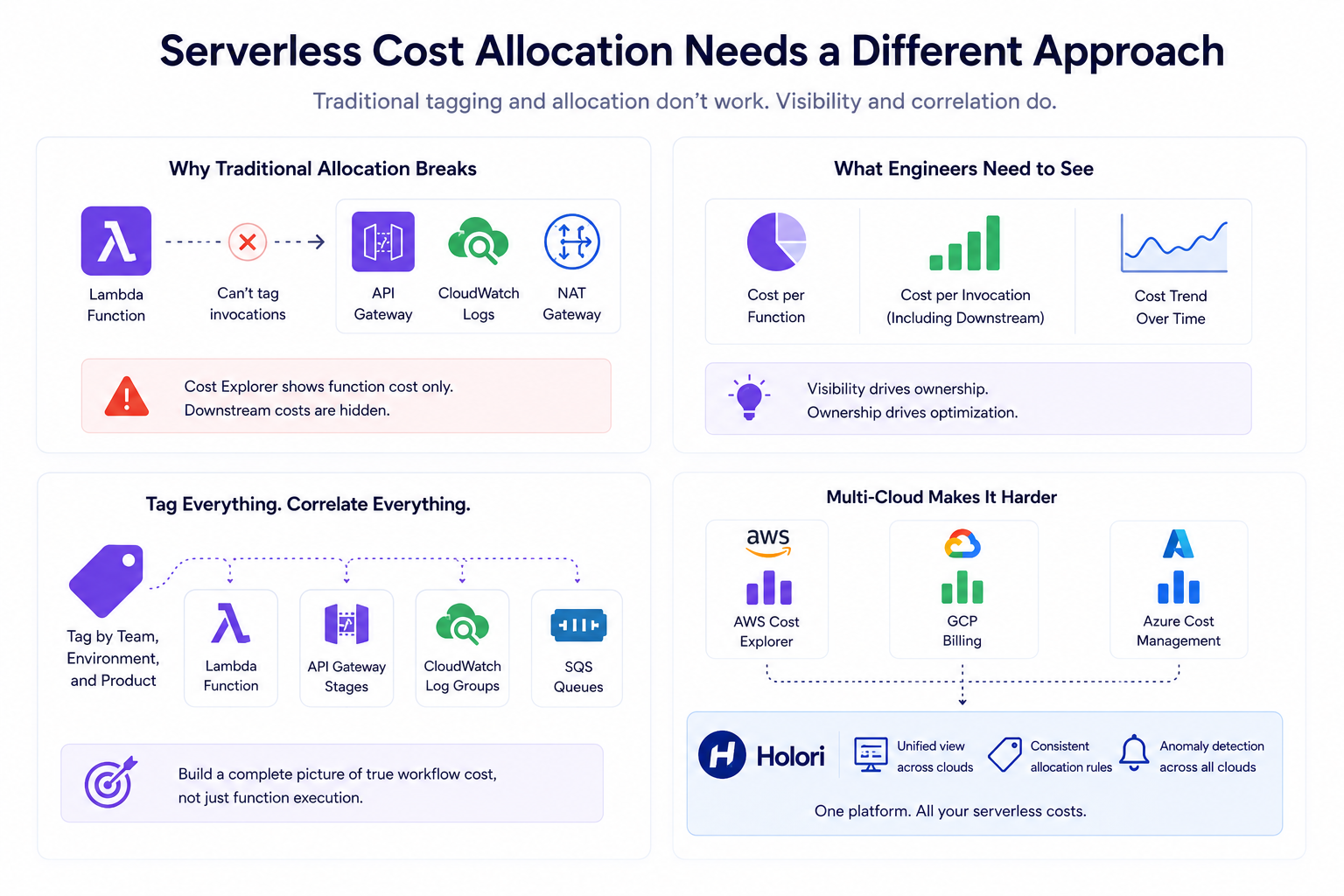
Standard FinOps cost allocation practices break down with serverless. You cannot tag a Lambda function’s invocations the way you tag an EC2 instance. Cost Explorer shows Lambda costs at the function level, but it doesn’t show you the downstream cost of the API Gateway, CloudWatch, or NAT Gateway traffic that function generates. Building proper serverless cost observability requires a different approach.
Most teams track Lambda costs at the account or service level, which is too coarse to drive action. Dashboards that show cost per function, cost per invocation including downstream, and cost trend over time give engineers the visibility they need to own their function’s cost impact. When engineers can see exactly how much their function costs, they optimize it. When costs are hidden in aggregate numbers, nobody takes ownership.
Native Tagging and Its Limits
Tagging Lambda functions by team, environment, and product is the foundation of serverless cost allocation. In addition to function-level tags, tagging the associated API Gateway stages, CloudWatch log groups, and SQS queues with the same identifiers allows you to build a more complete picture of what each serverless workflow actually costs, not just the function execution portion.
The problem is that native tagging breaks down quickly in practice. Many serverless resources cannot be tagged at the individual invocation level. Some supporting services, like certain CloudWatch metrics or NAT Gateway data flows, don’t support cost allocation tags at all. And in large environments with dozens of teams, getting consistent tagging applied and maintained across hundreds of Lambda functions and their associated resources is an ongoing operational effort that rarely stays current.
This is where the tag coverage gap becomes a real cost allocation problem. When resources are untagged or inconsistently tagged, their costs fall into an unallocated bucket. That bucket grows quietly and makes it impossible to answer the question every FinOps team eventually gets asked: which team or product is responsible for this spend?
Virtual Tags: Allocation Without Retagging
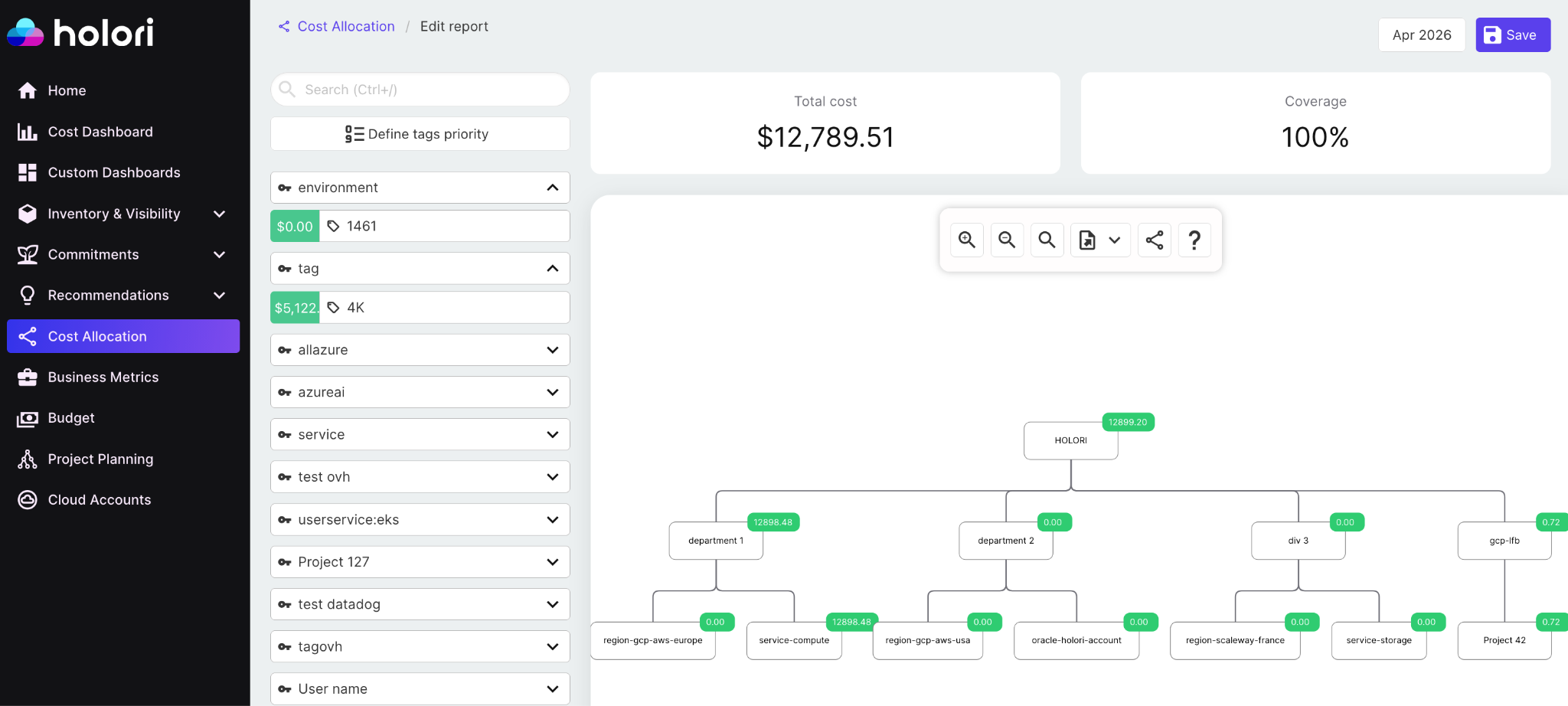
Virtual tags solve the tagging gap without requiring you to retag resources in the cloud provider console. Rather than applying tags at the resource level, virtual tags are allocation rules defined in your FinOps platform that group costs based on existing attributes: account ID, resource name patterns, regions, or any combination of metadata already present in your billing data.
In Holori, you define a virtual tag by specifying a rule. For example, all Lambda functions whose names contain “payments” across all accounts get assigned to the Payments team virtual tag. All resources in a specific AWS account or GCP project get assigned to a given business unit. Resources that share a naming convention but span multiple cloud providers get grouped under a single product tag, even if the underlying cloud tags are inconsistent or missing entirely.
The result is that cost allocation happens at the reporting layer rather than at the infrastructure layer. You don’t need a tagging enforcement campaign, a tag policy rollout, or a multi-week effort to clean up historical resources before you can start allocating costs meaningfully. You define the rules once in Holori, and the allocation applies retroactively and going forward across your entire cloud inventory.
For serverless environments specifically, this matters enormously. A Lambda function processing payment events, the API Gateway stage in front of it, the SQS queue feeding it, and the CloudWatch log group attached to it can all be grouped under the same virtual tag even if their native cloud tags are inconsistent, missing, or managed by different teams with different tagging conventions.
Multi-Cloud Allocation in a Single View
For FinOps teams managing multi-cloud environments, cost allocation becomes even more complex. Lambda cost data lives in AWS Cost Explorer, Cloud Run costs in GCP billing, Azure Functions in Azure Cost Management, and none of these tools talk to each other. Each provider has different tagging mechanisms, different cost export schemas, and different levels of granularity in their billing data.
Holori ingests cost data from all three providers, normalizes it into a common model, and applies your virtual tag rules consistently across the entire dataset. A team that runs Lambda on AWS for its API layer and Cloud Run on GCP for its data pipelines can see a single cost allocation view by team, by product, and by environment, without manually correlating three separate billing exports. Cost anomalies surface across all providers in one place, and showback or chargeback reports reflect the complete picture of what each team actually consumed, regardless of which cloud it ran on.
Setting Up Cost Anomaly Detection for Serverless
Serverless costs can spike in ways that traditional compute cannot. A misconfigured retry policy can cause a Lambda function to loop and generate millions of invocations in minutes. An event source that starts producing unexpected volume can exhaust a monthly budget in hours. These failure modes are rare but expensive, and they require a different kind of cost monitoring than static budget alerts.
CloudWatch anomaly detection configured on Lambda cost metrics can alert when projected daily spend exceeds your rolling average by more than 20%, catching runaway functions, unexpected traffic spikes, and event loop bugs before they become expensive. Setting this up for your highest-cost functions takes less than an hour and provides ongoing protection against the most costly serverless failure modes.
Function-level concurrency limits are the other line of defense. Setting a reserved concurrency limit on a function caps the maximum number of simultaneous executions, which in turn caps the maximum possible cost per unit of time. For functions where an accidental invocation storm would be catastrophic to the bill, reserved concurrency is a cost ceiling mechanism, not just a performance guardrail.
When Serverless Stops Being the Cheapest Option
Serverless cost optimization includes knowing when not to use serverless. The pay-per-invocation model is genuinely cost-effective for sporadic, unpredictable, or bursty workloads. It becomes expensive relative to alternatives for workloads that run continuously at high volume.
The crossover point depends on your specific workload, but a general rule: if a Lambda function is running more than 50 to 60 percent of the time, a containerized workload on ECS Fargate or a rightsized EC2 instance will likely be cheaper. At that level of utilization, the per-invocation overhead of Lambda billing exceeds the idle cost of a reserved container. Running Lambda Power Tuning alongside a cost comparison against ECS Fargate pricing for the same workload is a useful exercise for any high-volume function.
Google Cloud Run’s concurrency model changes this calculation somewhat. Because a single Cloud Run instance can handle up to 1,000 concurrent requests, the per-request cost at high throughput is much lower than Lambda, which handles one request per execution environment. For high-concurrency APIs, Cloud Run often wins on cost at scale even compared to optimized Lambda configurations.
Serverless Cost Optimization Checklist for FinOps Teams
Effective serverless cost optimization is a continuous practice, not a one-time audit. The following review cadence covers the highest-impact areas:
Monthly, review the top 10 most expensive functions and check whether memory allocation is still optimal, whether CloudWatch log retention is configured, and whether downstream charges from API Gateway and NAT Gateway are proportionate to function execution costs. Quarterly, audit event source configurations for batch sizing and filtering, review Provisioned Concurrency coverage against actual traffic patterns, and compare serverless workloads against container alternatives where utilization has grown.
For any new function going into production, the standard review should include memory configuration via Power Tuning, log retention policy, architecture selection (arm64 vs x86), and whether the function should be inside a VPC at all, since VPC placement adds cold start latency and NAT Gateway costs that can be avoided for functions that only access AWS services.
If you need help to better understand, manage, allocate your serverless resources, dont hesitate to try Holori: https://app.holori.com/
Frequently Asked Questions
What is serverless cost optimization?
Serverless cost optimization is the practice of reducing and managing the costs associated with serverless architectures, including not just function execution costs (measured in GB-seconds and invocations) but also the surrounding infrastructure: API Gateway, CloudWatch Logs, NAT Gateway, and data transfer. Because serverless billing is granular and distributed across many services, effective optimization requires visibility across the entire stack, not just the functions themselves.
Why is my AWS Lambda bill higher than expected?
The most common reason is that Lambda compute is only a fraction of the total serverless bill. API Gateway, CloudWatch Logs, NAT Gateway data processing, and outbound data transfer charges frequently exceed the Lambda execution cost itself, sometimes by a factor of five or more. Start by breaking down your serverless costs by service, not just by function, to find where the money is actually going.
Does allocating more memory to a Lambda function always cost more?
Not necessarily. Because Lambda allocates CPU proportionally to memory, more memory means more CPU, which means faster execution. For CPU-bound functions, the reduced execution duration can offset the higher per-GB-second rate, resulting in the same or lower total cost with better performance. AWS Lambda Power Tuning is the standard tool for finding the optimal memory setting for a given function.
When should I use Cloud Run instead of Lambda for cost reasons?
Google Cloud Run is often more cost-effective than Lambda for workloads with high concurrency, because a single Cloud Run instance can serve up to 1,000 concurrent requests, dramatically reducing per-request overhead at scale. Lambda spins up a separate execution environment per concurrent request, so high-concurrency workloads multiply costs in ways that Cloud Run does not. If your Lambda function regularly hits concurrency in the hundreds or thousands, running the same workload on Cloud Run is worth a cost comparison.
How do I get proper cost allocation for serverless workloads?
Tag every serverless resource consistently: Lambda functions, API Gateway stages, CloudWatch log groups, SQS queues, and any other associated resources should carry the same team, environment, and product tags. Then build dashboards that aggregate costs across all associated resources per workflow or per team, rather than looking at Lambda costs in isolation. Multi-cloud FinOps platforms like Holori can automate this aggregation and apply consistent allocation rules across AWS, GCP, and Azure without manual correlation of billing exports.
Is serverless always cheaper than traditional compute?
No. Serverless is genuinely cheaper for sporadic, bursty, or unpredictable workloads where idle capacity would otherwise be wasted. For continuously running, high-volume workloads, the per-invocation overhead of serverless billing typically exceeds the cost of reserved or committed compute. A Lambda function running at 70 percent utilization around the clock is usually more expensive than a rightsized EC2 instance or Fargate container running the same workload on a Savings Plan.