Cloud bills don’t lie, but they don’t explain themselves either. You know you’re overspending. You just can’t always pinpoint where. More often than not, a significant chunk of the answer is sitting in overprovisioned infrastructure: compute instances, databases, and containers running at a fraction of their allocated capacity, billing you for headroom you provisioned months ago and never revisited.
That’s the cloud rightsizing problem. For FinOps practitioners, it’s one of the most consistently impactful and consistently underexecuted levers available.
What Is Cloud Rightsizing?
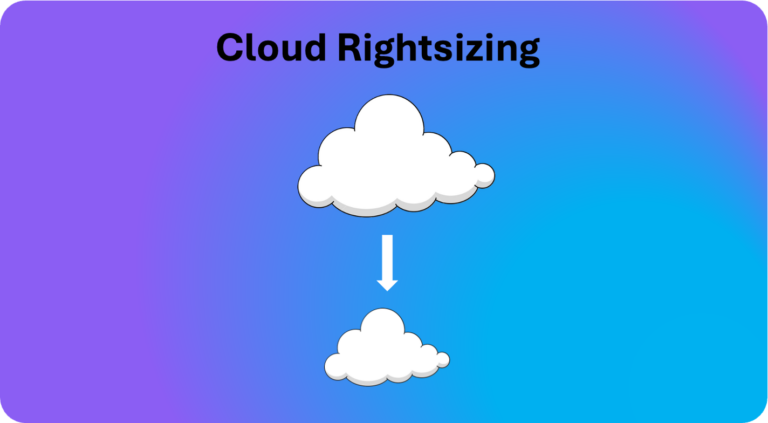
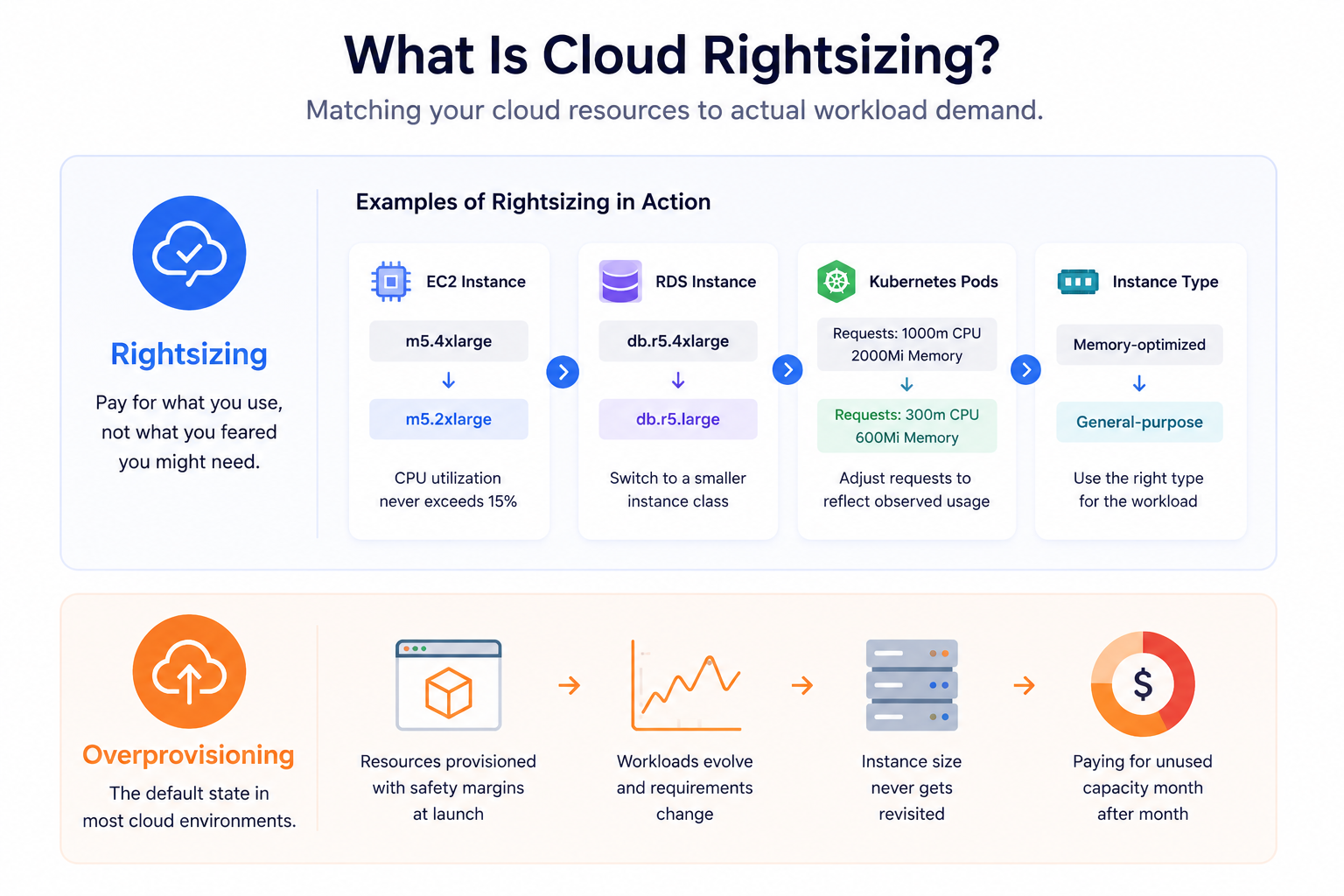
Cloud rightsizing is the practice of matching the size and type of your cloud resources to the actual demand of your workloads. It means asking a simple but operationally difficult question for every provisioned resource: is this instance actually using what we’re paying for?
In concrete terms, rightsizing might mean moving an EC2 instance from m5.4xlarge to m5.2xlarge because CPU utilization never exceeds 15%, switching an underutilized RDS instance to a smaller class, adjusting Kubernetes pod resource requests to reflect observed usage rather than conservative estimates, or changing a memory-optimized instance to a general-purpose one when the workload doesn’t actually need the extra RAM. The common thread is alignment: paying for what you use, not what you feared you might need.
The opposite of rightsizing is the default state of most cloud environments: overprovisioning. Teams provision resources with safety margins that made sense at launch, workloads evolve, requirements change, and the instance size never does.
Why Overprovisioning Is the Default
Before getting into how to fix it, it’s worth understanding why it happens, because rightsizing is not just a technical problem. It’s an organizational one.
Provisioning happens once; optimization rarely follows. Engineers size instances at deployment, often under time pressure, with incomplete data about how a workload will behave in production. That initial estimate rarely gets revisited once things are running.
Safety margins compound. Everyone adds a buffer: the engineer, the team lead, the architect. Each one is individually reasonable. Collectively, they produce instances running at a small fraction of their allocated capacity.
Ownership is diffuse. In large environments, it’s genuinely unclear who is responsible for reviewing and adjusting a given set of resources. Without clear ownership, nothing happens. The resource sits, runs, and bills.
Then there’s the fear of performance regression. Downsizing an instance carries real risk: if performance degrades, someone gets paged at 2am. Nobody gets paged for overspending. The asymmetry of consequences pushes teams toward caution, and caution means keeping the larger instance.
Finally, dev and test environments are regularly forgotten. These environments are stood up quickly and often run 24/7 despite being used only during business hours, and at a fraction of their provisioned capacity.
The numbers that result from all this are significant. Industry estimates consistently put cloud waste at 20 to 35% of total cloud spending, with overprovisioning as a leading contributor. On Azure specifically, the average VM runs at roughly 7% CPU utilization, and 73% of Azure VMs are oversized by at least one SKU tier. Downsizing those oversized VMs typically saves around 36% on compute costs.
Where Rightsizing Opportunities Typically Hide
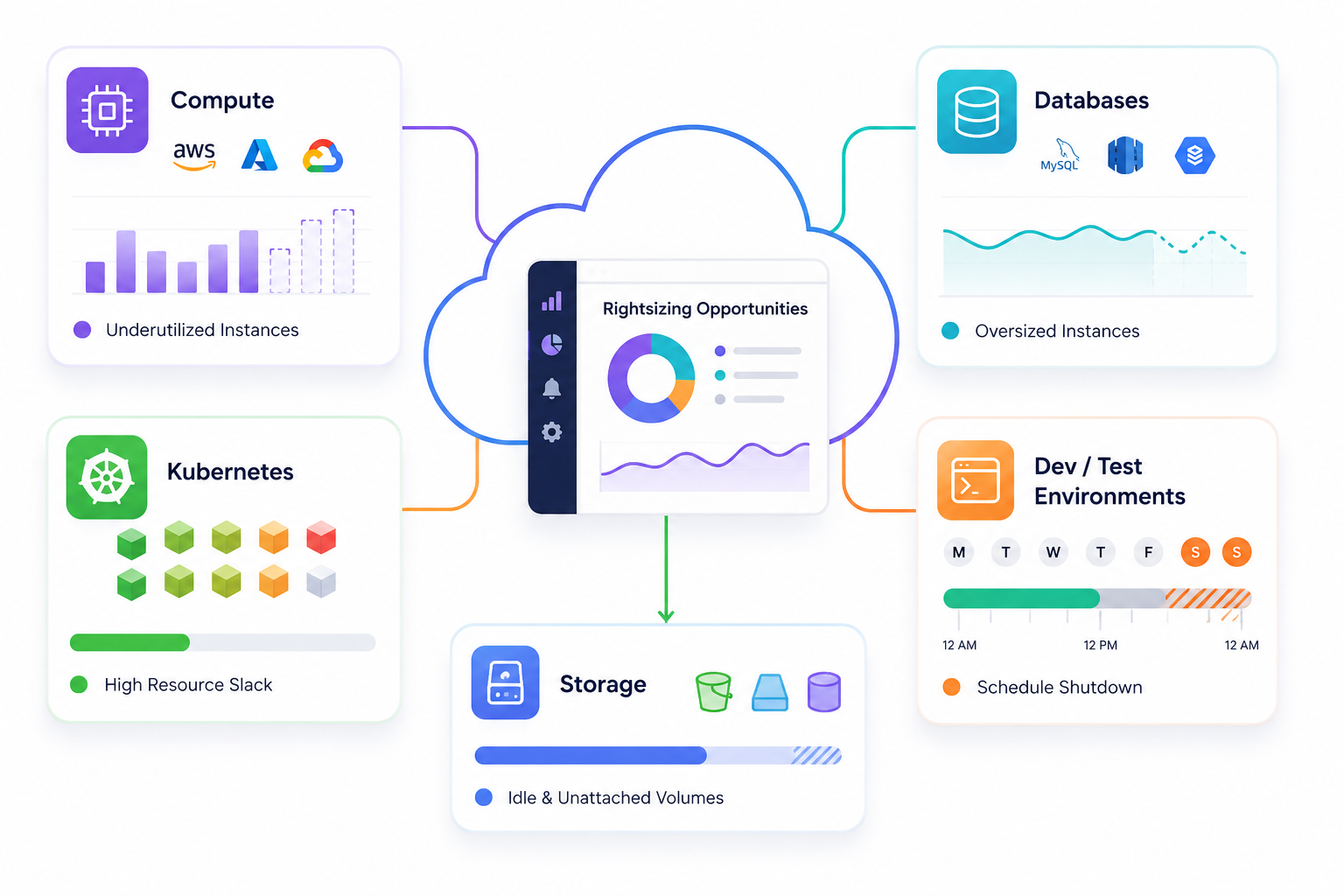
Rightsizing is not limited to EC2 instances. FinOps practitioners need to think across the full resource inventory.
Compute is the most obvious category, covering EC2, Azure VMs, and GCP Compute Engine. Look for instances with consistently low CPU and memory utilization over a 30 to 90 day window. A common working threshold: if peak CPU stays below 20 to 30%, a smaller instance is worth evaluating seriously.
Databases are often more expensive than compute and more frequently overlooked. An oversized RDS or Cloud SQL instance running at 5% CPU is burning money on capacity that will never be used. For variable workloads, serverless database options like Aurora Serverless v2 or Azure SQL Serverless can eliminate the problem entirely by billing only for what you consume.
Kubernetes workloads are a particularly rich source of waste that doesn’t show up in instance-level reports. Pod resource requests and limits are commonly set high at first deployment and never revisited. The gap between what pods request and what they actually use (sometimes called the slack) is a direct measure of waste. Addressing it requires visibility at the namespace and pod level, not just at the node level.
Dev and test environments deserve their own attention because the fix is often simpler than in production. Scheduled shutdown during off-hours, or aggressive rightsizing to minimal instances, can recover a large share of cost with minimal risk. Running a full-size production-equivalent stack for a development team that works an 8-hour day wastes roughly 65% of potential compute cost.
Storage volumes round out the picture. Oversized EBS volumes, unattached persistent disks, and forgotten snapshots don’t appear in the same dashboards as compute waste but accumulate steadily. A 1TB gp3 volume sitting unattached is pure spend with zero value.
How to Approach Rightsizing: A Practical Framework
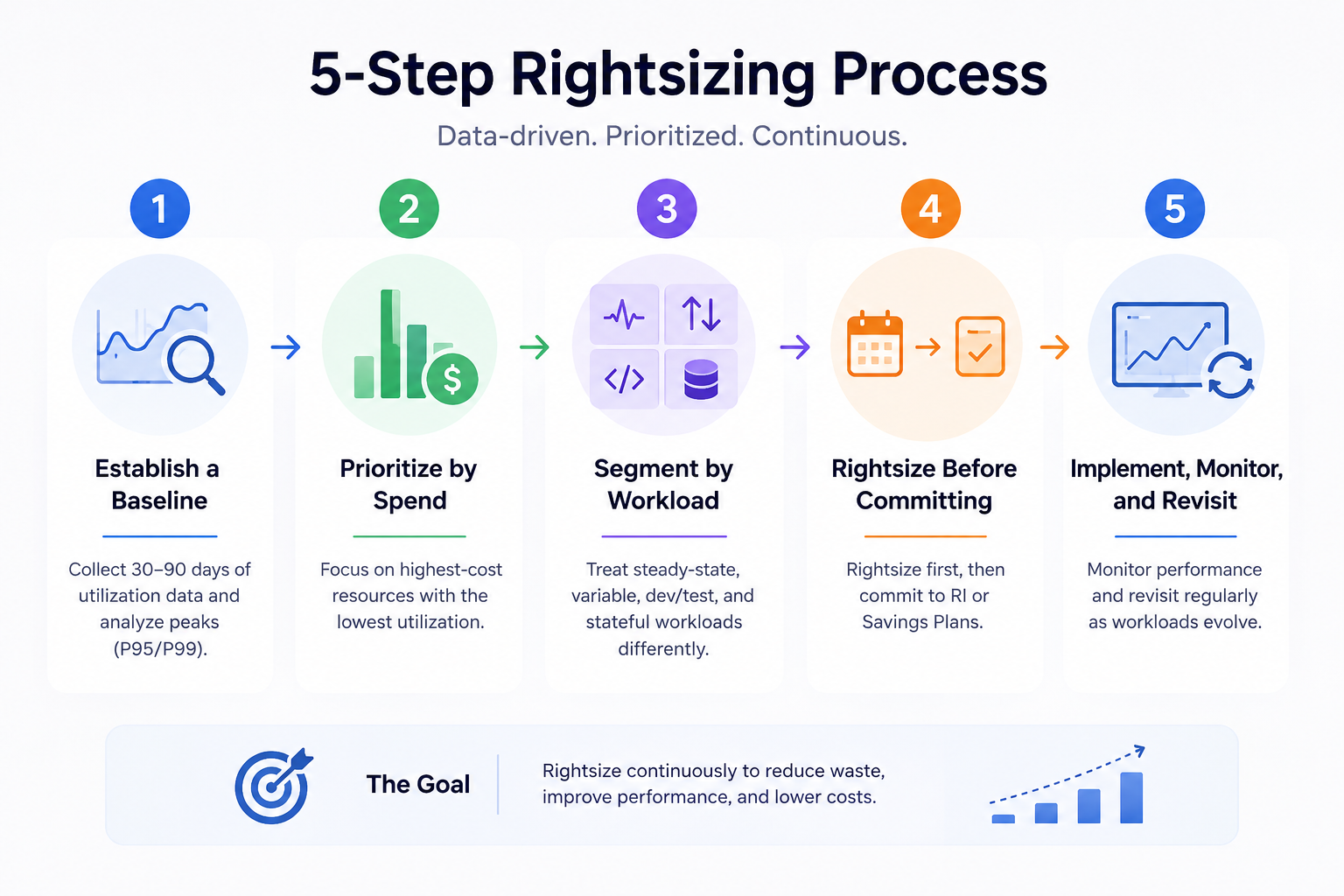
Establish a Utilization Baseline
Rightsizing recommendations are only as good as the data behind them. A 24-hour utilization snapshot is not enough because workloads have weekly patterns, monthly cycles, and seasonal peaks. AWS recommends 14 days of data as a minimum; in practice, 30 to 90 days gives a more reliable picture.
The most important metrics to collect are CPU utilization, memory utilization, network I/O, and disk I/O. CPU is easy to get from any cloud provider’s native monitoring. Memory is trickier: CloudWatch on AWS doesn’t capture it by default, which means the CloudWatch agent needs to be installed separately. Rightsizing on CPU alone, without memory data, produces incomplete recommendations and can result in undersized instances.
Crucially, look at percentiles, not just averages. An instance with average CPU of 8% and a P99 spike to 90% cannot safely be downsized. An instance with average CPU of 8% and P99 at 20% almost certainly can. Averages hide the peaks that determine whether a smaller instance will hold under load.
Prioritize by Spend, Not by Count
In a large environment, you’ll surface dozens or hundreds of rightsizing opportunities. Don’t work through them alphabetically or by resource count. Sort by potential savings: the highest-cost instances with the lowest utilization come first. A single oversized r5.16xlarge database instance delivers more savings when addressed than fifty forgotten t3.micro instances. Focus effort where the financial return justifies it.
Segment by Workload Type
Not all resources can be treated the same way. Steady-state workloads with predictable usage patterns are good candidates for immediate rightsizing. Variable workloads require more careful percentile analysis, and autoscaling may be a better answer than manual resizing. Dev and test environments are quick wins where aggressive rightsizing carries minimal risk. Production stateful workloads such as databases and message queues require more caution, staged changes, and close monitoring after the fact.
Rightsize Before Committing
This sequencing point is critical and often missed. Committing to Reserved Instances or Savings Plans locks you into a resource configuration. If you commit first and rightsize later, your existing commitments may no longer match your resized resources, creating underutilization waste at the commitment level on top of whatever overprovisioning you were trying to fix.
The right order is always: rightsize first, then commit. This ensures your commitments reflect your actual optimized baseline, not your inflated starting point.
Implement, Monitor, and Revisit
After resizing an instance, monitor performance closely for at least one full business cycle before considering the change settled. Track P95/P99 latency and error rates before and after the change so you have a clear baseline for comparison. Cloud environments change continuously: new services get deployed, workloads grow, architectures evolve. A resource that was correctly sized six months ago may be over or under-provisioned today.
Most mature FinOps teams build rightsizing reviews into a regular cadence, monthly or quarterly, rather than treating it as a one-off exercise triggered by a budget conversation.
Native Tools vs. Third-Party Platforms for cloud rightsizing
Each major cloud provider offers built-in rightsizing recommendations. AWS Compute Optimizer analyzes EC2 instances, EBS volumes, Lambda functions, and ECS on Fargate using CloudWatch data; since re:Invent 2025, it supports automated application of recommendations on a recurring schedule. Azure Advisor provides VM rightsizing recommendations based on 14-day utilization patterns, integrated with Azure Cost Management. GCP Recommender identifies idle VMs and suggests machine type adjustments based on observed utilization.
These tools are a useful starting point, but they share a fundamental limitation: they operate in isolation. If you run workloads across multiple clouds, which most enterprises do, you have no unified view of rightsizing opportunities, no single prioritization layer, and no cross-cloud context. You end up manually working through three separate recommendation engines and trying to consolidate the picture yourself.
This is where a dedicated FinOps platform like Holori changes the workflow. Rather than jumping between Compute Optimizer, Azure Advisor, and GCP Recommender, Holori surfaces rightsizing recommendations across all your cloud providers in a single interface, prioritized by savings potential and enriched with your cost allocation and tagging context. You can see which team or product owns the oversized resource, what the projected savings are, and act without leaving the platform.
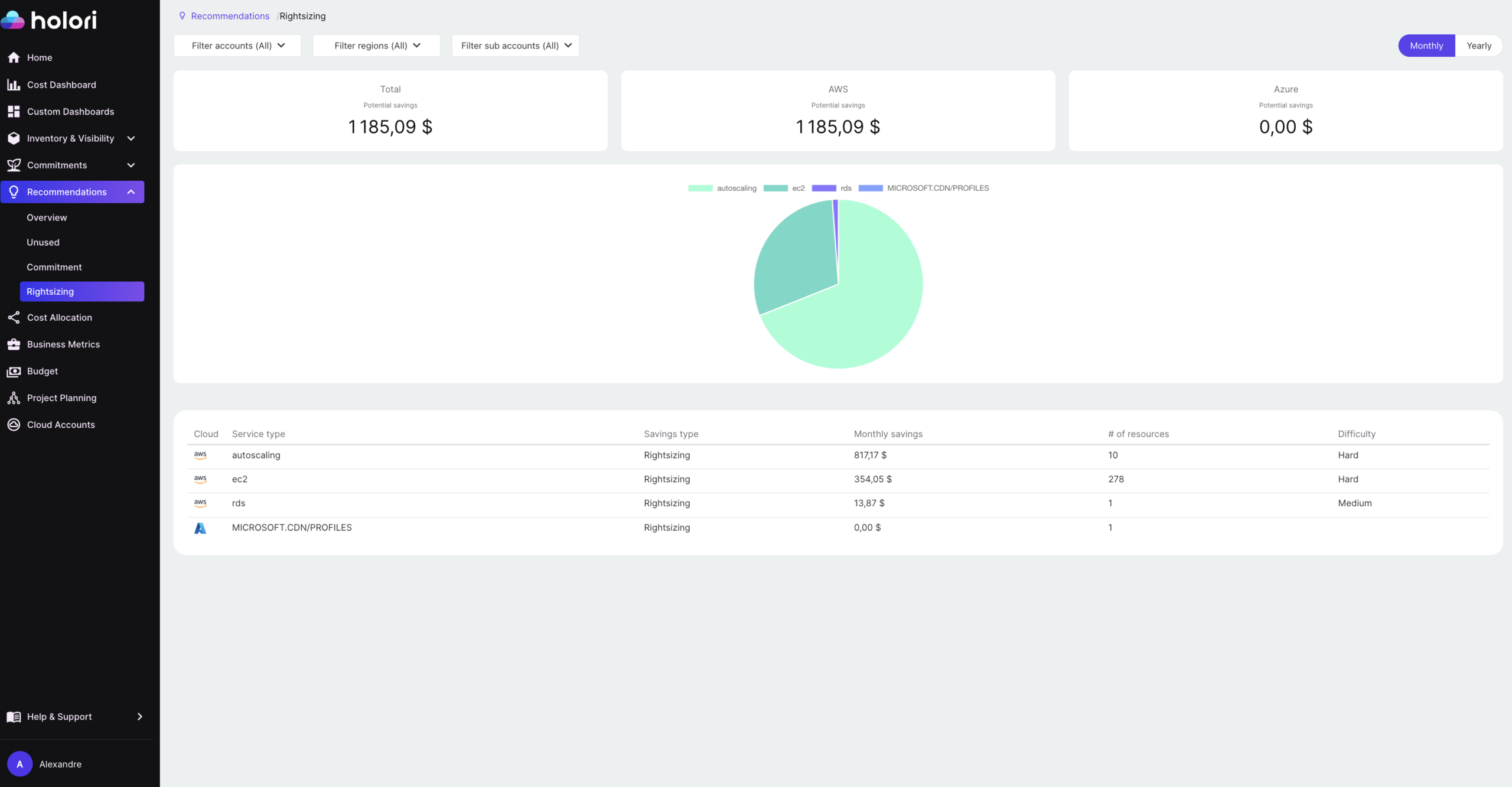
For FinOps teams managing multi-cloud environments, that consolidation is not just a convenience. It’s what turns rightsizing from an occasional project into a systematic, continuous practice.
Common Rightsizing Mistakes
Relying on average utilization alone. Averages hide spikes. Always look at peak utilization (P95 or P99) before making a sizing decision. An instance that looks idle on average can be genuinely constrained during peak hours.
Rightsizing without performance monitoring. Always validate after the resize. Set baseline alerts on latency, error rates, and CPU before making the change so you have something to compare against.
Skipping memory metrics. CPU is easy to collect; memory often requires additional instrumentation. Rightsizing on CPU alone without memory data produces incomplete and sometimes wrong recommendations, particularly for memory-intensive workloads.
Treating all environments equally. Dev environments can be aggressively rightsized with minimal risk. Production workloads require more care. Applying the same threshold to both leads to either missed savings or production incidents.
Doing it once. Cloud environments drift continuously. A one-time rightsizing effort captures some savings and then watches them erode as new overprovisioning accumulates. The only durable approach is a recurring process.
Cloud Rightsizing Across FinOps Maturity Stages
Where rightsizing sits in a FinOps practice depends on where the team is in its maturity.
At the Crawl stage, most teams are still building visibility and just understanding what they have and what it costs. Rightsizing may happen informally, driven by individual engineers who notice obvious waste. It’s reactive and inconsistent.
At the Walk stage, rightsizing becomes a structured process: regular reviews, defined utilization thresholds, and ownership assigned through cost allocation and tagging. This is where most teams should be aiming. It doesn’t require advanced tooling. It requires process and accountability.
At the Run stage, rightsizing is largely automated. ML-based tooling continuously analyzes utilization, surfaces recommendations, and in some cases applies them automatically within defined guardrails. The FinOps team’s role shifts from executing changes to governing the automation and reviewing exceptions.
Regardless of maturity level, the principle is the same: rightsizing should be a repeatable, scheduled discipline, not a one-off cost-cutting initiative triggered when the CFO asks questions.
Key Takeaways about cloud rightsizing
Cloud rightsizing aligns resource size to actual workload demand. In most cloud environments, overprovisioning is the default, not the exception. It’s driven by a combination of time pressure at provisioning, compounding safety margins, diffuse ownership, and the asymmetric consequences of undersizing versus oversizing.
The biggest opportunities tend to sit in compute instances, managed databases, Kubernetes pod resource requests, and dev/test environments. To find them reliably, you need 30 to 90 days of utilization data analyzed at the P95 or P99 percentile rather than the average. And you need to rightsize before committing to Reserved Instances or Savings Plans, not after.
Native cloud tools from AWS, Azure, and GCP are a useful starting point, but they work in isolation. A multi-cloud FinOps platform like Holori gives you a unified, prioritized view across providers, which is what turns rightsizing from an occasional exercise into a sustainable practice.

Holori helps FinOps teams identify and act on rightsizing opportunities across AWS, Azure, GCP, and more, in a single platform. Book a demo to see how it works.
Frequently Asked Questions
What is cloud rightsizing?
Cloud rightsizing is the practice of matching the size and type of your cloud resources to what your workloads actually consume. In most environments, resources are provisioned with generous safety margins at launch and never revisited, which means teams end up paying for capacity they never use. Rightsizing closes that gap by adjusting instance types, database tiers, and container resource requests to reflect real utilization data rather than initial estimates.
How much can cloud rightsizing save?
It depends heavily on how much historical overprovisioning exists, but industry benchmarks put cloud waste from overprovisioning at 20 to 35% of total cloud spend. On Azure specifically, 73% of VMs are oversized by at least one tier, with average savings of around 36% when they are corrected. For most organizations doing a first rightsizing pass, savings of 15 to 25% on compute costs are realistic and achievable within a single quarter.
How long does it take to see rightsizing results?
The first meaningful savings can appear within weeks of starting, especially if you prioritize your highest-cost, lowest-utilization resources first. However, the changes need to be monitored for at least one full business cycle after implementation to confirm that performance has not degraded. Building a monthly or quarterly review cadence is what turns the initial savings into a durable reduction rather than a one-time gain that erodes over time.
Should I rightsize before buying Reserved Instances or Savings Plans?
Yes, always. Committing to a Reserved Instance or Savings Plan locks you into a resource configuration. If you rightsize after committing, your commitment may no longer match your resized instances, which creates a different kind of waste: underutilized commitment coverage. The correct sequence is to rightsize first, establish your optimized baseline, and then commit based on that baseline.
What metrics should I use to identify rightsizing opportunities?
The most important metrics are CPU utilization, memory utilization, network I/O, and disk I/O, analyzed over a 30 to 90 day window. The key is to look at peak percentiles (P95 or P99) rather than averages. An instance with 8% average CPU but P99 spikes to 85% cannot safely be downsized. One with 8% average CPU and P99 at 18% almost certainly can. Memory requires particular attention because it is not captured by CloudWatch by default on AWS and needs additional instrumentation to surface correctly.
What is the difference between cloud rightsizing and autoscaling?
They address the same underlying problem from different angles. Rightsizing adjusts the baseline size of a resource to match its typical steady-state demand. Autoscaling dynamically adjusts capacity in response to changing load, scaling up during peaks and back down during quiet periods. For variable workloads, autoscaling is often the better solution. For workloads with stable, predictable patterns, rightsizing the baseline and combining it with modest autoscaling headroom is typically more cost-effective. The two approaches are complementary rather than mutually exclusive.